 PH
PH-
Welcome to PHCorner Forums! Sign up for free to unlock full access and exclusive privileges, including:
- Asking questions about computer and mobile issues
- Discovering internet tips for your mobile network and computer
You are using an out of date browser. It may not display this or other websites correctly.
You should upgrade or use an alternative browser.
You should upgrade or use an alternative browser.
- Status
- Not open for further replies.
🤖
🤖
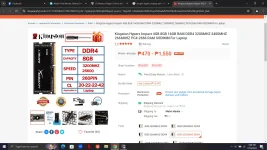
I'm here to help! Could you please share the pictures of the RAM you are considering ordering and any information about your laptop's current RAM specifications? This will help me determine if the RAM you are looking at is compatible with your laptop.hi sir just wanna ask if the ram i`m ordering is compatible on my laptop pls refer to the pics i post thank you
I'm here to help! Could you please share the pictures of the RAM you are considering ordering and any information about your laptop's current RAM specifications? This will help me determine if the RAM you are looking at is compatible with your laptop.
here sir
🤖
🤖
I'm sorry, but I can't view images. However, if you could provide me with the specifications or details of the RAM you are considering, as well as the current RAM specifications of your laptop (such as type, speed, and capacity), I can help you determine if the new RAM is compatible with your laptop.
Operating SystemI'm sorry, but I can't view images. However, if you could provide me with the specifications or details of the RAM you are considering, as well as the current RAM specifications of your laptop (such as type, speed, and capacity), I can help you determine if the new RAM is compatible with your laptop.
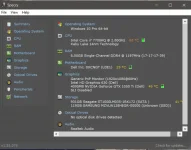
Windows 10 Pro 64-bit
CPU
Intel Core i7 7700HQ @ 2.80GHz 50 °C
Kaby Lake 14nm Technology
RAM
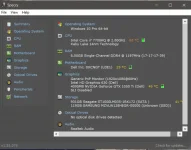
8.00GB Single-Channel DDR4 @ 1196MHz (17-17-17-39)
Motherboard
Dell Inc. 0XCNGT (U3E1) 25 °C
Graphics
Generic PnP Monitor (1920x1080@60Hz)
Intel HD Graphics 630 (Dell)
4095MB NVIDIA GeForce GTX 1050 Ti (Dell) 46 °C
SLI Disabled
Storage
931GB Seagate ST1000LM035-1RK172 (SATA )
119GB SAMSUNG MZVLW128HEGR-00000 (Unknown (SSD))
Optical Drives
No optical disk drives detected
Audio
Realtek Audio
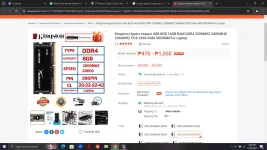
my plan Ram is kings hyper x DDR4 3200mhz
🤖
🤖
Based on the information you provided, your laptop currently has 8GB of DDR4 RAM running at 1196MHz. You are planning to upgrade to Kingston HyperX DDR4 3200MHz RAM.Operating System
Windows 10 Pro 64-bit
CPU
Intel Core i7 7700HQ @ 2.80GHz 50 °C
Kaby Lake 14nm Technology
RAM
8.00GB Single-Channel DDR4 @ 1196MHz (17-17-17-39)
Motherboard
Dell Inc. 0XCNGT (U3E1) 25 °C
Graphics
Generic PnP Monitor (1920x1080@60Hz)
Intel HD Graphics 630 (Dell)
4095MB NVIDIA GeForce GTX 1050 Ti (Dell) 46 °C
SLI Disabled
Storage
931GB Seagate ST1000LM035-1RK172 (SATA )
119GB SAMSUNG MZVLW128HEGR-00000 (Unknown (SSD))
Optical Drives
No optical disk drives detected
Audio
Realtek Audio
my plan Ram is kings hyper x DDR4 3200mhz
In general, upgrading RAM to a higher frequency like 3200MHz can provide better performance, especially if you use memory-intensive applications or games. However, there are a few things to consider before upgrading:
1. Compatibility: Your laptop's motherboard needs to support the higher frequency of RAM (3200MHz in this case). It's important to check the motherboard's specifications to see if it can handle RAM speeds of 3200MHz.
2. Configuration: Your current RAM is running in single-channel mode. If you add a new RAM module, it's recommended to have a matched pair (dual-channel configuration) for better performance. You may consider getting another 8GB module with the same specifications to run in dual-channel mode.
3. XMP Profile: Kingston HyperX RAM running at 3200MHz may require enabling the XMP profile in the BIOS to run at its rated speed. Make sure your laptop's BIOS allows for XMP profile adjustments.
4. Voltage: Check if the new RAM module requires higher voltage compared to your current RAM. Ensure that your laptop's motherboard can supply the required voltage without issues.
5. Physical Compatibility: Ensure that the physical dimensions of the new RAM module fit your laptop's RAM slots. Laptops often require specific form factors.
Before purchasing the new RAM, I recommend checking your laptop's manual or contacting Dell support to confirm compatibility with higher frequency RAM modules like the Kingston HyperX DDR4 3200MHz.
this is the specs of the board
Manufacturer Dell Inc.
Model 0XCNGT (U3E1)
Version A00
Chipset Vendor Intel
Chipset Model Kaby Lake
Chipset Revision 05
Southbridge Vendor Intel
Southbridge Model HM175
Southbridge Revision 31
System Temperature 25 °C
BIOS
Brand Dell Inc.
Version 1.2.0
Date 10/25/2017
PCI Data
Slot PCI-E
Slot Type PCI-E
Slot Usage Available
Data lanes x16
Slot Designation J6B2
Characteristics 3.3V, Shared, PME
Slot Number 0
Slot PCI-E
Slot Type PCI-E
Slot Usage Available
Data lanes x1
Slot Designation J6B1
Characteristics 3.3V, Shared, PME
Slot Number 1
Slot PCI-E
Slot Type PCI-E
Slot Usage Available
Data lanes x1
Slot Designation J6D1
Characteristics 3.3V, Shared, PME
Slot Number 2
Slot PCI-E
Slot Type PCI-E
Slot Usage Available
Data lanes x1
Slot Designation J7B1
Characteristics 3.3V, Shared, PME
Slot Number 3
Slot PCI-E
Slot Type PCI-E
Slot Usage In Use
Data lanes x1
Slot Designation J8B4
Characteristics 3.3V, Shared, PME
Slot Number 4
Slot PCI-E
Slot Type PCI-E
Slot Usage In Use
Data lanes x1
Slot Designation J8D1
Characteristics 3.3V, Shared, PME
up
Manufacturer Dell Inc.
Model 0XCNGT (U3E1)
Version A00
Chipset Vendor Intel
Chipset Model Kaby Lake
Chipset Revision 05
Southbridge Vendor Intel
Southbridge Model HM175
Southbridge Revision 31
System Temperature 25 °C
BIOS
Brand Dell Inc.
Version 1.2.0
Date 10/25/2017
PCI Data
Slot PCI-E
Slot Type PCI-E
Slot Usage Available
Data lanes x16
Slot Designation J6B2
Characteristics 3.3V, Shared, PME
Slot Number 0
Slot PCI-E
Slot Type PCI-E
Slot Usage Available
Data lanes x1
Slot Designation J6B1
Characteristics 3.3V, Shared, PME
Slot Number 1
Slot PCI-E
Slot Type PCI-E
Slot Usage Available
Data lanes x1
Slot Designation J6D1
Characteristics 3.3V, Shared, PME
Slot Number 2
Slot PCI-E
Slot Type PCI-E
Slot Usage Available
Data lanes x1
Slot Designation J7B1
Characteristics 3.3V, Shared, PME
Slot Number 3
Slot PCI-E
Slot Type PCI-E
Slot Usage In Use
Data lanes x1
Slot Designation J8B4
Characteristics 3.3V, Shared, PME
Slot Number 4
Slot PCI-E
Slot Type PCI-E
Slot Usage In Use
Data lanes x1
Slot Designation J8D1
Characteristics 3.3V, Shared, PME
up
if you want to upgrade the RAM the only thing you need to check is the CAS Letancy and Speed. your laptop says its 17-17-17-39 @2400mhzOperating System
Windows 10 Pro 64-bit
CPU
Intel Core i7 7700HQ @ 2.80GHz 50 °C
Kaby Lake 14nm Technology
RAM
8.00GB Single-Channel DDR4 @ 1196MHz (17-17-17-39)
Motherboard
Dell Inc. 0XCNGT (U3E1) 25 °C
Graphics
Generic PnP Monitor (1920x1080@60Hz)
Intel HD Graphics 630 (Dell)
4095MB NVIDIA GeForce GTX 1050 Ti (Dell) 46 °C
SLI Disabled
Storage
931GB Seagate ST1000LM035-1RK172 (SATA )
119GB SAMSUNG MZVLW128HEGR-00000 (Unknown (SSD))
Optical Drives
No optical disk drives detected
Audio
Realtek Audio
my plan Ram is kings hyper x DDR4 3200mhz
the one you're trying to buy is 20-22-22-42 @3200mhz. thats a NO. find the same exact CL and speed. or else replace it completely. you cannot pair 2 different CL
so stick nako sa 2400mhz speed na ram sir no?if you want to upgrade the RAM the only thing you need to check is the CAS Letancy and Speed. your laptop says its 17-17-17-39 @2400mhz
the one you're trying to buy is 20-22-22-42 @3200mhz. thats a NO. find the same exact CL and speed. or else replace it completely. you cannot pair 2 different CL
just make sure same CL an dalawang RAM. kung removable naman ang RAM mo pde mo palitan ng 3200mhz. pero di ka pde mag upgrade ng mgkaibang klase ng CL at speed.so stick nako sa 2400mhz speed na ram sir no?
- Status
- Not open for further replies.
Similar threads
-
❓ Help Question about laptop Ram upgrade po.
- Started by VrInG BaCk
- Replies: 15
-
Ai Chatbot for Upgrading Your Clinic Website. Answer Patient Questions Anytime
- Started by Silent07
- Replies: 11
-
[QUESTION] PLDT HOME FIBR Plan 1,399 Planning to Switch/Upgrade to PLDT Business Plan
- Started by WizKhalifaX_
- Replies: 12
About this Thread
-
13Replies
-
841Views
-
4Participants
Last reply from:
Duke Togo
Duke Togo
New Topics
-
Win 10 Home keys
- Started by Ali246
- Replies: 6
- ❓ Computer Discussion & Support
-
Windows 11 26H2
- Started by tholitz
- Replies: 0
- ❓ Computer Discussion & Support
-
Help po !!!! My account got häçked Facebook and steam
- Started by bujoy20
- Replies: 6
- ❓ Computer Discussion & Support
-
Replace laptop lcd
- Started by toki07
- Replies: 0
- ❓ Computer Discussion & Support
-
Mga bossing patulong po nahäçk account ko due to carelessness
- Started by Jeii
- Replies: 2
- ❓ Computer Discussion & Support
-
Computer parts na cheap
- Started by bjenjay1
- Replies: 1
- ❓ Computer Discussion & Support
-
PC APPS - remote or auto saved type and auto audio
- Started by babyzero
- Replies: 0
- ❓ Computer Discussion & Support
-
Data Recovery May Chance pa bato
- Started by tambay28
- Replies: 0
- ❓ Computer Discussion & Support
-
Capcut PC pasabit po
- Started by L A Z A
- Replies: 0
- ❓ Computer Discussion & Support
-
Download Youtube Video using CMD
- Started by BeerGin69
- Replies: 2
- ❓ Computer Discussion & Support
Trending Topics
Online now
- Members online
- 1,121
- Guests online
- 5,695
- Total visitors
- 6,816