 PH
PHDetroitGuru
Forum Guru
Hindi, cloned sana yan neto:Wordpress na ba gamit mo idol?
You do not have permission to view the full content of this post. Log in or register now.
kaso di ko matapos kasi may issue sa mobile.
Hindi, cloned sana yan neto:Wordpress na ba gamit mo idol?
Ayun ok na. Tinanggal ko text align sa css salamat idolE test mo yung "height" or tingnan mo din sa css mo search mo tong "video-container"
Cloned movie-web project ko sa vercel.
You do not have permission to view the full content of this post. Log in or register now.
Di natapos kasi may issue sa termux android yung next.js
Ongoing pa testing nya sa automation Hahahahaha kaso nagkakaron daw ng error.DetroitGuru anong gamit mong pang auto post ?
python?
rooted need ba sa cp ?
hirap mag manual post eh HAHAHA
<script>/*<![CDATA[*/ var uri = window.location.toString(); if (uri.indexOf("%3D","%3D") > 0) { var clean_uri = uri.substring(0, uri.indexOf("%3D")); window.history.replaceState({}, document.title, clean_uri);} var uri = window.location.toString(); if (uri.indexOf("%3D%3D","%3D%3D") > 0) { var clean_uri = uri.substring(0, uri.indexOf("%3D%3D")); window.history.replaceState({}, document.title, clean_uri);} var uri = window.location.toString(); if (uri.indexOf("&m=1","&m=1") > 0) { var clean_uri = uri.substring(0, uri.indexOf("&m=1")); window.history.replaceState({}, document.title, clean_uri); } var uri = window.location.toString(); if (uri.indexOf("?m=1","?m=1") > 0) { var clean_uri = uri.substring(0, uri.indexOf("?m=1"));window.history.replaceState({}, document.title, clean_uri);}; var protocol=window.location.protocol.replace(/\:/g,''); if(protocol=='http'){ var url=window.location.href.replace('http','https'); window.location.replace(url);} /*]]>*/</script>Ongoing pa testing nya sa automation Hahahahaha kaso nagkakaron daw ng error.
Yup, python. No need na rooted. Pero para magawa mo automation sa blogger mo need ng autorization sa 0auth client which is dito ako nagkakaproblema.DetroitGuru anong gamit mong pang auto post ?
python?
rooted need ba sa cp ?
hirap mag manual post eh HAHAHA
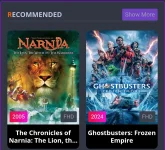
sa recommend ya tingin ko there's no way we can see the badge only 3 label can show lng po ata eh isama mopo ung complete change mo nalang sa kung anong gusto mong ilagay . pero gumagawa nadin ako way para diyan ehYup, python. No need na rooted. Pero para magawa mo automation sa blogger mo need ng autorization sa 0auth client which is dito ako nagkakaproblema.
TwingklingWatermelon Yung part ng recommendation nawala yung badge
View attachment 3079343
 ..
..Lagay mo to sa upper </head> section:sir sa part na ihahide mo yung post mo sa main page panu yun? d ko kasi maintindihan?
<b:if cond='data:blog.pageType == "index"'>
<style>
.hidepic {
display: none;
}
</style>
</b:if><img src="https://example.com/image.jpg" class="hidepic" alt="Hidden Image">Tinatry ko pa tong google script magkaiba nga lang sa python kaya medyo mahirap din. Hahasa recommend ya tingin ko there's no way we can see the badge only 3 label can show lng po ata eh isama mopo ung complete change mo nalang sa kung anong gusto mong ilagay . pero gumagawa nadin ako way para diyan eh
pag ka may free time ka pabulong ng mga gamit mong tools para maka pag post nadin ako nang maramihan sa ngayon 1 post palang ako and 1 for demo post .
ok na sana nalagay ko na ung badge ang problema wla ko alam sa JavaScript hahaha..Lagay mo to sa upper </head> section:
Replace "index" with your pagetype.HTML:<b:if cond='data:blog.pageType == "index"'> <style> .hidepic { display: none; } </style> </b:if>
Pagetype Values:
In your post or page, add class name class="hidepic"
- "index" for the homepage
- "post" for individual blog posts
- "archive" for archive pages
- "search" for search results pages
HTML:<img src="https://example.com/image.jpg" class="hidepic" alt="Hidden Image">
Tinatry ko pa tong google script magkaiba nga lang sa python kaya medyo mahirap din. Haha
CSS kulang mo jan sigurook na sana nalagay ko na ung badge ang problema wla ko alam sa JavaScript hahaha..
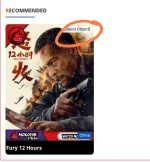
lumalabas lng [object, Object] pero try ko pade hahaha..
kaya mo yan HAHAHA
pure JavaScript siya idol ehCSS kulang mo jan siguro
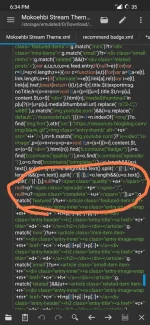
Abay astig ng badge mo ahh. png ba yan?pure JavaScript siya idol eh
if you want to try find this line 4491 on my script
View attachment 3079476
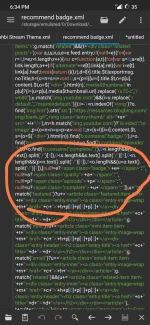
make it look like this.
View attachment 3079477
and this is the result when i try it .
View attachment 3079478
try mo din i explore
nah png lang yan ginawan ko ng border ung mga image kada post para ma trabaho Hahaha.Abay astig ng badge mo ahh, icon.
Pwedi nmn siguro png or icon sa badge?nah png lang yan ginawan ko ng border ung mga image kada post para ma trabaho Hahaha.
pwede ata ya..diko pa na tetest ePwedi nmn siguro png or icon sa badge?
pano gamitin to ya?Pwedi nmn siguro png or icon sa badge?
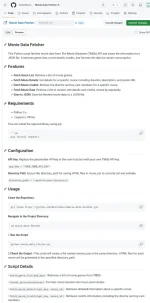
Project Released:
You do not have permission to view the full content of this post. Log in or register now.
Visit mo lang yung link. May guide nmn dun.pwede ata ya..diko pa na tetest e
pano gamitin to ya?
through api to?Abay astig ng badge mo ahh. png ba yan?
Nagreready ako for deployment ng python script ko para makagamit kayo.
View attachment 3080025
View attachment 3080035
Yup, request API on TMDBth
through api to?