PH
PHgambitxp32
Enthusiast
may tricks ba kayo pano paramihin ang views ng website..
for future reference, gagamitin ko to. mas okay kung may custom ng konti sa template para di pare-parehopara sa mga nag hahanap ng tutorial pano mag post ng maramihan galing sa same TEMPLTE or THEME nila !!
sorry boss DetroitGuru sayo ko kinukuha post eh HAHAHA..
NO POST?
View attachment 3068950
no problema HAHA
Step 1:
View attachment 3068951
copy mo muna ung website kahit na naka domain basta alam mo na naka blogspot ung website naun e makukuha mo ung post nya!
NOTE : always mong icheck kung meron ganto sa huli ng url "/?m=1" if walang ganyan lagyan mo nalang ..
Step 2 :
View attachment 3068964
paste mo dito and click backup
Link : You do not have permission to view the full content of this post. Log in or register now.
Step 3 :
View attachment 3068974
then download backup muna!
Step 4 :
View attachment 3068976
Done.
Step 5 :
View attachment 3068978
open your blogspot kung saan nyo ilalagay and click settings!
Step 6 :
View attachment 3068981
hanapin nyo lang tong si Import content!
and click nyo lang sya !
Step 7 :
View attachment 3068983
Click Impot !
Step 8 :
View attachment 3068984
Hanapin at i import ung na download na backup files kanina !
Step 9 :
View attachment 3068985
mag antay ng 1-5mins para ma post laht !
Step 10 :
View attachment 3068986
after waiting pumunta sa post !
Step 11 :
View attachment 3068987
See Congrats !!
Lets check our website !
Step 12 :
View attachment 3068991
Congrats isa kana ding katulad kong tamad mag post HAHAHA..
BTW thanks sa content ni DetroitGuru srry di ako marunong mag mention e HAHAHA..
View attachment 3068970
View attachment 3068972
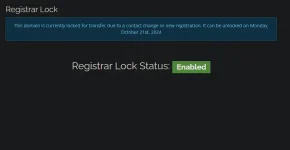
Meaning po nyan For TRANSFER lang po ng Domain if may balak ka itransfer yung domain mo sa ibang Company ng bilihan ng domains eh sa Oct 21st mo pa pede itransfer. Pero kung wala ka namang balak eh iignore mo lang, Wala pong problema sa domain mo ^^View attachment 3071630View attachment 3071634
guys, pa help. panu to? bat ganito cotober 21, 2024 pa daw. wala namang disable nka lagay.
Meaning po nyan For TRANSFER lang po ng Domain if may balak ka itransfer yung domain mo sa ibang Company ng bilihan ng domains eh sa Oct 21st mo pa pede itransfer. Pero kung wala ka namang balak eh iignore mo lang, Wala pong problema sa domain mo ^^
para sa mga nag hahanap ng tutorial pano mag post ng maramihan galing sa same TEMPLTE or THEME nila !!
sorry boss DetroitGuru sayo ko kinukuha post eh HAHAHA..
NO POST?
View attachment 3068950
no problema HAHA
Step 1:
View attachment 3068951
copy mo muna ung website kahit na naka domain basta alam mo na naka blogspot ung website naun e makukuha mo ung post nya!
NOTE : always mong icheck kung meron ganto sa huli ng url "/?m=1" if walang ganyan lagyan mo nalang ..
Step 2 :
View attachment 3068964
paste mo dito and click backup
Link : You do not have permission to view the full content of this post. Log in or register now.
Step 3 :
View attachment 3068974
then download backup muna!
Step 4 :
View attachment 3068976
Done.
Step 5 :
View attachment 3068978
open your blogspot kung saan nyo ilalagay and click settings!
Step 6 :
View attachment 3068981
hanapin nyo lang tong si Import content!
and click nyo lang sya !
Step 7 :
View attachment 3068983
Click Impot !
Step 8 :
View attachment 3068984
Hanapin at i import ung na download na backup files kanina !
Step 9 :
View attachment 3068985
mag antay ng 1-5mins para ma post laht !
Step 10 :
View attachment 3068986
after waiting pumunta sa post !
Step 11 :
View attachment 3068987
See Congrats !!
Lets check our website !
Step 12 :
View attachment 3068991
Congrats isa kana ding katulad kong tamad mag post HAHAHA..
BTW thanks sa content ni DetroitGuru srry di ako marunong mag mention e HAHAHA..
View attachment 3068970
View attachment 3068972
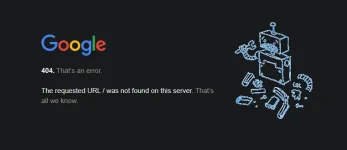
Lagyan mo wwwView attachment 3071656
problema ko is ganito na kasi eh. na close ko kasi nung friday kala ko kasi hindi pa pwede. tiningnan ko yung tutorial magkaiba kasi.
Aware na ako sa ganito. Pero dapat same template para mag work ng maayos.
Lagyan mo www
meaning pala nyan, same template/theme. di kaya mainis sayo kinoyahan mo, haha.para sa mga nag hahanap ng tutorial pano mag post ng maramihan galing sa same TEMPLTE or THEME nila !!
sorry boss DetroitGuru sayo ko kinukuha post eh HAHAHA..
NO POST?
View attachment 3068950
no problema HAHA
Step 1:
View attachment 3068951
copy mo muna ung website kahit na naka domain basta alam mo na naka blogspot ung website naun e makukuha mo ung post nya!
NOTE : always mong icheck kung meron ganto sa huli ng url "/?m=1" if walang ganyan lagyan mo nalang ..
Step 2 :
View attachment 3068964
paste mo dito and click backup
Link : You do not have permission to view the full content of this post. Log in or register now.
Step 3 :
View attachment 3068974
then download backup muna!
Step 4 :
View attachment 3068976
Done.
Step 5 :
View attachment 3068978
open your blogspot kung saan nyo ilalagay and click settings!
Step 6 :
View attachment 3068981
hanapin nyo lang tong si Import content!
and click nyo lang sya !
Step 7 :
View attachment 3068983
Click Impot !
Step 8 :
View attachment 3068984
Hanapin at i import ung na download na backup files kanina !
Step 9 :
View attachment 3068985
mag antay ng 1-5mins para ma post laht !
Step 10 :
View attachment 3068986
after waiting pumunta sa post !
Step 11 :
View attachment 3068987
See Congrats !!
Lets check our website !
Step 12 :
View attachment 3068991
Congrats isa kana ding katulad kong tamad mag post HAHAHA..
BTW thanks sa content ni DetroitGuru srry di ako marunong mag mention e HAHAHA..
View attachment 3068970
View attachment 3068972
Makapalit na nga lang ng templatemeaning pala nyan, same template/theme. di kaya mainis sayo kinoyahan mo, haha.

yeah HAHAHA..meaning pala nyan, same template/theme. di kaya mainis sayo kinoyahan mo, haha.
wag naman ya HAHAHA hirap kase mag upload tas data lang HAHAHA .. pero ikaw po bahala hehehe.. balak ko din mag change theme eh ..Makapalit na nga lang ng template

yeah HAHAHA..
wag naman ya HAHAHA hirap kase mag upload tas data lang HAHAHA .. pero ikaw po bahala hehehe.. balak ko din mag change theme eh ..
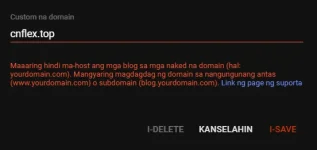
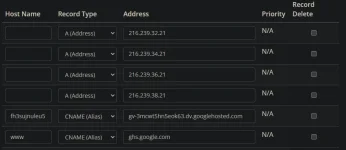
Anong domain store ba yan?View attachment 3071687
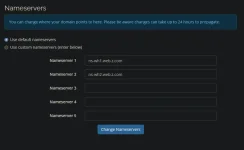
san ilalagay yung cname? wala kasi akong makita. boss URL2 paki up ulit step 2 ng tutorial iba na kasi site lumalabas pag clinick ko.
Yup, it takes time pa bago ma setup nila ssl mo. Saka usually mag nonotif nmn yan si blogger pag okay na.View attachment 3071863
clarification lang. Need natin mag hintay 2 hours noh bago e-save? nakalimutan ko d ko kasi makita tutorial. na save kona sa settings pero hehehe nag error kasi.
Yup, it takes time pa bago ma setup nila ssl mo
Magkano bili mo jan sa domain mo?
92 pesos poMagkano bili mo jan sa domain mo?
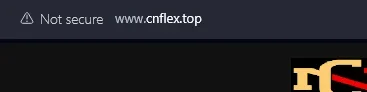
Meron po sa TUT ko po nasa V2.0 na thread ko po nasa WORLD WIDE WEB section po xa, Binawalan ako ni sir Draft sa iknow8.com link ko bawal daw mag link ng blog niche website kaya nilipat ko muna duon. Wala pa ako time i transfer lahat ng tutorials duon.
Meron po sa TUT ko po nasa V2.0 na thread ko po nasa WORLD WIDE WEB section po xa, Binawalan ako ni sir Draft sa iknow8.com link ko bawal daw mag link ng blog niche website kaya nilipat ko muna duon. Wala pa ako time i transfer lahat ng tutorials duon.
Meron po sa TUT ko po nasa V2.0 na thread ko po nasa WORLD WIDE WEB section po xa, Binawalan ako ni sir Draft sa iknow8.com link ko bawal daw mag link ng blog niche website kaya nilipat ko muna duon. Wala pa ako time i transfer lahat ng tutorials duon.
UPDATED: NEW THREAD is UP Method #2 Check niyo na ^^
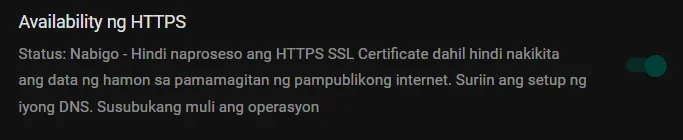
Wait mo langView attachment 3071970
pag-ganito lods, anu gagawin? hintayin lang ba? nkasabi nabigo daw.