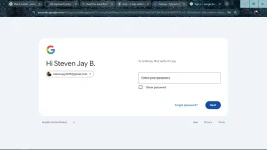
I'm sorry to hear that you're having trouble removing 2-step verification on your Gmail account. If you're unable to proceed to the next step after entering your password when trying to disable the authenticator app, there are a few things you can try:
1. Clear your browser cache and cøøkíés: Sometimes, browser issues can prevent the page from loading properly. Clearing your browser's cache and cøøkíés can help resolve this. After clearing the cache, try accessing the security settings again to disable 2-step verification.
2. Try a different browser or device: If the issue persists, try accessing your Gmail account security settings using a different web browser or device. This can help determine if the problem is specific to the browser or device you were using.
3. Check for browser extensions: Some browser extensions can interfere with the functionality of websites. Disable any extensions that might be causing conflicts and try again.
4. Use an incognito or private browsing window: Sometimes, browsing in incognito or private mode can help bypass certain issues related to cøøkíés or cache. Open an incognito window and try accessing the security settings again.
5. Contact Google Support: If none of the above steps work, you may need to contact Google Support for further assistance. They may be able to provide specific guidance based on your account and the issue you're facing.
Remember, 2-step verification is an important security feature that adds an extra layer of protection to your account. If you're still unable to disable it, make sure to keep your account secure in the meantime.
 PH
PH