 PH
PHFreenet Man
Elite
New update!
Follow the instructions to install Honor of Kings with the lite APK version because the 64-Bit version is too odd.
Sundan natin to!
Una download nalang sa Google Play
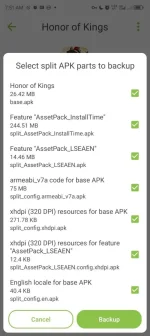
Tapos I-open ang Split APK Installer app
I-click ang backup at pagkatapos, I-close po nating ang app.
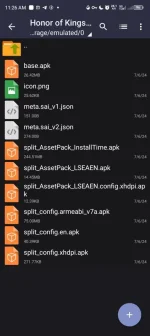
I-open ng ZArchiver app
So, hanapin mo sa storage: 'Honor of Kings .XAPK .APKs'
Then Open as archive/view.
Tangallin ng 32-Bit na nasa loob ng APK file
Wait po natin and done!
Tapos download mo lang ng Aurora Store na may 53 revision na same version sa 4.3.5 at mag log-in.
Then search 'Honor of Kings'
Then tap download
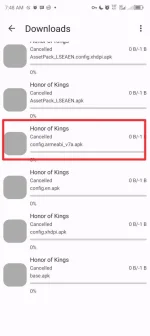
Kaya running na mag-download ng game. I-tap mo tong 3 circle button then I-tap Downloads
Tap mo ulit ng 3 circle button then tap Force stop para itigil ng downloads na makita mo na naka listahan ng files na dinownload.
Tap at hold ng 'armeabi-v7a'
Then tap 'Copy link'
Done! Force clear completed nalang
Download 1DM app.
Then copy nalang ng link na nasa 32-Bit na APK file.
Then start download.
Done! Tapos wait mo lang ng matapos.
For 32-Bit na APK file, I-copy at I-past mo lang tapos Install HOK.
Done! Check Lib-Checker kung merong 32-Bit na game version mo.
Congrats. You are now playing HOK!
Easy to step na yan! Paalam EMEL BIBI Moontubol at Bytebugok!


Aurora Store
Download
LibChecker
Download
Split APKs Installer
Download
XAPKs Installer
Download
ZArchiver
Download
MT Manager
Download
Shizuku for direct APK installation
Honor of Kings
Download

Follow the instructions to install Honor of Kings with the lite APK version because the 64-Bit version is too odd.
Sundan natin to!
Una download nalang sa Google Play
Tapos I-open ang Split APK Installer app
I-click ang backup at pagkatapos, I-close po nating ang app.
I-open ng ZArchiver app
So, hanapin mo sa storage: 'Honor of Kings .XAPK .APKs'
Then Open as archive/view.
Tangallin ng 32-Bit na nasa loob ng APK file
Wait po natin and done!
Tapos download mo lang ng Aurora Store na may 53 revision na same version sa 4.3.5 at mag log-in.
Then search 'Honor of Kings'
Then tap download
Kaya running na mag-download ng game. I-tap mo tong 3 circle button then I-tap Downloads
Tap mo ulit ng 3 circle button then tap Force stop para itigil ng downloads na makita mo na naka listahan ng files na dinownload.
Tap at hold ng 'armeabi-v7a'
Then tap 'Copy link'
Done! Force clear completed nalang
Download 1DM app.
Then copy nalang ng link na nasa 32-Bit na APK file.
Then start download.
Done! Tapos wait mo lang ng matapos.
For 32-Bit na APK file, I-copy at I-past mo lang tapos Install HOK.
Done! Check Lib-Checker kung merong 32-Bit na game version mo.
Congrats. You are now playing HOK!
Easy to step na yan! Paalam EMEL BIBI Moontubol at Bytebugok!
Aurora Store
Download
LibChecker
Download
Split APKs Installer
Download
XAPKs Installer
Download
ZArchiver
Download
MT Manager
Download
Shizuku for direct APK installation
Honor of Kings
Download