❓ Help Help IDM in facebook

Crayvolt

Established
my naka experience po sa inyo na
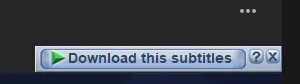
ung popup ay only download this subtitles in facebook private instead na download this video?
pa help po nag uninstall install napo ako fresh install pa. ganun pa din gusto ko mabalik ung download this video
nag dadownload lang sya srt file instead na video hys. anyare sa idm or sa facebook ba
any alternative ways po
 
Hello! I understand that you are experiencing an issue with IDM where instead of downloading the video from Facebook, it only downloads the subtitles file. Here are some steps you can try to resolve this issue and get IDM to download the video instead of just the subtitles file:

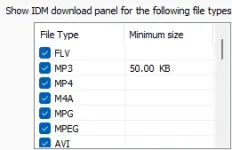
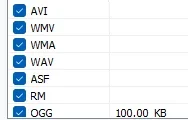
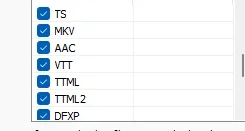
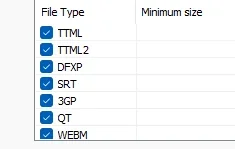
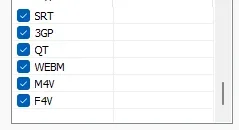
1. Check IDM Settings: Make sure that IDM is configured correctly to download videos. Open IDM and go to "Downloads" -> "Options" -> "File Types". Ensure that the video file extensions (e.g., MP4, MKV, etc.) are included in the list.

2. Update IDM: Ensure that you have the latest version of IDM installed on your computer. Sometimes, updating IDM can resolve compatibility issues with certain websites.

3. Browser Compatibility: Check if the issue persists in different browsers. Sometimes, IDM may not work properly with certain browser versions. You can try using a different browser to see if the problem is browser-specific.

4. Facebook Video Quality: Some videos on Facebook may have restrictions that prevent them from being downloaded. Make sure that the video you are trying to download is not restricted by the uploader.

5. Alternative Methods: If IDM still doesn't work as expected, you can try alternative methods to download videos from Facebook. One common method is to copy the video URL and paste it into a video downloader website or software.

If you have tried these steps and are still facing issues with IDM, you can consider reaching out to IDM support for further assistance. They may be able to provide specific troubleshooting steps based on your issue. Let me know if you need further help or clarification!
 
Try using inspect element (click the F12 button), nakikita 'don yung mga assests including mga subtitle files, then paste it on IDM to download it.
na try ko nayan, kaso putol putol ung generated .mp4 file dnaman na pplay. hys pero thank you padin ka ph

kasi boss ikaw yung mag-e-instruct kay IDM what files ang ida-download niya, pasukin mo lang settings niya, and need mo din ng latest browser IDM integration module add-on boss
na try ko na din yan po, uninstall , intall new downloaded, po pati adon integration lahat na ginawa ko. pati yang instruct nayan. ginawa ko nayan mga filetypes naka check lahat, tapos uncheck ulet check. tapos reload try ulet.

basta sa fb private group dnako nakakadownload, subtitle ung na show na panel.

pero my alternative akong na ginawa para maka download kaso sd quality kababa, blurd hys. need ko kasi ung videos files for educational purpose.

1720188076966.webp
walay talaga mga kph my naka experience na din ba?
if meron na fix nyo ho ba?
 
na try ko na din yan po, uninstall , intall new downloaded, po pati adon integration lahat na ginawa ko. pati yang instruct nayan. ginawa ko nayan mga filetypes naka check lahat, tapos uncheck ulet check. tapos reload try ulet.

basta sa fb private group dnako nakakadownload, subtitle ung na show na panel.

pero my alternative akong na ginawa para maka download kaso sd quality kababa, blurd hys. need ko kasi ung videos files for educational purpose.

View attachment 3001177walay talaga mga kph my naka experience na din ba?
if meron na fix nyo ho ba?
need mo kasi i-ensure boss that the file type that IDM is monitoring is correct, chances are fb is using a file type that is not included in your IDM's list
 

About this Thread

  • 13
    Replies
  • 1K
    Views
  • 4
    Participants
Last reply from:
Crayvolt

Trending Topics

Online now

Members online
980
Guests online
924
Total visitors
1,904

Forum statistics

Threads
2,276,343
Posts
28,969,224
Members
1,231,216
Latest member
jawadahmadi
Back
Top