 PH
PHFreeNetNeed
Elite
Alternative to Deepfreeze, shadow defender. Latest version windows 10 supported na. unlike sa Rollback Rx uncompatible pa sa win 10. sinubukan ko ayun na leche ang win 10 boot up.
When you’re managing a public computer, you need a special kind of tool. You need a way to reset that computer back to a clean state every time it boots so no one can make any harmful changes.
Installing Reboot Restore Rx
Before installing Reboot Restore Rx, be sure that your system is in the clean state you want to “freeze” it in. Install the software you want, update it, arrange the desktop, and do everything else you need to do. Of course, you can temporarily disable Reboot Restore RX to update your system state later.
While installing Reboot Restore Rx, you can select the partitions you want to restore at reboot. This allows you to have a separate data partition that won’t be touched, if you like — or you can set Reboot Restore RX to restore all your partitions.
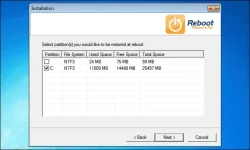
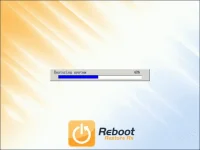
The computer will restart to install the Reboot Restore Rx recovery environment. Whenever the computer boots, it will first boot into this environment, where the Windows drive’s state will be restored automatically before the computer boots normally. To undo any changes, you’ll just need to reboot your computer.
Preventing Users From Disabling Reboot Restore Rx
Reboot Restore RX is fairly simple to use. Its biggest problem is that it can be disabled without a password. By default, Reboot Restore Rx launches in the system tray each time you log in and provides you with a right-click option that allows you to easily disable the protection. If you’re using Reboot Restore RX to lock down a public computer, that’s not a good idea.
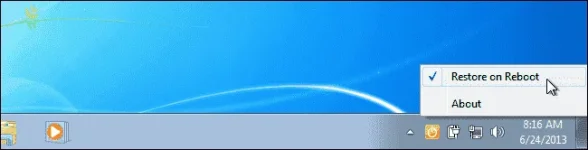
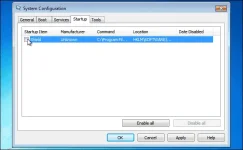
Your best bet is to prevent the Reboot Restore Rx icon from starting at boot by disabling it in MSConfig or a startup manager like the one found in CCleaner. If you want to disable the protection, you can then manually launch the Reboot Restore Rx application by browsing to it on your hard drive. The computer’s users could theoretically do this as well, but this provides more protection. You could even lock down the folder containing the Reboot Restore Rx application and require special user permissions to access it, which would prevent people from disabling it even if they went out of their way to look for it.
If you need to launch it later, you’ll find the system tray program installed at C:\RebootRestoreRx\program files\Shield\shieldtray.exe
"Alternative Create another user profile without user n pass. admin lang meron at double check kung makikita sa tray icon ang rebbot restore rx icon
Updating or Changing Your System
Of course, you’ll occasionally want to modify your system. Whether you want to install updates, add new software, delete files, or do anything else on your computer, you’ll have to disable the feature. This is a very simple process.
Accessing the Boot Console
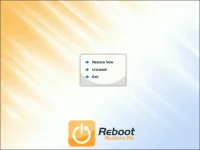
At the Reboot Restore Rx splash screen, which will appear every time your computer starts, you can press the Home key on your keyboard repeatedly to access a special menu. Anyone with access to the computer could theoretically do this, but they would need to know they have to press the Home key — it isn’t displayed on-screen.

You can choose to Uninstall Reboot Restore Rx from here. This will remove Reboot Restore Rx from your system.
Reboot Restore Rx isn’t the most secure and enterprise-ready option, but it’s very easy-to-use and runs on a variety of different Windows systems. Reboot Restore Rx is ideal for people who want their computers to be in the same state every time they boot and don’t want to purchase the Ultimate edition of Windows or perform a more complicated setup process, whether they’re a business with a few public computers or parents who want their childrens’ computers locked down.
DL link
You do not have permission to view the full content of this post. Log in or register now.
When you’re managing a public computer, you need a special kind of tool. You need a way to reset that computer back to a clean state every time it boots so no one can make any harmful changes.
Installing Reboot Restore Rx
Before installing Reboot Restore Rx, be sure that your system is in the clean state you want to “freeze” it in. Install the software you want, update it, arrange the desktop, and do everything else you need to do. Of course, you can temporarily disable Reboot Restore RX to update your system state later.
While installing Reboot Restore Rx, you can select the partitions you want to restore at reboot. This allows you to have a separate data partition that won’t be touched, if you like — or you can set Reboot Restore RX to restore all your partitions.
The computer will restart to install the Reboot Restore Rx recovery environment. Whenever the computer boots, it will first boot into this environment, where the Windows drive’s state will be restored automatically before the computer boots normally. To undo any changes, you’ll just need to reboot your computer.
Preventing Users From Disabling Reboot Restore Rx
Reboot Restore RX is fairly simple to use. Its biggest problem is that it can be disabled without a password. By default, Reboot Restore Rx launches in the system tray each time you log in and provides you with a right-click option that allows you to easily disable the protection. If you’re using Reboot Restore RX to lock down a public computer, that’s not a good idea.
Your best bet is to prevent the Reboot Restore Rx icon from starting at boot by disabling it in MSConfig or a startup manager like the one found in CCleaner. If you want to disable the protection, you can then manually launch the Reboot Restore Rx application by browsing to it on your hard drive. The computer’s users could theoretically do this as well, but this provides more protection. You could even lock down the folder containing the Reboot Restore Rx application and require special user permissions to access it, which would prevent people from disabling it even if they went out of their way to look for it.
If you need to launch it later, you’ll find the system tray program installed at C:\RebootRestoreRx\program files\Shield\shieldtray.exe
"Alternative Create another user profile without user n pass. admin lang meron at double check kung makikita sa tray icon ang rebbot restore rx icon
Updating or Changing Your System
Of course, you’ll occasionally want to modify your system. Whether you want to install updates, add new software, delete files, or do anything else on your computer, you’ll have to disable the feature. This is a very simple process.
- First, disable the Restore on Reboot option from the system tray icon. If you have disabled the system tray icon, you will need to launch it manually.
- Next, make your changes. Update your software and do everything else you want to do.
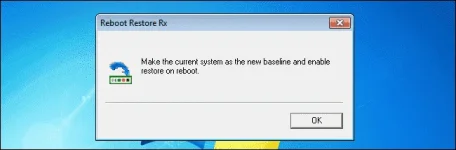
- After you’re done, right-click the system tray icon again and select Restore on Reboot. When you do this, it will inform you that it’s making the current system the new baseline state.
Accessing the Boot Console
At the Reboot Restore Rx splash screen, which will appear every time your computer starts, you can press the Home key on your keyboard repeatedly to access a special menu. Anyone with access to the computer could theoretically do this, but they would need to know they have to press the Home key — it isn’t displayed on-screen.
You can choose to Uninstall Reboot Restore Rx from here. This will remove Reboot Restore Rx from your system.
Reboot Restore Rx isn’t the most secure and enterprise-ready option, but it’s very easy-to-use and runs on a variety of different Windows systems. Reboot Restore Rx is ideal for people who want their computers to be in the same state every time they boot and don’t want to purchase the Ultimate edition of Windows or perform a more complicated setup process, whether they’re a business with a few public computers or parents who want their childrens’ computers locked down.
DL link
You do not have permission to view the full content of this post. Log in or register now.

