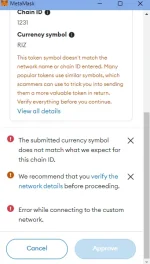
PH
PHYou do not have permission to view the full content of this post.
Log in or register now. pwede na sa phone!
Need nga lang puhunan pang avail ng VPS. Sa gusto subukan ito guide sundan nalang

Run Rivalz Node on your Phone using VPS (CTTO)
NOTE: need mo ng Credit/Debit Card or Paypal para makabili ng VPS (PHP 1000+ ang magagastos for 1 month)
1st Gawa ka muna ng accout : You do not have permission to view the full content of this post. Log in or register now.
Connect your wallet
Connect your Twitter
2nd Bili ka ng VPS, I recommend Contabo para mura.
You do not have permission to view the full content of this post. Log in or register now.
Piliin mo yung:
Cloud VPS 1
Region: European Union
Storage Type: 400gb SSD
Image: Windows Server 2022 Datacenter
Log in Password: (Ikaw bahala, gagamitin yan sa Remote Desktop App)
DONE! (Wag na galawin yung ibang settings)
Click mo yung NEXT then fillup your details and complete your payment.
Then hintayin mo nalang dumating yung email ni Contabo, ibibigay nila sayo yung login information na gagamitin mo sa Remote Desktop App.
3rd Download mo yung Remote Desktop sa Playstore
You do not have permission to view the full content of this post. Log in or register now....
Open app
Click Add PC
PC Name: IP address ng VPS
Username: administrator
Password: yung password na nilagay mo sa VPS
Admin mode: ON
SAVE
4th Connect to your VPS
Dapat makikita mo na dito yung Windows PC
OPEN mo yung browser then Download RClient for Windows
You do not have permission to view the full content of this post. Log in or register now.
Install the App
Click STORAGE CONTROLL > Allocate atleast 50Gb
Click WALLET MANAGEMENT > Paste mo yung wallet address na kinonnect mo sa Rivalz account mo.
Click Play to Start
DONE! Pwede mo na i-close yung Remote Desktop App.
6th Validate your account
Login ka ulit doon sa Rivalz website (sa browser ng phone mo wag sa VPS)
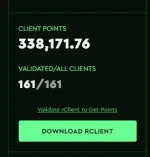
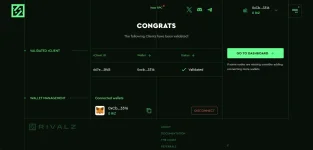
Click mo yung VALIDATE RCLIENT TO GET POINTS
Then click Validate.
DONE!
You do not have permission to view the full content of this post. Log in or register now.
You do not have permission to view the full content of this post. Log in or register now.
You do not have permission to view the full content of this post. Log in or register now.
Kung my pc kayo Try nyo ito click this link : You do not have permission to view the full content of this post. Log in or register now.
Cost $ 0
Free
STEP-BY-STEP GUIDE:
1. Register via link : You do not have permission to view the full content of this post. Log in or register now.
2. Connect Metamask wallet
3. Connect X
4. Download rClient
5. Open Client and go to STORAGE CONTROL
6. Allocate 50 GB or more
7. Click PLAY (run) button then validate
8. Happy Earning

Need nga lang puhunan pang avail ng VPS. Sa gusto subukan ito guide sundan nalang
Run Rivalz Node on your Phone using VPS (CTTO)
NOTE: need mo ng Credit/Debit Card or Paypal para makabili ng VPS (PHP 1000+ ang magagastos for 1 month)
1st Gawa ka muna ng accout : You do not have permission to view the full content of this post. Log in or register now.
Connect your wallet
Connect your Twitter
2nd Bili ka ng VPS, I recommend Contabo para mura.
You do not have permission to view the full content of this post. Log in or register now.
Piliin mo yung:
Cloud VPS 1
Region: European Union
Storage Type: 400gb SSD
Image: Windows Server 2022 Datacenter
Log in Password: (Ikaw bahala, gagamitin yan sa Remote Desktop App)
DONE! (Wag na galawin yung ibang settings)
Click mo yung NEXT then fillup your details and complete your payment.
Then hintayin mo nalang dumating yung email ni Contabo, ibibigay nila sayo yung login information na gagamitin mo sa Remote Desktop App.
3rd Download mo yung Remote Desktop sa Playstore
You do not have permission to view the full content of this post. Log in or register now....
Open app
Click Add PC
PC Name: IP address ng VPS
Username: administrator
Password: yung password na nilagay mo sa VPS
Admin mode: ON
SAVE
4th Connect to your VPS
Dapat makikita mo na dito yung Windows PC
OPEN mo yung browser then Download RClient for Windows
You do not have permission to view the full content of this post. Log in or register now.
Install the App
Click STORAGE CONTROLL > Allocate atleast 50Gb
Click WALLET MANAGEMENT > Paste mo yung wallet address na kinonnect mo sa Rivalz account mo.
Click Play to Start
DONE! Pwede mo na i-close yung Remote Desktop App.
6th Validate your account
Login ka ulit doon sa Rivalz website (sa browser ng phone mo wag sa VPS)
Click mo yung VALIDATE RCLIENT TO GET POINTS
Then click Validate.
DONE!
You do not have permission to view the full content of this post. Log in or register now.
You do not have permission to view the full content of this post. Log in or register now.
You do not have permission to view the full content of this post. Log in or register now.
Kung my pc kayo Try nyo ito click this link : You do not have permission to view the full content of this post. Log in or register now.
Cost $ 0
Free
STEP-BY-STEP GUIDE:
1. Register via link : You do not have permission to view the full content of this post. Log in or register now.
2. Connect Metamask wallet
3. Connect X
4. Download rClient
5. Open Client and go to STORAGE CONTROL
6. Allocate 50 GB or more
7. Click PLAY (run) button then validate
8. Happy Earning