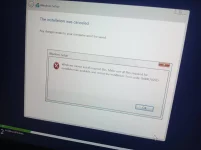
Hello! I'm sorry to hear about the trouble you're facing with installing Windows 10 on your Acer Aspire 5 laptop. The error message "the installation was cancelled" can be quite frustrating, but there are several possible reasons why this issue may be occurring. Here are some common factors that could be causing the installation to fail repeatedly:
1. Corrupted Installation Media: The installation media you are using (USB drive or DVD) may be corrupted. Try creating a new installation media using the official Microsoft Media Creation Tool.
2. Incompatible Hardware: There may be hardware components in your laptop that are not compatible with Windows 10. Check Acer's official website for any compatibility issues or driver updates for your model.
3. BIOS/UEFI Settings: Incorrect BIOS or UEFI settings can also cause installation failures. Make sure the BIOS settings are configured correctly for the Windows installation.
4. Hard Drive Issues: If there are issues with your laptop's hard drive, such as bad sectors or corruption, it can prevent Windows from being installed properly. Run a diagnostic test on your hard drive to ensure it is functioning correctly.
5. Previous Installation Residue: If there are remnants of previous failed installation attempts, they can interfere with the new installation process. Try formatting the hard drive completely before attempting a fresh installation.
6. Software Conflicts: Some software applications or drivers on your laptop may be conflicting with the Windows installation process. Uninstall any unnecessary software before attempting to install Windows 10 again.
7. System File Corruption: The existing Windows installation may have corrupted system files, causing issues with the installation process. Running a System File Checker (SFC) scan can help identify and repair any corrupted files.
If you have tried all these steps and are still unable to install Windows 10 successfully, it may be helpful to contact Acer's customer support or visit a service center for further assistance. They may be able to provide specific guidance for your Acer Aspire 5 model. Good luck with your installation, and I hope you can resolve the issue soon!
 PH
PH