👾 Cheat WUTHERING WAVES CHEAT MOD NO INJECTOR NEEDED UPDATED WORKING August 21, 2024

falsestory

Established
1719471438851.png


1720020378413.png
1720020402169.png
1720020469814.png


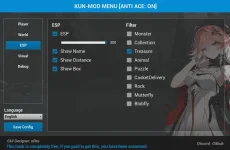
ESP provides the location of the monsters, chests, puzzles, etc
Instructions:

PLEASE NOTE TO DELETE the OLD .PAK FILES INSIDE YOUR ~mod folder or it will not work

1.Extract and copy the ~mod folder to Paks folder and paste it inside.
C:\Wuthering Waves\Wuthering Waves Game\Client\Content\Paks

2.Locate Client-Win64-Shipping in C:\Wuthering Waves\Wuthering Waves Game\Client\Binaries\Win64

3. Right click and send to desktop

4. Go to the shortcut created in Desktop and right click and click properties.

5. Add -fileopenlog on the target box. This should look like this "C:\Wuthering Waves\Wuthering Waves Game\Client\Binaries\Win64\Client-Win64-Shipping.exe" -fileopenlog

6. Run the game from the shortcut you have created

PRESS ALT+X FOR THE CHEAT MENU TO APPEAR

CREDITS TO: Shirasagane and Nobu and their team


UPDATE: WORKING 8/21/2024

You do not have permission to view the full content of this post. Log in or register now.
 
outdated nato, not sure kay author kung iuupdate pa niya, galit yun eh dami kasi binebenta eto kahit wala nakukuhang profit dito mga original author
 
sorry, typed wrong, instead of typing fileopenlog, i typed openfilelog.. and i copied the file inside of mod folder instead of pasting mod folder in pak folder.. its working
 
after downloading the resources today, it wont show the menu... but if you use hotkey it's still working but you can't the display menu

sorry, it's working fine now, i restarted my pc, was using microsoft team, maybe thats why mod overlay was not working properly
 

About this Thread

  • 27
    Replies
  • 8K
    Views
  • 20
    Participants
Last reply from:
mostrapx

Trending Topics

Online now

Members online
1,182
Guests online
2,529
Total visitors
3,711

Forum statistics

Threads
2,269,625
Posts
28,930,140
Members
1,241,506
Latest member
sanjol
Back
Top