PH
PHFirst: visit this github license keys and find the version of your Windows Server, save the license key to notepad.
You do not have permission to view the full content of this post. Log in or register now.
Second: After copying the license key, replace the <license> and paste it on the this command
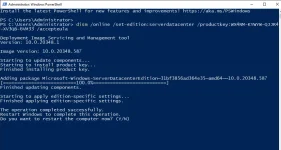
dism /online /set-edition:serverdatacenter /productkey:<license> /accepteula
Example: Windows Server 2022 command
dism /online /set-edition:serverdatacenter /productkey:WX4NM-KYWYW-QJJR4-XV3QB-6VM33 /accepteula
Third: Open powershell and enter the command based on the license key of the windows server version.
Fourth: After installing the eula license. Restart the server and goto massgrave.dev and choose KMS Online activation.
There you go PHC's!
You have now successfully registered Windows Server!
Enjoy!
Follow for more tutorials!
~PHC_r0sin@nt3

You do not have permission to view the full content of this post. Log in or register now.
Second: After copying the license key, replace the <license> and paste it on the this command
dism /online /set-edition:serverdatacenter /productkey:<license> /accepteula
Example: Windows Server 2022 command
dism /online /set-edition:serverdatacenter /productkey:WX4NM-KYWYW-QJJR4-XV3QB-6VM33 /accepteula
Third: Open powershell and enter the command based on the license key of the windows server version.
Fourth: After installing the eula license. Restart the server and goto massgrave.dev and choose KMS Online activation.
There you go PHC's!
You have now successfully registered Windows Server!
Enjoy!
Follow for more tutorials!
~PHC_r0sin@nt3