 PH
PH-
Welcome to PHCorner Forums! Sign up for free to unlock full access and exclusive privileges, including:
- Asking questions about computer and mobile issues
- Discovering internet tips for your mobile network and computer
You are using an out of date browser. It may not display this or other websites correctly.
You should upgrade or use an alternative browser.
You should upgrade or use an alternative browser.
❓ Help Please help FB can't log in sira na Po Yung sim authentication ko wala din email ginamit.
- Thread starter Yoshikoz
- Start date
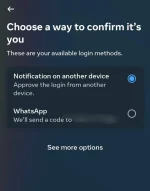
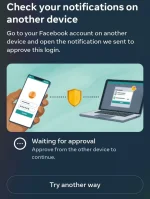
Hi, I can't log in on my Facebook account, and my simcard for authentication is already broken, either email.Hello! How can I assist you today regarding the SIM authentication issue you are facing? Feel free to provide more information so that I can better understand your situation and provide you with the most relevant assistance.
If you have no access to your SIM or email, you can still try the following methods to recover your Facebook account:
Using Trusted Contacts:
Go to the Facebook login page and click on "Forgotten account?".
Enter your username or full name, then click "Search".
Click on "No longer have access to these?".
Enter a new email address or phone number that you can access, and click "Continue".
Click "Reveal My Trusted Contacts" and enter the full name of one of your trusted contacts.
You will see a set of instructions that includes a URL. This URL contains a special security code that only your trusted contacts can access.
Contact your friends and give them the URL, asking them to open the link and send you the security code.
Use the security codes from your trusted contacts to access your account.
Identity Verification:
Go to the Facebook login page and click on "Forgotten account?".
Enter your username or full name, then click "Search".
Click on "No longer have access to these?".
Click on "I cannot access my email account".
Follow the instructions to submit a request to Facebook for account recovery.
You may be asked to upload a photo ID (such as a passport or driver's license) to verify your identity.
Facebook will review your submission and contact you via the new email address you provided.
Facebook Help Center:
Visit the Facebook Help Center.
Search for "login issues" or "identity verification" to find the most relevant information.
Follow the guided instructions provided.
Report a Login Issue:
Go to the Facebook Report a Login Issue page.
Fill out the form with as much detail as possible, including any new contact information where Facebook can reach you.
Submit the form and wait for Facebook to respond.
If none of these methods work, you might need to create a new Facebook account. Be sure to keep your recovery options up to date to avoid similar issues in the future.
- ᑕᕼᗩTGᑭT
Using Trusted Contacts:
Go to the Facebook login page and click on "Forgotten account?".
Enter your username or full name, then click "Search".
Click on "No longer have access to these?".
Enter a new email address or phone number that you can access, and click "Continue".
Click "Reveal My Trusted Contacts" and enter the full name of one of your trusted contacts.
You will see a set of instructions that includes a URL. This URL contains a special security code that only your trusted contacts can access.
Contact your friends and give them the URL, asking them to open the link and send you the security code.
Use the security codes from your trusted contacts to access your account.
Identity Verification:
Go to the Facebook login page and click on "Forgotten account?".
Enter your username or full name, then click "Search".
Click on "No longer have access to these?".
Click on "I cannot access my email account".
Follow the instructions to submit a request to Facebook for account recovery.
You may be asked to upload a photo ID (such as a passport or driver's license) to verify your identity.
Facebook will review your submission and contact you via the new email address you provided.
Facebook Help Center:
Visit the Facebook Help Center.
Search for "login issues" or "identity verification" to find the most relevant information.
Follow the guided instructions provided.
Report a Login Issue:
Go to the Facebook Report a Login Issue page.
Fill out the form with as much detail as possible, including any new contact information where Facebook can reach you.
Submit the form and wait for Facebook to respond.
If none of these methods work, you might need to create a new Facebook account. Be sure to keep your recovery options up to date to avoid similar issues in the future.
- ᑕᕼᗩTGᑭT
Thanks a lot this is very helpful.
If you have no access to your SIM or email, you can still try the following methods to recover your Facebook account:
Using Trusted Contacts:
Go to the Facebook login page and click on "Forgotten account?".
Enter your username or full name, then click "Search".
Click on "No longer have access to these?".
Enter a new email address or phone number that you can access, and click "Continue".
Click "Reveal My Trusted Contacts" and enter the full name of one of your trusted contacts.
You will see a set of instructions that includes a URL. This URL contains a special security code that only your trusted contacts can access.
Contact your friends and give them the URL, asking them to open the link and send you the security code.
Use the security codes from your trusted contacts to access your account.
Identity Verification:
Go to the Facebook login page and click on "Forgotten account?".
Enter your username or full name, then click "Search".
Click on "No longer have access to these?".
Click on "I cannot access my email account".
Follow the instructions to submit a request to Facebook for account recovery.
You may be asked to upload a photo ID (such as a passport or driver's license) to verify your identity.
Facebook will review your submission and contact you via the new email address you provided.
Facebook Help Center:
Visit the Facebook Help Center.
Search for "login issues" or "identity verification" to find the most relevant information.
Follow the guided instructions provided.
Report a Login Issue:
Go to the Facebook Report a Login Issue page.
Fill out the form with as much detail as possible, including any new contact information where Facebook can reach you.
Submit the form and wait for Facebook to respond.
If none of these methods work, you might need to create a new Facebook account. Be sure to keep your recovery options up to date to avoid similar issues in the future.
- Chath
Thanks @C E S S
PHC-Chicken
Eternal Poster
add ka email and number na updated para sureball na.
Mukhang mahirap ang sitwasyon mo dahil wala kang access sa SIM authentication at email. Subukan natin ang mga sumusunod na hakbang para maayos ito:
1. Login sa Facebook sa Browser:
- Kung nakaka-login ka sa Facebook gamit ang browser, pumunta sa You do not have permission to view the full content of this post. Log in or register now..
2. Security and Login Settings:
- Sa kaliwang bahagi, hanapin ang "Security and Login".
- Sa seksyon na ito, makikita mo ang "Change password". Subukan mong baguhin ang password mo dito.
3. Add Email or Phone Number:
- Sa kaliwang bahagi, hanapin ang "Contact".
- Dito, maaari kang magdagdag ng bagong email address o phone number. Siguraduhin na may access ka sa bagong email o phone number na ilalagay mo.
4. Two-Factor Authentication:
- Sa "Security and Login" settings, hanapin ang "Use two-factor authentication".
- I-disable mo muna ito kung naka-enable, para hindi ka mahirapan sa pag-login.
5. Recovery Options:
- Kung hindi mo pa rin ma-access ang iyong account, subukan ang You do not have permission to view the full content of this post. Log in or register now. at hanapin ang "Recover Your Account".
- Sundin ang mga hakbang na ibibigay ng Facebook para ma-recover ang iyong account.
6. Contact Facebook Support:
- Kung hindi pa rin maayos, subukan mong kontakin ang Facebook Support. Pumunta sa You do not have permission to view the full content of this post. Log in or register now. at hanapin ang "Get help from Facebook".
Sana makatulong ang mga hakbang na ito para maayos ang iyong problema. Kung may iba ka pang tanong, huwag mag-atubiling magtanong!
1. Login sa Facebook sa Browser:
- Kung nakaka-login ka sa Facebook gamit ang browser, pumunta sa You do not have permission to view the full content of this post. Log in or register now..
2. Security and Login Settings:
- Sa kaliwang bahagi, hanapin ang "Security and Login".
- Sa seksyon na ito, makikita mo ang "Change password". Subukan mong baguhin ang password mo dito.
3. Add Email or Phone Number:
- Sa kaliwang bahagi, hanapin ang "Contact".
- Dito, maaari kang magdagdag ng bagong email address o phone number. Siguraduhin na may access ka sa bagong email o phone number na ilalagay mo.
4. Two-Factor Authentication:
- Sa "Security and Login" settings, hanapin ang "Use two-factor authentication".
- I-disable mo muna ito kung naka-enable, para hindi ka mahirapan sa pag-login.
5. Recovery Options:
- Kung hindi mo pa rin ma-access ang iyong account, subukan ang You do not have permission to view the full content of this post. Log in or register now. at hanapin ang "Recover Your Account".
- Sundin ang mga hakbang na ibibigay ng Facebook para ma-recover ang iyong account.
6. Contact Facebook Support:
- Kung hindi pa rin maayos, subukan mong kontakin ang Facebook Support. Pumunta sa You do not have permission to view the full content of this post. Log in or register now. at hanapin ang "Get help from Facebook".
Sana makatulong ang mga hakbang na ito para maayos ang iyong problema. Kung may iba ka pang tanong, huwag mag-atubiling magtanong!
Thank you po, pero I just confirmed it now, parang na häçk na Kasi kahapon Akala ko it's just on meta to fb conversion or what so ever security they're making, and nakaka log in pako sa browser, then Ngayon it's says incorrect password na, what to do po? I want help, Kasi andun mga mahahalagang contacts ko, sadly it's expensive ata to find or impossible na ma retrieve saken Yun </3add ka email and number na updated para sureball na.
Thanks po, I appreciate your help, I'm gonna try this thank you
About this Thread
-
8Replies
-
1KViews
-
4Participants
Last reply from:
Yoshikoz
Yoshikoz
New Topics
-
UPLIFT (system suggestions at inis)
- Started by PHC-Coder
- Replies: 3
- 💬 Chitchat
-
Any owner ng Vendo Machine, like carwash and wifi?
- Started by darknight0909
- Replies: 0
- 💬 Chitchat
-
Kami po ay nasunugan
- Started by mjba4w
- Replies: 2
- 💬 Chitchat
-
Scribd Free Trial 2 download limit bypass Unli Download Bug
- Started by -NEXUS-
- Replies: 5
- 💬 Chitchat
-
RCBC acct ko, pinang scam dito galing.
- Started by ProTiTips
- Replies: 4
- 💬 Chitchat
-
Ai free video generator
- Started by labrador
- Replies: 0
- 💬 Chitchat
-
Pa claim po ako ng ᑕᕼᗩTGᑭT ko may free offer po ako
- Started by Tan342
- Replies: 6
- 💬 Chitchat
-
CC Checker lang master pabulong
- Started by Deymmm3
- Replies: 1
- 💬 Chitchat
Trending Topics
Online now
- Members online
- 1,156
- Guests online
- 4,395
- Total visitors
- 5,551