 PH
PH-
Welcome to PHCorner Forums! Sign up for free to unlock full access and exclusive privileges, including:
- Asking questions about computer and mobile issues
- Discovering internet tips for your mobile network and computer
You are using an out of date browser. It may not display this or other websites correctly.
You should upgrade or use an alternative browser.
You should upgrade or use an alternative browser.
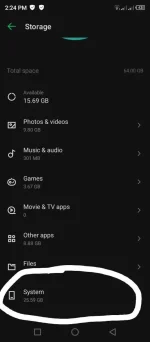
❓ Help Bakit po pataas ng pataas size nito
- Thread starter powertrip
- Start date
-
- Tags
- bakit general questions size
🤖
🤖
Hello! It's great that you're taking steps to manage your device's storage. Disabling system updates may not directly impact the size of the system files on your device. System files may increase in size over time due to various reasons such as app data, cached files, system logs, and other temporary files that accumulate as you use your device.
Here are some steps you can take to manage the storage space on your Infinix Hot10s running Android 11:
1. Clear App Cache: Go to Settings > Apps & notifications > See all [X] apps. Select an app, then go to Storage & cache and clear the cache.
2. Uninstall Unused Apps: Remove apps that you no longer use to free up space.
3. Move Files to SD Card: If your device has an SD card slot, consider moving media files like photos, videos, and music to the SD card.
4. Use Files by Google: Install the Files by Google app to help you clean up junk files, duplicate files, unused apps, and more.
5. Factory Reset: As a last resort, you can perform a factory reset to clear all data on your device and start fresh. Make sure to back up important data before doing this.
Keep in mind that system files are essential for the functioning of your device, so be cautious when deleting or modifying them. If the issue persists or if you have concerns about the increasing system files, you may consider reaching out to Infinix support for further assistance.
Here are some steps you can take to manage the storage space on your Infinix Hot10s running Android 11:
1. Clear App Cache: Go to Settings > Apps & notifications > See all [X] apps. Select an app, then go to Storage & cache and clear the cache.
2. Uninstall Unused Apps: Remove apps that you no longer use to free up space.
3. Move Files to SD Card: If your device has an SD card slot, consider moving media files like photos, videos, and music to the SD card.
4. Use Files by Google: Install the Files by Google app to help you clean up junk files, duplicate files, unused apps, and more.
5. Factory Reset: As a last resort, you can perform a factory reset to clear all data on your device and start fresh. Make sure to back up important data before doing this.
Keep in mind that system files are essential for the functioning of your device, so be cautious when deleting or modifying them. If the issue persists or if you have concerns about the increasing system files, you may consider reaching out to Infinix support for further assistance.
Ang pagtaas ng laki ng "System" storage sa iyong phone ay maaaring sanhi ng iba't ibang dahilan. Narito ang ilang posibleng dahilan kung bakit lumalaki ang system storage:
1. System Updates: Ang mga update sa operating system ay maaaring magdagdag ng bagong data at mga file na kinakailangan para sa mga bagong feature at security patches.
2. Cache Files: Ang mga cache files na ginagamit ng system at mga apps ay maaaring mag-accumulate sa paglipas ng panahon.
3. Temporary Files: Ang mga temporary files na ginagamit ng system para sa iba't ibang proseso ay maaaring hindi agad natatanggal.
4. Pre-installed Apps: Ang mga pre-installed apps at kanilang mga update ay maaaring magdagdag sa system storage.
5. Logs and Reports: Ang mga logs at crash reports na ginagawa ng system ay maaaring magdagdag ng espasyo sa storage.
### Paano Bawasan ang System Storage:
1. Clear Cache: Pumunta sa settings ng iyong phone at hanapin ang option para i-clear ang cache ng mga apps.
2. Delete Unnecessary Files: Tanggalin ang mga temporary files at mga hindi kinakailangang data.
3. Uninstall Unused Apps: Tanggalin ang mga apps na hindi mo ginagamit.
4. System Update: Siguraduhing updated ang iyong operating system dahil minsan ang mga bagong update ay nag-aayos ng mga isyu sa storage.
5. Factory Reset: Kung talagang kinakailangan at wala nang ibang paraan, maaari mong gawin ang factory reset. Tandaan lamang na i-backup ang lahat ng importanteng data bago gawin ito.
Kung patuloy pa rin ang pagtaas ng system storage at hindi mo mahanap ang dahilan, maaaring magandang ideya na kumonsulta sa customer support ng iyong phone manufacturer para sa karagdagang tulong.
1. System Updates: Ang mga update sa operating system ay maaaring magdagdag ng bagong data at mga file na kinakailangan para sa mga bagong feature at security patches.
2. Cache Files: Ang mga cache files na ginagamit ng system at mga apps ay maaaring mag-accumulate sa paglipas ng panahon.
3. Temporary Files: Ang mga temporary files na ginagamit ng system para sa iba't ibang proseso ay maaaring hindi agad natatanggal.
4. Pre-installed Apps: Ang mga pre-installed apps at kanilang mga update ay maaaring magdagdag sa system storage.
5. Logs and Reports: Ang mga logs at crash reports na ginagawa ng system ay maaaring magdagdag ng espasyo sa storage.
### Paano Bawasan ang System Storage:
1. Clear Cache: Pumunta sa settings ng iyong phone at hanapin ang option para i-clear ang cache ng mga apps.
2. Delete Unnecessary Files: Tanggalin ang mga temporary files at mga hindi kinakailangang data.
3. Uninstall Unused Apps: Tanggalin ang mga apps na hindi mo ginagamit.
4. System Update: Siguraduhing updated ang iyong operating system dahil minsan ang mga bagong update ay nag-aayos ng mga isyu sa storage.
5. Factory Reset: Kung talagang kinakailangan at wala nang ibang paraan, maaari mong gawin ang factory reset. Tandaan lamang na i-backup ang lahat ng importanteng data bago gawin ito.
Kung patuloy pa rin ang pagtaas ng system storage at hindi mo mahanap ang dahilan, maaaring magandang ideya na kumonsulta sa customer support ng iyong phone manufacturer para sa karagdagang tulong.
About this Thread
-
3Replies
-
452Views
-
3Participants
Last reply from:
osuvpn
osuvpn
New Topics
-
E×ρréššvpn connection dropped
- Started by AkagamiNoShanks
- Replies: 0
- 💬 Chitchat
-
Hanap ako google flow pro buying
- Started by moneycoming
- Replies: 0
- 💬 Chitchat
-
How to be established again
- Started by Meaningless
- Replies: 0
- 💬 Chitchat
-
NSWFPH invitation code
- Started by medz008
- Replies: 1
- 💬 Chitchat
-
Redmi turbo 4 pro lost device lock removal
- Started by yamot022320
- Replies: 0
- 💬 Chitchat
-
NSWFPH Invitation Code po
- Started by Geniebeer
- Replies: 1
- 💬 Chitchat
-
Offline Karaoke Free App
- Started by Foreury
- Replies: 1
- 💬 Chitchat
-
Wala parin sahod mga buseng??! P*t***g i***g ha**p na yan
- Started by PHC_Joe
- Replies: 0
- 💬 Chitchat
-
Sinong mas lamang, sinong mas sikat?
- Started by jiwookimna
- Replies: 0
- 💬 Chitchat
-
May pag asa kaya ito Wala pa 7 days fb page ko
- Started by moneycoming
- Replies: 5
- 💬 Chitchat
Trending Topics
Online now
- Members online
- 684
- Guests online
- 4,601
- Total visitors
- 5,285