❓ Help Excel/VBA Auto print by scanned barcode

Ward0827

Forum Veteran
Pa help po sana baka pede madagdag to ng automatic n mag piprint pag nag scan ng barcode

current problem po kc is pagmag iiscan kmi ng barcode is automatic lilipat ung active cell sa baba ng cell. which is ang code lng nmin ay activeCell = E1, kaya ang nangyayari ay after mag scan ang magiging active cell n ay blangko.
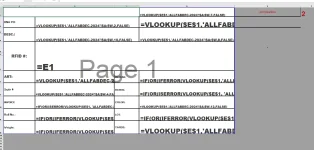
1718757408671.webp


A1:D12 = print data
E1 = lookup value
F1 = # of print


" Current Code
Private Sub Worksheet_SelectionChange(ByVal Target As Range)
If Target.Address = "$E$1" Then
Target.Value = ""
Else
[E1] = ActiveCell
Dim NumCopies As Integer
NumCopies = Range("F1").Value
If NumCopies > 0 Then
ActiveWindow.SelectedSheets.PrintOut Copies:=NumCopies, Collate:=True, IgnorePrintAreas:=False
End If
End If
End Sub
"
 
Narito ang isang mungkahi para sa inyong VBA code upang hindi magalaw ang active cell kapag nag-scan ng barcode at mag-print ng data base sa halaga sa E1 at bilang ng pag-print sa F1:

Code:
Private Sub Worksheet_Change(ByVal Target As Range)
    If Not Intersect(Target, Range("E1")) Is Nothing Then
        Dim NumCopies As Integer
        NumCopies = Range("F1").Value
        If NumCopies > 0 Then
            Application.EnableEvents = False ' I-disable ang event handling para hindi mag-trigger ang Worksheet_Change ulit habang nag-u-update tayo ng cell values
            ActiveSheet.Unprotect ' Kung ang worksheet ay protected, i-unprotect muna para ma-update ang values
            Target.Value = "" ' I-clear ang value ng E1
            ActiveWindow.SelectedSheets.PrintOut Copies:=NumCopies, Collate:=True, IgnorePrintAreas:=False
            ActiveSheet.Protect ' I-protect ulit ang worksheet kung kinakailangan
            Application.EnableEvents = True ' I-enable ulit ang event handling
        End If
    End If
End Sub

Pakiusap lang na siguraduhing naka-disable ang Protection ng worksheet kung kinakailangan para sa pag-update ng mga values at printing. Kung may iba pang mga katanungan o pagkaklaro, huwag mag-atubiling magtanong ulit. Salamat!
 
Narito ang isang mungkahi para sa inyong VBA code upang hindi magalaw ang active cell kapag nag-scan ng barcode at mag-print ng data base sa halaga sa E1 at bilang ng pag-print sa F1:

Code:
Private Sub Worksheet_Change(ByVal Target As Range)
    If Not Intersect(Target, Range("E1")) Is Nothing Then
        Dim NumCopies As Integer
        NumCopies = Range("F1").Value
        If NumCopies > 0 Then
            Application.EnableEvents = False ' I-disable ang event handling para hindi mag-trigger ang Worksheet_Change ulit habang nag-u-update tayo ng cell values
            ActiveSheet.Unprotect ' Kung ang worksheet ay protected, i-unprotect muna para ma-update ang values
            Target.Value = "" ' I-clear ang value ng E1
            ActiveWindow.SelectedSheets.PrintOut Copies:=NumCopies, Collate:=True, IgnorePrintAreas:=False
            ActiveSheet.Protect ' I-protect ulit ang worksheet kung kinakailangan
            Application.EnableEvents = True ' I-enable ulit ang event handling
        End If
    End If
End Sub

Pakiusap lang na siguraduhing naka-disable ang Protection ng worksheet kung kinakailangan para sa pag-update ng mga values at printing. Kung may iba pang mga katanungan o pagkaklaro, huwag mag-atubiling magtanong ulit. Salamat!
Thanks but trying this still occur the same problem. lumilipat ung active cell sa baba
 
Thanks but trying this still occur the same problem. lumilipat ung active cell sa baba
Narito ang isang muling mungkahi para sa inyong VBA code upang hindi magalaw ang active cell kapag nag-scan ng barcode at mag-print ng data base sa halaga sa E1 at bilang ng pag-print sa F1. Ang code na ito ay nagtatanggal ng paglipat ng active cell sa ibang cell matapos mag-scan ng barcode:

Code:
Private Sub Worksheet_Change(ByVal Target As Range)
    If Not Intersect(Target, Range("E1")) Is Nothing Then
        Dim NumCopies As Integer
        NumCopies = Range("F1").Value
        If NumCopies > 0 Then
            Application.EnableEvents = False ' I-disable ang event handling para hindi mag-trigger ang Worksheet_Change ulit habang nag-u-update tayo ng cell values
            ActiveSheet.Unprotect ' Kung ang worksheet ay protected, i-unprotect muna para ma-update ang values
            Dim scannedValue As String
            scannedValue = Target.Value
            Target.ClearContents ' I-clear ang value ng E1
            ActiveSheet.Protect ' I-protect ulit ang worksheet kung kinakailangan
            Application.EnableEvents = True ' I-enable ulit ang event handling
            
            ' Dito ilalagay ang code para i-print ang data base sa scannedValue at NumCopies
            ' Halimbawa:
            ' Range("A1:D12").AutoFilter Field:=1, Criteria1:=scannedValue
            ' ActiveWindow.SelectedSheets.PrintOut Copies:=NumCopies, Collate:=True, IgnorePrintAreas:=False
        End If
    End If
End Sub

Pakiusap subukan ang code na ito at ilagay ang tamang code para i-print ang data base base sa scannedValue at NumCopies. Kung may iba pang mga katanungan o kailangan ng karagdagang tulong, huwag mag-atubiling magtanong ulit. Salamat!
 

About this Thread

  • 3
    Replies
  • 428
    Views
  • 1
    Participants
Last reply from:
Unknown user

Trending Topics

Online now

Members online
344
Guests online
1,133
Total visitors
1,477

Forum statistics

Threads
2,273,575
Posts
28,950,428
Members
1,235,837
Latest member
ninzi
Back
Top