 PH
PHPHC MichaelM
Eternal Poster
Hi Guys my tech ba dito ? ano kaya problema pag ung laptop after ilang minutes biglang nag distort ung Image tapos nag shutdown? history of repair is pinalitan lang lcd kasi nahulog dati.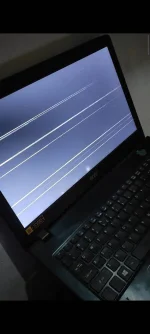
ok po ung LCD ko, gumagama, pero after ng ilang minutes nag distort tsaka nag autoshutdowntry external monitor to check if ok lcd mo, if ok sya then other issue yan sa pc
malayo sa overheating paps. 39 lang temp.. naka bantayKung ung LCD problem..malamang ung LCD na yan sir..
ung Shudown issue naman..baka mag poblema ka na sa proce mo sir..check mo dapat ung temp ng proce mo sir..
high chance connection yan sa motherboard, hahanapin dyan yung faulty na resitor/capacitor or connection.ok po ung LCD ko, gumagama, pero after ng ilang minutes nag distort tsaka nag autoshutdown
malayo sa overheating paps. 39 lang temp.. naka bantay
feel ko rin paps, pina ayos ko, sabi ng tech yan daw ung sira, sabi pinalitan na daw pero nd ko nakita ung pag palit. haixtt mukhang na scam ata ako.high chance connection yan sa motherboard, hahanapin dyan yung faulty na resitor/capacitor or connection.