 PH
PH-
Welcome to PHCorner Forums! Sign up for free to unlock full access and exclusive privileges, including:
- Asking questions about computer and mobile issues
- Discovering internet tips for your mobile network and computer
You are using an out of date browser. It may not display this or other websites correctly.
You should upgrade or use an alternative browser.
You should upgrade or use an alternative browser.
❓ Help Windows 10 Help
- Thread starter japz
- Start date
-
- Tags
- help windows windows 10
- Status
- Not open for further replies.
🤖
🤖
Hello! I'm sorry to hear that you're having trouble installing Windows 10 from the ISO downloaded from Google. It's important to make sure that the ISO file is not corrupted and that you are using a reliable source to download it.
Instead of sharing the ISO file directly, I recommend downloading the official Windows 10 ISO from the Microsoft website to ensure its authenticity and integrity. Here's how you can do it:
1. Visit the official Microsoft website: You do not have permission to view the full content of this post. Log in or register now.
2. Scroll down to the "Create Windows 10 installation media" section and click on the "Download tool now" button.
3. Run the tool and follow the on-screen instructions to create a bootable USB drive with the Windows 10 installation files.
After creating the bootable USB drive, you can proceed with the Windows 10 installation by booting from the USB drive. This method should help you avoid any errors you encountered with the ISO file downloaded from other sources.
If you encounter any issues during the installation process, feel free to ask for further assistance. Good luck with your Windows 10 installation!
Instead of sharing the ISO file directly, I recommend downloading the official Windows 10 ISO from the Microsoft website to ensure its authenticity and integrity. Here's how you can do it:
1. Visit the official Microsoft website: You do not have permission to view the full content of this post. Log in or register now.
2. Scroll down to the "Create Windows 10 installation media" section and click on the "Download tool now" button.
3. Run the tool and follow the on-screen instructions to create a bootable USB drive with the Windows 10 installation files.
After creating the bootable USB drive, you can proceed with the Windows 10 installation by booting from the USB drive. This method should help you avoid any errors you encountered with the ISO file downloaded from other sources.
If you encounter any issues during the installation process, feel free to ask for further assistance. Good luck with your Windows 10 installation!
Download the Official Windows 10 ISO:Go to the official Microsoft Windows 10 download page.Click on "Download tool now" to get the Media Creation Tool.Run the Media Creation Tool and select "Create installation media (USB flash drive, DVD, or ISO file) for another PC."Follow the prompts to download the ISO file.
Link: You do not have permission to view the full content of this post. Log in or register now.
Feed back nalang kung ok na or solved
Link: You do not have permission to view the full content of this post. Log in or register now.
Feed back nalang kung ok na or solved
PHC- Naksu
Elite
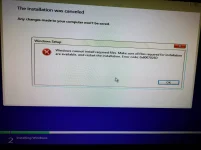
matanong ko nga lods, anu ung exact error nlabas sa pag iinstall mo?thanks sa feedback.. yes sa site ng microsoft nko nag download ilang beses na same error parin... gumamit nko ng ilang FD and HD/SSD error parin..
kahit rufus ganun parin eh..
PHC- Naksu
Elite
pag gnyan ang error, ung usb po yan n gamit mo pang install ang sira, pkitry mo palitan
Narito ang mga hakbang upang ayusin ang error code 0x8007025D na nararanasan mo sa pag-install ng Windows:
1. Suriin ang Installation Media:
- Siguraduhing hindi corrupt ang iyong installation USB o DVD. Maaari mong gawin ito sa pamamagitan ng paglikha ng bagong installation media gamit ang You do not have permission to view the full content of this post. Log in or register now..
2. Gumamit ng Ibang USB Port o USB Drive:
- Subukan ang ibang USB port sa iyong computer o gumamit ng ibang USB drive. Minsan, ang mga USB port o drive ay maaaring may problema, na nagiging sanhi ng read errors.
3. I-verify ang ISO File:
- Kung gumagamit ka ng ISO file, tiyakin na hindi ito corrupt. Maaari kang mag-download ng bagong kopya mula sa Microsoft website.
4. Idisconnect ang Hindi Kailangan na Hardware:
- Alisin ang anumang hindi kinakailangang peripherals (external hard drives, printers, atbp.) mula sa iyong computer habang nag-i-install.
5. Suriin ang RAM:
- Ang sira o depektibong RAM ay maaaring maging sanhi ng error na ito. Patakbuhin ang memory diagnostic tool tulad ng Windows Memory Diagnostic o MemTest86 upang suriin ang RAM. Kung may maraming RAM sticks, subukan na alisin ang ilan at mag-install ng Windows gamit ang isa lamang.
6. Mga Setting ng BIOS/UEFI:
- Tiyaking tama ang mga setting ng BIOS/UEFI para sa pag-install. Suriin ang mga setting na may kaugnayan sa USB, SATA mode (AHCI vs. RAID), at i-disable ang anumang overclocking settings.
7. I-update ang BIOS/UEFI:
- Siguraduhing up-to-date ang BIOS/UEFI firmware. Minsan, ang mga compatibility issues ay nagiging sanhi ng pag-install failure.
8. Mga Problema sa Disk:
- Patakbuhin ang disk check sa iyong hard drive o SSD upang tiyakin na walang bad sectors. Maaari mong gamitin ang mga tool tulad ng CHKDSK sa Windows o mga third-party disk diagnostic tools.
9. Clean Installation:
- Kung maaari, magsagawa ng clean installation imbes na upgrade. Minsan, ito ay nakakapag-bypass ng mga error na may kaugnayan sa kasalukuyang system configurations.
Kung pagkatapos ng mga hakbang na ito ay nananatili pa rin ang problema, maaaring nagpapahiwatig ito ng mas malalim na hardware issue o mas kumplikadong software incompatibility na maaaring mangailangan ng tulong ng isang propesyonal.
Sabihin mo nalang kung ayus na or kulang parin
iland usb n gamit ko.. bumuli n rin ako ng bago ganun parin ehpag gnyan ang error, ung usb po yan n gamit mo pang install ang sira, pkitry mo palitan
PHC- Naksu
Elite
cge then try mo itong iSO ko and be sure ung latest n rufus ung gamit moiland usb n gamit ko.. bumuli n rin ako ng bago ganun parin eh
thanks.. pa link lodicge then try mo itong iSO ko and be sure ung latest n rufus ung gamit mo
PHC- Naksu
Elite
yung iso click mo lods explore mo lang mkikita mo link sa babathanks.. pa link lodi
tnx lods.. try ko maya asa labas lang ako.. update kita.. salamatyung iso click mo lods explore mo lang mkikita mo link sa baba
PHC- Naksu
Elite
try mo extract ISO files ndownload mo, making sure n completed ung file dinownkiad mo befire mo gamitin sa rufustry ko ngaun lods.. downloading na.. 3 usb gagamitin ko 2 GPT isang MBR... update ako later. thanks
rekta na sa rufus binasa nman lods.. trying to install now..try mo extract ISO files ndownload mo, making sure n completed ung file dinownkiad mo befire mo gamitin sa rufus
nag eeror parin lodi..
PHC- Naksu
Elite
gumagamit k ba ng idm? or normal download lang?rekta na sa rufus binasa nman lods.. trying to install now..
nag eeror parin lodi..
normal download lang lodsgumagamit k ba ng idm? or normal download lang?
kung win8 kaya saka update sa win10?
Ianzkie1983
Honorary Poster
check mo kung mbr or gpt yung format para sa os mo
press windows icon+ r then type msinfo32. check mo kung anung bios mode ka kung legacy o uefi Ang nasa bios mo
press windows icon+ r then type msinfo32. check mo kung anung bios mode ka kung legacy o uefi Ang nasa bios mo
Imperial_Nuggets
Fanatic
Mostly incomplete download, pero di tutuloy sa rufus kung may CRC. Ano host os bago mo iburn sa thumbdrive? Kung windows 10 disable mo muna yung realtime protection ng win def, saka mo iburn. Or maybe format mo ng ntfs muna yung thumbdrive mo wag exfat o fat32
- Status
- Not open for further replies.
Similar threads
-
Windows 10 22H2 build 19045.7725 Aio 16in1 Preactivated (Latest Windows 10 version)
- Started by maroo88
- Replies: 1
-
-
-
-
🔗 Direct Link [Opriken] Windows 10 Pro 22H2.7725 Lite - New Released-Sept2026
- Started by outsidecap
- Replies: 21
About this Thread
-
31Replies
-
2KViews
-
8Participants
Last reply from:
Ianzkie1983
Ianzkie1983
New Topics
-
Active Directory tutorial
- Started by Allergies
- Replies: 0
- ❓ Computer Discussion & Support
-
Hide Yuzu or any emulator
- Started by izanagi07
- Replies: 1
- ❓ Computer Discussion & Support
-
Phc error in Desktop
- Started by dicode100
- Replies: 3
- ❓ Computer Discussion & Support
-
Microsfot 365 activation tool or key need lang boss asap
- Started by zzaj zzaj
- Replies: 1
- ❓ Computer Discussion & Support
-
Di makaacess sa TGT ngayon umaga using pldt ip.
- Started by Dvin
- Replies: 1
- ❓ Computer Discussion & Support
-
Guys pa help naman for mobile nitflex cookie
- Started by Darknel_SQL
- Replies: 1
- ❓ Computer Discussion & Support
-
Bypass, Sign in to access this site" dialog box
- Started by meowkie
- Replies: 0
- ❓ Computer Discussion & Support
-
-
Meta Business Suite Desktop Forwarded Message
- Started by PHC - iReyt
- Replies: 9
- ❓ Computer Discussion & Support
-
Ano pwedeng pamalit kay vmware?
- Started by CookiesH
- Replies: 4
- ❓ Computer Discussion & Support
Trending Topics
Online now
- Members online
- 791
- Guests online
- 1,973
- Total visitors
- 2,764