 PH
PH-
Welcome to PHCorner Forums! Sign up for free to unlock full access and exclusive privileges, including:
- Asking questions about computer and mobile issues
- Discovering internet tips for your mobile network and computer
You are using an out of date browser. It may not display this or other websites correctly.
You should upgrade or use an alternative browser.
You should upgrade or use an alternative browser.
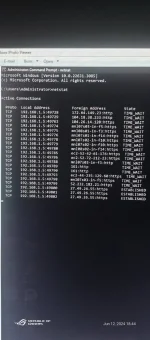
❓ Help Pahelp ako dito pano alisin yan
🤖
🤖
To remove a hijack on your PC, such as a browser hijacker or malware that takes control of your web browser and redirects your searches, you can follow these steps:How to remove hijack on pc
1. Run a Full Antivirus Scan: Start by running a full antivirus scan on your PC to detect and remove any malware or malicious software that may be causing the hijacking. Make sure your antivirus software is up to date before scanning your system.
2. Use Anti-Malware Tools: In addition to your antivirus software, you can use dedicated anti-malware tools like 𝐌𝐚𝐥𝐰𝐚𝐫𝐞𝐛𝐲𝐭𝐞𝐬 to scan and remove any potentially unwanted programs (PUPs) or adware causing the hijack.
3. Reset Your Web Browser: If your web browser has been hijacked, you can try resetting it to its default settings. For example, in Google Chrome, you can go to Settings > Advanced > Reset and clean up > Reset settings to their original defaults.
4. Remove Suspicious Browser Extensions: Check your browser extensions or add-ons for any suspicious or unfamiliar ones that may be causing the hijack. Remove any extensions that you did not install or that seem suspicious.
5. Clear Browser Data: Clearing your browser's cookies, cache, and browsing history can help remove any tracking cookies or temporary data that may be contributing to the hijack.
6. Update Your Browser and Operating System: Ensure that your web browser and operating system are up to date with the latest security patches and updates to prevent vulnerabilities that malware could exploit.
7. Change Your Passwords: If you suspect that your accounts have been compromised due to the hijack, change your passwords for important accounts to prevent unauthorized access.
8. Seek Professional Help: If you are unable to remove the hijack on your own, consider seeking help from a professional IT technician or a computer repair service.
By following these steps, you can help remove a hijack on your PC and secure your system from further unauthorized access or malicious activities.
Mukhang kailangan mong linisin ang mga resulta ng
1. Pindutin ang
2. Kung gusto mong i-clear ang screen ng command prompt, maaari mong gamitin ang
3. Kung nais mong isara ang isang partikular na koneksyon, kailangan mong hanapin ang process ID (PID) na nauugnay sa koneksyon at gamitin ang
Tandaan na ang paggamit ng
Kung kailangan mo ng karagdagang tulong o may iba pang katanungan, huwag mag-atubiling magtanong. Sana ay nakatulong ito sa iyo!
netstat command sa iyong command prompt window. Para gawin ito, maaari mong subukan ang sumusunod na hakbang:1. Pindutin ang
Ctrl + C para ihinto ang netstat command kung ito ay patuloy na tumatakbo.2. Kung gusto mong i-clear ang screen ng command prompt, maaari mong gamitin ang
cls command. I-type lang ang cls at pindutin ang Enter.3. Kung nais mong isara ang isang partikular na koneksyon, kailangan mong hanapin ang process ID (PID) na nauugnay sa koneksyon at gamitin ang
taskkill command para isara ito. Halimbawa, kung ang PID ay 1234, i-type ang taskkill /PID 1234 /F at pindutin ang Enter.Tandaan na ang paggamit ng
taskkill command ay maaaring makaapekto sa iba pang proseso na nauugnay sa PID na iyon, kaya siguraduhin na tama ang PID bago mo ito isara.Kung kailangan mo ng karagdagang tulong o may iba pang katanungan, huwag mag-atubiling magtanong. Sana ay nakatulong ito sa iyo!
TS, una muna, kailangan siguro alamin mo muna kung legit ba ang mga connections na iyan, try mo install si PNetMon. Malalaman mo kung aling programs ang may active connection sa internet. I-block niya ang host url kung kasama ito sa blacklist ng mga potentially malicious hosts:
You do not have permission to view the full content of this post. Log in or register now.
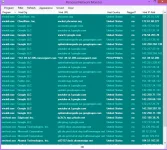
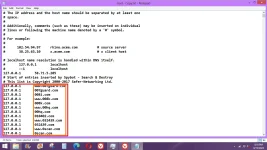
Pangalawa, kung duda ka pa rin sa ibang connections na persistent, pwede mong i-edit yung Host file para siya i-block. Makikita mo yung Host file sa OS (C: ) > Windows > System 32 > Drivers > etc, right click mo yung Host file, click on Open with, click on Notepad > edit mo na tapos click on Save.
Check mo itong attached picture ng edited Host file, ita-type mo isa-isa yung mga Foreign host URLs sa bawat linya na katapat ng 127.0.0.1 tulad nung nasa loob ng orange box. Ang effect niyan ay mada-divert yung call sa Localhost instead na tumuloy sa Foreign host url.
You do not have permission to view the full content of this post. Log in or register now.
Pangalawa, kung duda ka pa rin sa ibang connections na persistent, pwede mong i-edit yung Host file para siya i-block. Makikita mo yung Host file sa OS (C: ) > Windows > System 32 > Drivers > etc, right click mo yung Host file, click on Open with, click on Notepad > edit mo na tapos click on Save.
Check mo itong attached picture ng edited Host file, ita-type mo isa-isa yung mga Foreign host URLs sa bawat linya na katapat ng 127.0.0.1 tulad nung nasa loob ng orange box. Ang effect niyan ay mada-divert yung call sa Localhost instead na tumuloy sa Foreign host url.
Similar threads
About this Thread
-
5Replies
-
397Views
-
3Participants
Last reply from:
Pen_J
Pen_J
New Topics
-
Android Port Suggestion
- Started by LinkMe
- Replies: 2
- 💬 Chitchat
-
Hosting po na pinakastable
- Started by weew2211A
- Replies: 0
- 💬 Chitchat
-
DTR-BIOMETRIC 1 Device ONLY
- Started by burigo_08
- Replies: 0
- 💬 Chitchat
-
Sino meron tutorial root redmi note 9 pro
- Started by nobitapugi
- Replies: 0
- 💬 Chitchat
-
Pa advice po ano maganda mini fan , pang gift lang po
- Started by Ze_Ro
- Replies: 0
- 💬 Chitchat
-
Mga pasensya na hihingi sana ako tulong
- Started by xrawr16
- Replies: 0
- 💬 Chitchat
-
Out of Project idea
- Started by Artimatrix
- Replies: 0
- 💬 Chitchat
-
Hi pwede mag ask?
- Started by Pghusmith
- Replies: 1
- 💬 Chitchat
-
Pas a bit po Netflix
- Started by samone
- Replies: 0
- 💬 Chitchat
-
RIP sa mga Distrokid paldoggers out there
- Started by ChatGPT
- Replies: 2
- 💬 Chitchat
Trending Topics
Online now
- Members online
- 1,325
- Guests online
- 10,014
- Total visitors
- 11,339