 PH
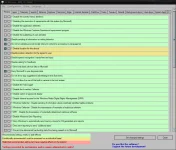
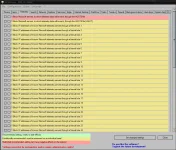
PHW10Privacy can display common Windows 10 security settings that can be activated as well as deactivated within the program. It also allows importing and exporting of your changes. While there are a lot of Windows 10 privacy tools out there, many of them lack the detail this program has. Of course, this means that it might take you a bit longer to go through your choices.
For those who don't want to go into detail you can choose from 3 predefined settings. While the design is very simple, there are also 3 colors so that you can easily spot the these 3 settings:
Green - Recommended - this is a conservative mode. Yellow - Conditionally recommended - probably the best bet but look over the choices. Red - Restricted - think of this as geek mode. Better know what you're doing. Must run as administrator.
Also, other similar apps don't always have a back or set a restore point making them a bit scary. This program however does offer a save, save as and load options so you can backup and import or export your settings anytime.
W10Privacy has a built in update checker and a handful of user settings as well.
pakilagay sa whitelist yung applciation exe
Download link
You do not have permission to view the full content of this post. Log in or register now.
For those who don't want to go into detail you can choose from 3 predefined settings. While the design is very simple, there are also 3 colors so that you can easily spot the these 3 settings:
Green - Recommended - this is a conservative mode. Yellow - Conditionally recommended - probably the best bet but look over the choices. Red - Restricted - think of this as geek mode. Better know what you're doing. Must run as administrator.
Also, other similar apps don't always have a back or set a restore point making them a bit scary. This program however does offer a save, save as and load options so you can backup and import or export your settings anytime.
W10Privacy has a built in update checker and a handful of user settings as well.
pakilagay sa whitelist yung applciation exe
Download link
You do not have permission to view the full content of this post. Log in or register now.