 PH
PHYou do not have permission to view the full content of this post.
Log in or register now.
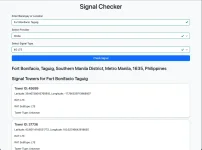
^^^^^^^^^^^THE VIDEO TUTORIAL IS ABOVE^^^^^^^^^
or
STEP by STEP Tutorial
HOW TO USE SIGNAL CHECKER AND TOWER CHECKER:
1. Please Install KIWI Browser in GooglePlay
2. Open Kiwi Browser
3. Search for CORS Unblock Extension in Chromewebstore
4. Add to Chrome
5. Go to the top of the right Menu button in Kiwi Browser
6. Scroll Down until you see the Extension Cors Unblock
7. Tap the extension when see an amber color in CORS Unblock means its activated
8. and When the color is dark grey or black means its not open, so please tap to activate
9. Go to this link to use the service You do not have permission to view the full content of this post. Log in or register now.
10. When you Entering your Barangay please do not add the Barangay just type your Exact Name or Area of your Barangay "Ex. ;.. Fort Bonifacio Taguig" do not type like this " Barangay Fort Bonifacio".
^^^^^^^^^^^THE VIDEO TUTORIAL IS ABOVE^^^^^^^^^
or
STEP by STEP Tutorial
HOW TO USE SIGNAL CHECKER AND TOWER CHECKER:
1. Please Install KIWI Browser in GooglePlay
2. Open Kiwi Browser
3. Search for CORS Unblock Extension in Chromewebstore
4. Add to Chrome
5. Go to the top of the right Menu button in Kiwi Browser
6. Scroll Down until you see the Extension Cors Unblock
7. Tap the extension when see an amber color in CORS Unblock means its activated
8. and When the color is dark grey or black means its not open, so please tap to activate
9. Go to this link to use the service You do not have permission to view the full content of this post. Log in or register now.
10. When you Entering your Barangay please do not add the Barangay just type your Exact Name or Area of your Barangay "Ex. ;.. Fort Bonifacio Taguig" do not type like this " Barangay Fort Bonifacio".