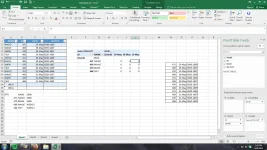
Hello! To generate a pivot table with in-out data under the date field, you can follow these steps:
1. Select the data range that includes your in-out data and dates.
2. Go to the "Insert" tab in Excel and click on "PivotTable." This will open a dialog box.
3. In the dialog box, select the range of data you want to analyze and choose where you want the pivot table to be placed (either a new worksheet or existing worksheet).
4. Click "OK" to create the pivot table.
5. In the PivotTable Fields pane, drag the "Date" field to the Rows area to show dates in the pivot table.
6. Drag the "In-Out" field to the Values area. By default, it will show as "Sum of In-Out" or similar.
7. To change the aggregation function (count, sum, etc.), click on the drop-down arrow next to "Sum of In-Out" in the Values area, then select "Value Field Settings."
8. In the dialog box that appears, you can choose from various summary functions like Sum, Count, Average, etc. Select the one that suits your needs and click "OK."
This way, you can generate a pivot table that shows in-out data under the date field with the desired aggregation function. Let me know if you need further assistance or clarification!
 PH
PH