PH
PHgustavvvgraves
Fanatic
First - right click nyo tong windows logo tapos select Windows PowerShell
then I copy nyo to then paste sa Windows PowerShell:
irm You do not have permission to view the full content of this post. Log in or register now. | iex
the

Tapos makikita nyo to instructions
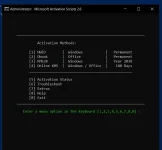
1 then enter kapag Windows gusto I activate
2 kapag Ms Office
Pa feedback nalang if working
Thank you!
then I copy nyo to then paste sa Windows PowerShell:
irm You do not have permission to view the full content of this post. Log in or register now. | iex
the
Tapos makikita nyo to instructions
1 then enter kapag Windows gusto I activate
2 kapag Ms Office
Pa feedback nalang if working
Thank you!