 PH
PHCrowdstrike Falcon User
Leecher
Follow this tweaks to harden its protection especially sa mga mahihilig mag download o mahilig gumamit ng mga pirated software.
Pero yung mga Kaspersky users na hindi mahilig sa mga cracked at gusto ng Maximum protection, just let me know para gawin ko sa other discussion.
Let's begin
1.
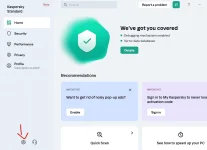
I used the beta version. Pero it doesn't matter kasi almost same lang sila. In Home tab, Click the settings at the lower left corner.
2.
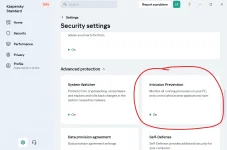
Click the Intrusion Prevention. One of the Kaspersky's best security feature.
3.
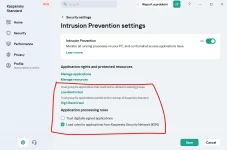
Follow this settings then click Save
4.
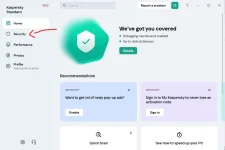
Go back to Home Tab then click the Security tab
5.
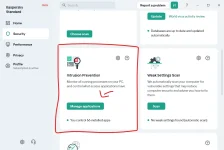
Click Manage applications
6.
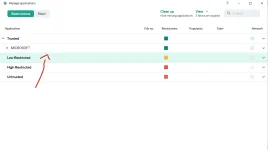
Right click the Low Restricted then click Details and rules
7.
Then go to Rights tab and follow these settings. You can enable the Log events if you want.
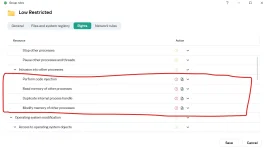
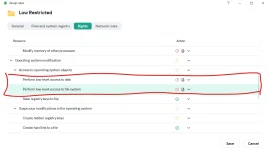
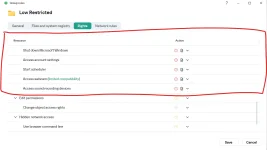
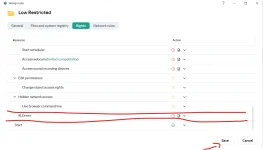
Don't forget to click Save.
8.
KSN is also one of its best feature. You will get the latest malware detections in Realtime (As long as you're connected to the Internet) unlike waiting for hours for signature updates. I always recommend to Turn it on.
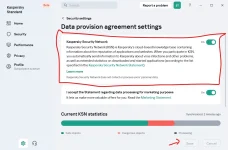
Then click Save
That's it! You just made your Kaspersky AV a little stronger against malware. If you have any questions, just let me know. Thank you.
Pero yung mga Kaspersky users na hindi mahilig sa mga cracked at gusto ng Maximum protection, just let me know para gawin ko sa other discussion.
Let's begin
1.
I used the beta version. Pero it doesn't matter kasi almost same lang sila. In Home tab, Click the settings at the lower left corner.
2.
Click the Intrusion Prevention. One of the Kaspersky's best security feature.
3.
Follow this settings then click Save
4.
Go back to Home Tab then click the Security tab
5.
Click Manage applications
6.
Right click the Low Restricted then click Details and rules
7.
Then go to Rights tab and follow these settings. You can enable the Log events if you want.
Don't forget to click Save.
8.
KSN is also one of its best feature. You will get the latest malware detections in Realtime (As long as you're connected to the Internet) unlike waiting for hours for signature updates. I always recommend to Turn it on.
Then click Save
That's it! You just made your Kaspersky AV a little stronger against malware. If you have any questions, just let me know. Thank you.

