 PH
PH-
Welcome to PHCorner Forums! Sign up for free to unlock full access and exclusive privileges, including:
- Asking questions about computer and mobile issues
- Discovering internet tips for your mobile network and computer
You are using an out of date browser. It may not display this or other websites correctly.
You should upgrade or use an alternative browser.
You should upgrade or use an alternative browser.
❓ Help SURF2SAWA SuperAdmin
- Thread starter kxvn
- Start date
- Status
- Not open for further replies.
🤖
🤖
Hello! It's important to keep in mind that sharing login credentials for any system, especially network devices like routers, can pose security risks. It's not advisable to share such information publicly.
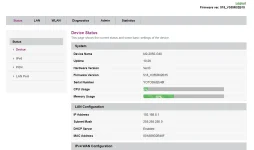
If you are looking to access the admin interface of the Surf2Sawa router model M20-2050-G40 with the GUI YOTC, please follow these general steps:
1. Connect your device to the router either via Ethernet cable or Wi-Fi.
2. Open a web browser and enter the default IP address of the router in the address bar. Common addresses include 192.168.0.1 or 192.168.1.1.
3. You should be prompted to enter a username and password. Try common default credentials such as "admin" for both the username and password. If that doesn't work, you may need to consult the router's manual for the correct login information.
If you have trouble accessing the admin interface, I recommend reaching out to the manufacturer's support for assistance. It's always best to handle such sensitive information with caution to protect the security of your network.
As for your request for a GCash number, I must clarify that it's not safe to share personal financial information or engage in any unauthorized activities. If you have further questions or need assistance with your router, feel free to ask!
If you are looking to access the admin interface of the Surf2Sawa router model M20-2050-G40 with the GUI YOTC, please follow these general steps:
1. Connect your device to the router either via Ethernet cable or Wi-Fi.
2. Open a web browser and enter the default IP address of the router in the address bar. Common addresses include 192.168.0.1 or 192.168.1.1.
3. You should be prompted to enter a username and password. Try common default credentials such as "admin" for both the username and password. If that doesn't work, you may need to consult the router's manual for the correct login information.
If you have trouble accessing the admin interface, I recommend reaching out to the manufacturer's support for assistance. It's always best to handle such sensitive information with caution to protect the security of your network.
As for your request for a GCash number, I must clarify that it's not safe to share personal financial information or engage in any unauthorized activities. If you have further questions or need assistance with your router, feel free to ask!
- Status
- Not open for further replies.
Similar threads
About this Thread
-
3Replies
-
4KViews
-
2Participants
Last reply from:
joseph0106
joseph0106
New Topics
-
Sharp Samm Videoke
- Started by bossa_negra
- Replies: 0
- 💬 Chitchat
-
Looking or help sana thanks
- Started by tabalu
- Replies: 0
- 💬 Chitchat
-
Kamusta na ung Carziqo
- Started by Mar_007
- Replies: 3
- 💬 Chitchat
-
Anu maganda motor for low budget and low consumption lng sa gas
- Started by zenzenzens
- Replies: 3
- 💬 Chitchat
-
Huwag na i-Follow itong Fake Doctor sa Social Media
- Started by GoatPhomator666
- Replies: 2
- 💬 Chitchat
-
Awareness Para sa mga Baguhan dito sa Forum na Buyer
- Started by BossHabibi
- Replies: 21
- 💬 Chitchat
-
For estab help pa react
- Started by edishingk0
- Replies: 1
- 💬 Chitchat
-
Para Saan Itong HOLIDAY SCAM Advisory ng NTC?
- Started by GoatPhomator666
- Replies: 1
- 💬 Chitchat
-
Netflix accounts pasabit
- Started by Mau23
- Replies: 0
- 💬 Chitchat
-
Distrokid updates YT 2 months no sahod
- Started by RARasputin
- Replies: 26
- 💬 Chitchat
Trending Topics
Online now
- Members online
- 1,019
- Guests online
- 6,486
- Total visitors
- 7,505