 PH
PH-
Welcome to PHCorner Forums! Sign up for free to unlock full access and exclusive privileges, including:
- Asking questions about computer and mobile issues
- Discovering internet tips for your mobile network and computer
You are using an out of date browser. It may not display this or other websites correctly.
You should upgrade or use an alternative browser.
You should upgrade or use an alternative browser.
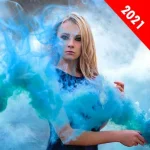
❓ Help PHOTO MAKE ALIVE EFFECTS
🤖
🤖
Hello! To achieve the effect of moving the blue smoke in a photo while keeping the person still, you can use photo editing software like Adobe Photoshop or Adobe After Effects. Here's a general guide on how to create this effect:
1. Open your photo in the editing software.
2. Use the selection tool to separate the blue smoke from the rest of the image. You can use the pen tool for more precise selection.
3. Once you have the blue smoke selected, duplicate the layer to work on it separately.
4. Apply a motion blur filter to the duplicated layer to create the effect of movement. Adjust the angle and distance of the blur to make it look like the smoke is moving.
5. You can also experiment with other filters or effects to enhance the movement of the smoke, such as adding a slight warp effect or using the liquify tool to distort the shape.
6. Once you are satisfied with the movement effect of the smoke, you can blend it back into the original image.
7. To ensure that the person in the photo remains still, you can use layer masks to hide the moving smoke from overlapping the person.
Remember to practice and experiment with different techniques to achieve the desired effect. Feel free to ask if you have any specific questions or need further assistance!
1. Open your photo in the editing software.
2. Use the selection tool to separate the blue smoke from the rest of the image. You can use the pen tool for more precise selection.
3. Once you have the blue smoke selected, duplicate the layer to work on it separately.
4. Apply a motion blur filter to the duplicated layer to create the effect of movement. Adjust the angle and distance of the blur to make it look like the smoke is moving.
5. You can also experiment with other filters or effects to enhance the movement of the smoke, such as adding a slight warp effect or using the liquify tool to distort the shape.
6. Once you are satisfied with the movement effect of the smoke, you can blend it back into the original image.
7. To ensure that the person in the photo remains still, you can use layer masks to hide the moving smoke from overlapping the person.
Remember to practice and experiment with different techniques to achieve the desired effect. Feel free to ask if you have any specific questions or need further assistance!
Sige po check ko po.may app to e. nakalimutan ko lang shemay
You do not have permission to view the full content of this post. Log in or register now.
eto ata yun boss. check mo sa ps
Hindi ko siya magets doon boss hindi ko makita hehemay app to e. nakalimutan ko lang shemay
You do not have permission to view the full content of this post. Log in or register now.
eto ata yun boss. check mo sa ps
panong d makita bossing ?Sige po check ko po.
Hindi ko siya magets doon boss hindi ko makita hehe
ung sa pag gawa ng effect niya.panong d makita bossing ?
ang alam ko. yung arrow. yung buntot yun yung start tapos yung dulo yun yung san papunta yung effectung sa pag gawa ng effect niya.
sige boss explore ko maya pag breaktime para makafocusang alam ko. yung arrow. yung buntot yun yung start tapos yung dulo yun yung san papunta yung effect
wala hindi ko magawa boss try ko nalang mag youtube mamaya.ang alam ko. yung arrow. yung buntot yun yung start tapos yung dulo yun yung san papunta yung effect
Sige tapos patong ko nalang nuh. sige boss salamat.sge boss . tip ko sayo kuha ka nalang ng gif na ganayng effects
Similar threads
-
📦 Android App 8Bit Photo Lab, Retro Effects v1.13.1 build 66 [Gold]
- Started by Rectify
- Replies: 1
-
🛠️ Tools Free ON1 Effects AI Photo Editor Lifetime (No Card Needed)
- Started by Hindisikupal
- Replies: 6
About this Thread
-
9Replies
-
660Views
-
2Participants
Last reply from:
inoako1
inoako1
New Topics
-
Ai free video generator
- Started by labrador
- Replies: 0
- 💬 Chitchat
-
Pa claim po ako ng ᑕᕼᗩTGᑭT ko may free offer po ako
- Started by Tan342
- Replies: 0
- 💬 Chitchat
-
CC Checker lang master pabulong
- Started by Deymmm3
- Replies: 1
- 💬 Chitchat
-
Nah: PH and EU Smart Kids Act is different
- Started by Freenet Man
- Replies: 0
- 💬 Chitchat
-
Nasaan section na po ba yung mga ********s at rated spg na mga videos?
- Started by Itchigo kurusaki
- Replies: 2
- 💬 Chitchat
-
Sa mga working adults dito, magkano natitira sa sahod niyo after bills?
- Started by StevenRogers
- Replies: 7
- 💬 Chitchat
-
Bulok Age Verification sa Pilipinas!
- Started by Freenet Man
- Replies: 3
- 💬 Chitchat
-
Tiktok Ai Affiliate
- Started by Johnny papa123
- Replies: 0
- 💬 Chitchat
-
Sa mga may credit card sa BDO
- Started by zerocipher
- Replies: 0
- 💬 Chitchat
-
Tiktok Affiliate for beginner.
- Started by P H C - A S T A
- Replies: 4
- 💬 Chitchat
Trending Topics
Online now
- Members online
- 482
- Guests online
- 3,428
- Total visitors
- 3,910