 PH
PHEasiest way to access advance server (root only)
Step 1
Download lucky patcher
Link:
You do not have permission to view the full content of this post. Log in or register now.
Step 2
Download custom patches on lucky patcher by tapping the three horizontal lines on the upper left.
View attachment 2951394
Step 3
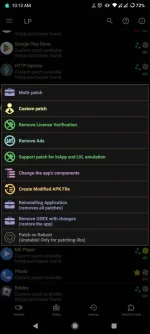
After updating the custom patches, tap the mobile legends app on lucky patcher and open menu of patches, select "custom ρá†ch"
Step 4
ρá†ch "FS267"
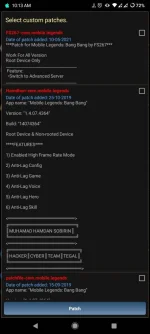
Done! You can now launch the mobile legends app, automatically you are now in advance server.
Tested on my dummy account.

Step 1
Download lucky patcher
Link:
You do not have permission to view the full content of this post. Log in or register now.
Step 2
Download custom patches on lucky patcher by tapping the three horizontal lines on the upper left.
View attachment 2951394
Step 3
After updating the custom patches, tap the mobile legends app on lucky patcher and open menu of patches, select "custom ρá†ch"
Step 4
ρá†ch "FS267"
Done! You can now launch the mobile legends app, automatically you are now in advance server.
Tested on my dummy account.