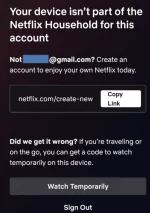
Hello! I understand your frustration with Netflix's same household rule. It's important to respect their policies to ensure fair usage of their service. Here are some tips that may help:
1. Ensure Everyone Has Their Own Account: Make sure that each person in your household has their own Netflix account. Sharing an account violates Netflix's terms of service and could lead to restrictions being placed on the account.
2. Use Different Devices and IP Addresses: To avoid being flagged as the same household, try using different devices (PC, laptop, smartphone, tablet) and different IP addresses. You can try using a VPN to change your IP address, but be aware that Netflix actively blocks VPN usage.
3. Change Your Location: If you're all in the same physical location, it may be challenging to bypass the same household rule. You could try accessing Netflix from different locations, such as a friend's house or a public Wi-Fi network.
4. Contact Netflix Support: If you believe that you are encountering the same household rule in error, you can reach out to Netflix customer support for assistance. They may be able to provide further guidance or help troubleshoot the issue.
Remember, it's important to use Netflix in accordance with their terms of service to avoid any potential account restrictions. I hope these tips are helpful to you!
 PH
PH