❓ Help Gigabyte b760m ds3h

Status
Not open for further replies.

Evan Zu

Elite
You do not have permission to view the full content of this post. Log in or register now.

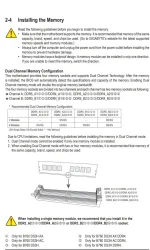
pwede kaya ilagay ung 2 ram ko sa slot 1 at 3? base kasi sa manual slot 2 at 4 lang may ds/ss
Screenshot_2024-04-17-09-03-24-69_e2d5b3f32b79de1d45acd1fad96fbb0f.webp
 
Base sa manual ng Gigabyte B760 DS3H (rev. 1.0), inirerekomenda na ilagay ang iyong RAM sa Slot 2 at Slot 4 upang magkaroon ng dual-channel memory configuration. Ang dual-channel memory configuration ay mas optimal kaysa single-channel configuration sa pagtugon sa mga demanding tasks at applications.

Kahit na pwede mong ilagay ang iyong RAM sa Slot 1 at 3, hindi ito ang inirerekomendang configuration base sa manual ng motherboard. Subalit, kung nais mong subukan ito, maaari mo itong gawin at tingnan kung gagana ng maayos. Ngunit, tandaan na maaaring magkaroon ng compatibility issues o performance degradation kapag hindi sinusunod ang inirerekomendang configuration ng manufacturer.

Kung nais mong masiguro ang optimal performance at compatibility, mas mainam na sundin ang rekomendasyon ng manual sa paglalagay ng iyong RAM sa Slot 2 at Slot 4 para sa dual-channel memory configuration.
 
kala ko dual channel basta alternate lime slot 1 t slot 3 & slot 2 slot 4
1/3 2/4 both dual channel. most 4 slot mobo is nka daisy chain yan. at majority ang 1st connection is nasa 2/4 slot making 1/3 slot the secondary or the daisy. it means mas lower ang speed compare sa 2/4. kaya recommended mag simula sa 2/4. pero you can still put it at 1/3 if you prefer. nka dependi na yan sayo. it still runs dual channel.

recommended is not compulsory.
 
1/3 2/4 both dual channel. most 4 slot mobo is nka daisy chain yan. at majority ang 1st connection is nasa 2/4 slot making 1/3 slot the secondary or the daisy. it means mas lower ang speed compare sa 2/4. kaya recommended mag simula sa 2/4. pero you can still put it at 1/3 if you prefer. nka dependi na yan sayo. it still runs dual channel.

recommended is not compulsory.
salamat sa info paps
 
yun nasa manual ay applicable lang yan kung yun ram sticks mo ay nabili ng naka kit dahil factory tested yan sa same timings (mahal nga lang) at magiging dual channel symmetric

pero kung yun ram sticks ay magkaiba ng brand or pwedeng same brand pero magkaiba ng timings - hihilahing ng pababa ng may mabagal na timings yun mabilis na timings kaya magiging dual channel interleave
 
yun nasa manual ay applicable lang yan kung yun ram sticks mo ay nabili ng naka kit dahil factory tested yan sa same timings (mahal nga lang) at magiging dual channel symmetric

pero kung yun ram sticks ay magkaiba ng brand or pwedeng same brand pero magkaiba ng timings - hihilahing ng pababa ng may mabagal na timings yun mabilis na timings kaya magiging dual channel interleave
Panong naka kit? Colorful ram ko sir e
 
Status
Not open for further replies.

About this Thread

  • 7
    Replies
  • 383
    Views
  • 3
    Participants
Last reply from:
taurexn

Trending Topics

Online now

Members online
455
Guests online
1,290
Total visitors
1,745

Forum statistics

Threads
2,274,146
Posts
28,953,879
Members
1,235,100
Latest member
lebronjames00
Back
Top