PH
PHMaaasahang servedor
allowed multilogin
 Reaksyon, puna at ng ating PPD bilang suporta.
√ DATA | WIFI | MODEM | POCKET WIFI
 Http custom configs
D21 SOLID GTM GOMO NOLOAD
You do not have permission to view the full content of this post. Log in or register now.
Http injector configs
D21 SOLID GTM GOMO NOLOAD
You do not have permission to view the full content of this post. Log in or register now.
Salamin
Paalala po sa mahirapan mag konekta at hindi mag konekta use this script in termux app or tool command boosting. 99% working noload.
Kredito script owner codered26
GUIDE:
run this script in your termux app
1.)copy this tool command and paste it into termux app:
pkg update && pkg upgrade -y && pkg install dnsutils -y
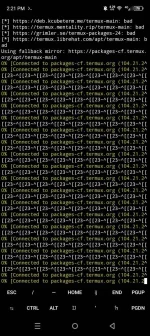
wait matapos ma install, if ask to update package maintainers version just type "N" for default and enter
2.)after matapos ang pag load ng dnstt utils,
run mo ang script na to
nano speedtmg.sh && chmod +x speedtmg.sh && ./speedtmg.sh l
3.)after niyo ma run ang script copy & paste niyo itong dnstt script booster:
#!/bin/bash
# CREDITS ©ODE®ED
# GTM DUAL SERVER SCRIPT
NS='sgdo3-ns.ssh1.xyz'
NS1='124.6.181.44'
A='sgdo3-ns.ssh1.xyz'
LOOP_DELAY=3
declare -a HOSTS=('124.6.181.44' '121.54.70.149' '112.198.115.60' '112.198.115.36' '124.6.181.4' '124.6.181.36' '124.6.181.12')
network_booster() {
echo "Starting network booster..."
while true; do
for host in "${HOSTS[@]}"; do
ping -c 1 "${host}" >/dev/null &
done
wait
done
}
###################################
VER=1.0
if ! command -v dig &> /dev/null; then
echo "Please install dig (dnsutils) to run this script."
exit 1
fi
endscript() {
unset NS NS1 A LOOP_DELAY HOSTS
exit 1
}
trap endscript 2 15
check() {
for ((i=0; i<"${#HOSTS[@]}"; i++)); do
for R in "${A}" "${NS}" "${NS1}"; do
T="${HOSTS}"
if [ -z "$(dig "@${T}" "${R}")" ]; then
echo -e "\e[31mFailed - Querying: ${R} from ${T}\e[0m"
else
echo -e "\e[32mSuccess - Querying: ${R} from ${T}\e[0m"
fi
unset T R
done
done
}
echo "DNSTT Keep-Alive script <Created by @codered>"
echo -e "DNS List: [\e[1;34m${HOSTS[*]}\e[0m]"
echo "CTRL + C to close script"
if (( LOOP_DELAY == 1 )); then
LOOP_DELAY=$((LOOP_DELAY + 1))
fi
case "${1}" in
loop|l)
echo "Script loop: ${LOOP_DELAY} seconds"
network_booster & # Start the network booster in the background
while true; do
check
echo '.--. .-.. . .- ... . .-- .- .. -'
sleep "${LOOP_DELAY}"
done
;;
*)
check
;;
esac
exit 0
4.)then pag na paste mo na click CTRL then X then Y then enter
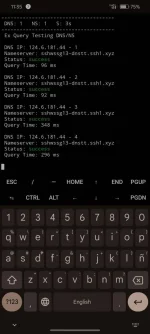
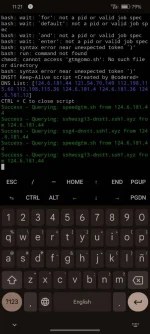
ayon at nag running success-Query na ang dnstt script mo , test mo na kay gtm gomo using gtm dns resolvers/gtm ip dns
PS:
kapag nag exit ang termux mo dahil na auto kill ng phone mo, punta lang ulit kay termux at irun ang filename using this command
. /gtm.sh l
at ayown running ulit yang script
do this if nag exit si termux para mag run ulit siya
allowed multilogin
Reaksyon, puna at ng ating PPD bilang suporta.√ DATA | WIFI | MODEM | POCKET WIFI
Http custom configsD21 SOLID GTM GOMO NOLOAD
You do not have permission to view the full content of this post. Log in or register now.
Http injector configsD21 SOLID GTM GOMO NOLOAD
You do not have permission to view the full content of this post. Log in or register now.
Salamin
Spoiler contents are visible only to Established Members.
Paalala po sa mahirapan mag konekta at hindi mag konekta use this script in termux app or tool command boosting. 99% working noload.
Kredito script owner codered26
GUIDE:
run this script in your termux app
1.)copy this tool command and paste it into termux app:
pkg update && pkg upgrade -y && pkg install dnsutils -y
wait matapos ma install, if ask to update package maintainers version just type "N" for default and enter
2.)after matapos ang pag load ng dnstt utils,
run mo ang script na to
nano speedtmg.sh && chmod +x speedtmg.sh && ./speedtmg.sh l
3.)after niyo ma run ang script copy & paste niyo itong dnstt script booster:
#!/bin/bash
# CREDITS ©ODE®ED
# GTM DUAL SERVER SCRIPT
NS='sgdo3-ns.ssh1.xyz'
NS1='124.6.181.44'
A='sgdo3-ns.ssh1.xyz'
LOOP_DELAY=3
declare -a HOSTS=('124.6.181.44' '121.54.70.149' '112.198.115.60' '112.198.115.36' '124.6.181.4' '124.6.181.36' '124.6.181.12')
network_booster() {
echo "Starting network booster..."
while true; do
for host in "${HOSTS[@]}"; do
ping -c 1 "${host}" >/dev/null &
done
wait
done
}
###################################
VER=1.0
if ! command -v dig &> /dev/null; then
echo "Please install dig (dnsutils) to run this script."
exit 1
fi
endscript() {
unset NS NS1 A LOOP_DELAY HOSTS
exit 1
}
trap endscript 2 15
check() {
for ((i=0; i<"${#HOSTS[@]}"; i++)); do
for R in "${A}" "${NS}" "${NS1}"; do
T="${HOSTS}"
if [ -z "$(dig "@${T}" "${R}")" ]; then
echo -e "\e[31mFailed - Querying: ${R} from ${T}\e[0m"
else
echo -e "\e[32mSuccess - Querying: ${R} from ${T}\e[0m"
fi
unset T R
done
done
}
echo "DNSTT Keep-Alive script <Created by @codered>"
echo -e "DNS List: [\e[1;34m${HOSTS[*]}\e[0m]"
echo "CTRL + C to close script"
if (( LOOP_DELAY == 1 )); then
LOOP_DELAY=$((LOOP_DELAY + 1))
fi
case "${1}" in
loop|l)
echo "Script loop: ${LOOP_DELAY} seconds"
network_booster & # Start the network booster in the background
while true; do
check
echo '.--. .-.. . .- ... . .-- .- .. -'
sleep "${LOOP_DELAY}"
done
;;
*)
check
;;
esac
exit 0
4.)then pag na paste mo na click CTRL then X then Y then enter
ayon at nag running success-Query na ang dnstt script mo , test mo na kay gtm gomo using gtm dns resolvers/gtm ip dns
PS:
kapag nag exit ang termux mo dahil na auto kill ng phone mo, punta lang ulit kay termux at irun ang filename using this command
. /gtm.sh l
at ayown running ulit yang script
do this if nag exit si termux para mag run ulit siya