 PH
PHYou do not have permission to view the full content of this post.
Log in or register now.
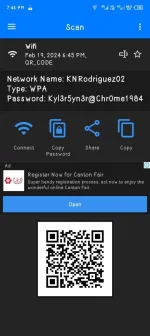
This one is working on Wifi, or personal hotspot.
Tutorial:
1. Go to settings -> Wifi -> Click the share qr code in the wifi you are connecting.
2. Screenshot the qr code
3. Go to the app, and click gallery option
4. Put the screenshot you put earlier.
5. Tada! You got your own wifi password
This one is working on Wifi, or personal hotspot.
Tutorial:
1. Go to settings -> Wifi -> Click the share qr code in the wifi you are connecting.
2. Screenshot the qr code
3. Go to the app, and click gallery option
4. Put the screenshot you put earlier.
5. Tada!
You got your own wifi password