 PH
PHIsang pindot ng Download, Downloaded lahat ng sa pinili mong courses.
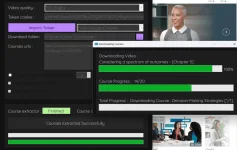
Tutorial:
Step 1: Extract the LinkedIn downloader: To see picture (You do not have permission to view the full content of this post. Log in or register now.)
Step 2: To get the Token Cookie
a. Punta sa Website ng LinkedIn
b. Right Click then Inspect Element: To see picture (You do not have permission to view the full content of this post. Log in or register now.)
c. sa tabi ng network may double arrow ( >> ): To see picture (You do not have permission to view the full content of this post. Log in or register now.)
d. Then select Application
e. Copy the Token: To see picture (You do not have permission to view the full content of this post. Log in or register now.)
f. Double click yung value ng " Li_At " then copy then paste sa Token Cookie
Step 3: Download Folder ( Choice mo na kung saan mo gusto masave ang ido-download mo
Step 4: Copy mo yung url ng LinkedIn courses na need mo
Step 5: Start Download!
Downloader:
You do not have permission to view the full content of this post. Log in or register now.
