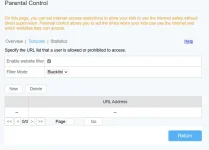
pede mo ba ko turuan pano ilagay ang youtube sa ganitong format http://[FE00::1]/test.html
I understand that you're looking to block YouTube by using a specific URL format like http://[FE00::1]/test.html. To achieve this on your Globe router, you can follow these general steps:
1. Access your Globe router's settings by entering its IP address into a web browser. The default IP address is often 192.168.254.254, but you can confirm this in the router's manual or by contacting Globe customer support.
2. Log in to your router using the admin credentials. If you haven't changed them, the default username and password are typically admin/admin or admin/password.
3. Look for the parental control or website blocking feature in the router settings. It might be under a section like Security, Firewall, or Parental Control.
4. Add a new rule to block specific websites. Enter the URL format http://[FE00::1]/test.html as the website you want to block. Save the changes.
5. Test the blocking by trying to access YouTube or the specific URL on a device connected to your network. It should be blocked if the rule is set up correctly.
Please note that the exact steps may vary depending on your router model and firmware version. If you encounter any difficulties, refer to your router's manual or contact Globe customer support for assistance.
 PH
PH