📦 Android App UPDATED YøùTùbé Vanced & YøùTùbé Revance with MicroG update (Buffering Bug FIX)

VCODE

Contributor
IMG_3047.png

YouTube ReVanced Mod APK is a modified version that includes features such as Background Playback, Ad-Free content, SponsorBlock, Return YouTube Dislike, and others.
You do not have permission to view the full content of this post. Log in or register now.
 
ano ginawa mo lods, para di mag direct sa dontkillmyapps
Settings > App management > Auto-start management > Vanced microG option should be allowed.

Go to Phone Settings > App Management > App Launch > Find Vanced MicroG and tap it (Which turns it on and done.

try this

Solution: For infinix user you need to go to app management and locate micro g and you can see additional setting their. Open it and add an account then after signing in/logging in your google account. You go to youtube/revanced and it will work now.

Pasubok nalang yan nga solution po baka maging okay po😊
 
yes lods y6p
Try mo Po tong method na to baka Nagana Po Sayo Kasi..

The first method to Remove Google Account from MicroG:
Go to Settings -> Apps -> Search for MicroG -> Storage and Cache -> Clear Storage.
Head back to the MicroG app and try to add a Google account.
Tap on “Sign in” -> Accounts -> Add Account. This will lead you to MicroG, where you can add your Google Account with credentials.
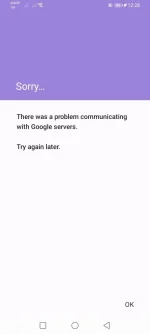
If you try to log in to your Google or Gmail account using MicroG again and get the error “There was a problem communicating with Google servers. Try again later,” you have to remove the Google account from your phone’s account settings. The guide is below.

A second method to remove MicroG accounts from Phone Accounts:
Go to Settings -> Password and Accounts -> MicroG -> Remove Account.
Return to the app where you were trying to log in using your Google account.
Tap on “Sign in” -> Accounts -> Add Account. This will lead you to MicroG, where you can add your Google Account with its credentials.
I hope these steps helped you fix the ‘Problem Communicating with Google Servers’ error while adding a Google account.
 

About this Thread

  • 28
    Replies
  • 4K
    Views
  • 20
    Participants
Last reply from:
enoy_30

Online now

Members online
994
Guests online
1,177
Total visitors
2,171

Forum statistics

Threads
2,273,112
Posts
28,947,677
Members
1,235,633
Latest member
ryumeijin
Back
Top