 PH
PHFollow-up ko lang doon sa gustong gumamit ng gpt4free, bukod sa tips sa first post, be sure to read instructions sa github site for their other uses. Yung free options nya ay nakadepende sa direct usage from site providers, so yung ilan dyan ay kailangang kunan ng har files para magamit yung "Web API" nila. Create the har files and paste them at "har_and_cookies" folder assuming yung gpt4free git (pack) ang gamit ninyo sa main site para mas madali. The more providers with har files, mas matagal at marami kayong options to use your oreferred models sa gui or api.
1. Download the zip code main branch or sa release section
2. Extract nyo sa C drive, rename it as "g4f" or "gpt4free"
3. Open cmd in that folder, create and environment, activate and install requirements
4. Kung gusto nyo yung gui, just type "g4f gui", then open the client at You do not have permission to view the full content of this post. Log in or register now.
5. Kung gusto nyong gamiting yung "api" type "g4f api", then set the api base of your client to You do not have permission to view the full content of this post. Log in or register now. , no api key needed; check nyo yung available models sa You do not have permission to view the full content of this post. Log in or register now..
Gamitin nyo sa You do not have permission to view the full content of this post. Log in or register now. or sa NextChat or yung may builtin plugin sa loob na N3xtChat
Mas versatile ang ChatGPTBox dahil pwede kayong mag-create ng kahit ilang api sa inyong preferred custom models. I-save nyo lang isa-sa sa UI. Kung ano lang nakalagay dyan sa models, yon ang gamitin ninyo para sure na gagana.
Ang gamit kong base url or endpoint dyan is You do not have permission to view the full content of this post. Log in or register now.. no api key needed = leave it blank.
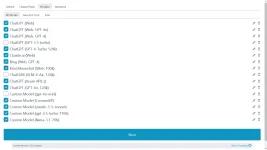
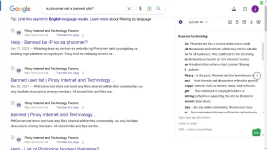
Llama-3.1-70b ang gamit ko sa ChatGPTBox, using Groq har file as example.
Sobrang dami ng supported providers nyan from common GPT/LLM, image and vision models. Be sure may accounts kayo sa lahat na nanghihingi ng login (free or ρáíd) for the har files or set nyo sa GUI sa settings sa ilan. Maasikasong gamitn pero pag na-setup nyo na ay mostly free na dahil nagpatong-patong yung api usage sa isang models, atbp. Meron din dyang patay due to takedown notice.
Bisitahin nyo rin yung issues section sa github for other complaints you want to refer to the authors para maayos nila yung app or look for issues you are encountering.
Yung development site ng chatGPTBox chrome addon is You do not have permission to view the full content of this post. Log in or register now..
Kung marami kayong api keys (free or ρáíd) , you can it in chatGPTBox by using You do not have permission to view the full content of this post. Log in or register now. or use you local AI apis din.
Nandyan naman yung guides nila.
1. Download the zip code main branch or sa release section
2. Extract nyo sa C drive, rename it as "g4f" or "gpt4free"
3. Open cmd in that folder, create and environment, activate and install requirements
4. Kung gusto nyo yung gui, just type "g4f gui", then open the client at You do not have permission to view the full content of this post. Log in or register now.
5. Kung gusto nyong gamiting yung "api" type "g4f api", then set the api base of your client to You do not have permission to view the full content of this post. Log in or register now. , no api key needed; check nyo yung available models sa You do not have permission to view the full content of this post. Log in or register now..
Gamitin nyo sa You do not have permission to view the full content of this post. Log in or register now. or sa NextChat or yung may builtin plugin sa loob na N3xtChat
Mas versatile ang ChatGPTBox dahil pwede kayong mag-create ng kahit ilang api sa inyong preferred custom models. I-save nyo lang isa-sa sa UI. Kung ano lang nakalagay dyan sa models, yon ang gamitin ninyo para sure na gagana.
Ang gamit kong base url or endpoint dyan is You do not have permission to view the full content of this post. Log in or register now.. no api key needed = leave it blank.
Llama-3.1-70b ang gamit ko sa ChatGPTBox, using Groq har file as example.
Sobrang dami ng supported providers nyan from common GPT/LLM, image and vision models. Be sure may accounts kayo sa lahat na nanghihingi ng login (free or ρáíd) for the har files or set nyo sa GUI sa settings sa ilan. Maasikasong gamitn pero pag na-setup nyo na ay mostly free na dahil nagpatong-patong yung api usage sa isang models, atbp. Meron din dyang patay due to takedown notice.
Bisitahin nyo rin yung issues section sa github for other complaints you want to refer to the authors para maayos nila yung app or look for issues you are encountering.
Yung development site ng chatGPTBox chrome addon is You do not have permission to view the full content of this post. Log in or register now..
Kung marami kayong api keys (free or ρáíd) , you can it in chatGPTBox by using You do not have permission to view the full content of this post. Log in or register now. or use you local AI apis din.
Nandyan naman yung guides nila.