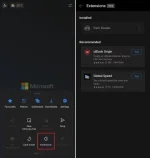
👨‍🏫 Tutorial HOW TO ADD EXTENSION ON MICROSOFT EDGE MOBILE BROWSER

VCODE

Forum Contributor
IMG_2825.webp

STEPS :-


1. install edge beta/Canary/dev version
2. go to edge://flags in search bar
3. search for edge "ANDROID EXTENSION" flag
4. turn to enable and restart edge browser
5. go to toolbar option and click all menu
6. click on extension option and install extensions what is available and you want.


About this Thread

  • 6
    Replies
  • 841
    Views
  • 5
    Participants
Last reply from:
VCODE

Trending Topics

Online now

Members online
435
Guests online
1,906
Total visitors
2,341

Forum statistics

Threads
2,314,536
Posts
29,178,729
Members
1,184,188
Latest member
jose_juan_113
Back
Top