 PH
PHrainych_ran
Contributor
You do not have permission to view the full content of this post. Log in or register now.Step By Step Guide:1) Open the provided link (it's an open-source app, so there's no need to worry).Download this : You do not have permission to view the full content of this post. Log in or register now. 2) Download the xManager app APK from the website and install it. 3) Once the software has been installed, grant all necessary permissions. 4) Launch the xManager app and select what you need. 5) Click on "Latest Release" and then "Download." 6) When the download is finished, select "Install Now." 7) Launch the newly installed Spotify app and sign in with your existing account or create a new one. 8) Initially, it will indicate that you do not have a Prémíùm plan. 9) Simply exit the application and then "Force Stop" it. 10) Reopen the Spotify app after the Force Stop is complete. 11) At this point, Spotify Prémíùm will be available to you! 12) If it doesn't indicate that you have a Prémíùm subscription, don't be concerned; you will still enjoy ad-free service and unlimited skips. SEND SCREENSHOT SA MGA NAKA PREMIUM 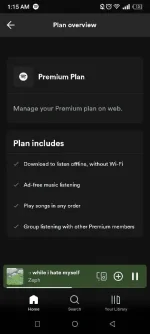 Big Credits : Team XManager |

