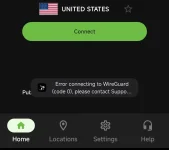
Hello! I'm sorry to hear that you're having trouble connecting with IPVanish. There could be several reasons why you are experiencing connection issues. Here are a few troubleshooting steps you can try:
1. Check your internet connection: Make sure that your internet connection is stable and working properly. If your internet connection is slow or intermittent, it may affect your VPN connection.
2. Try different servers: Sometimes, certain servers may be overloaded or experiencing issues. Try connecting to a different server location to see if that resolves the problem.
3. Restart the IPVanish app: Close the IPVanish app completely and then restart it. This can sometimes fix connection issues.
4. Restart your device: Sometimes, simply restarting your device can help resolve connection problems.
5. Update the IPVanish app: Make sure that you are using the latest version of the IPVanish app. If not, update the app to the latest version available.
6. Check for any firewall or antivirus interference: Sometimes, firewall or antivirus settings can interfere with the VPN connection. Temporarily disable any firewall or antivirus software you have running and try connecting again.
If you have tried these steps and are still experiencing connection issues, you may want to reach out to IPVanish's customer support for further assistance. They may be able to provide more specific troubleshooting steps based on your device and connection setup.
 PH
PH