 PH
PH-
Welcome to PHCorner Forums! Sign up for free to unlock full access and exclusive privileges, including:
- Asking questions about computer and mobile issues
- Discovering internet tips for your mobile network and computer
You are using an out of date browser. It may not display this or other websites correctly.
You should upgrade or use an alternative browser.
You should upgrade or use an alternative browser.
🤖
🤖
Para ma-center ang text nang hindi naaapektuhan ang background image, maaari mong subukan ang mga sumusunod:
1. Gumamit ng
2. Gumamit ng
Subukan mo itong mga halimbawa at i-adjust ang parameters base sa iyong layout requirements. Sana makatulong ito sa pag-cecenter ng text sa iyong background image.
1. Gumamit ng
RelativeLayout:
XML:
<RelativeLayout xmlns:android="http://schemas.android.com/apk/res/android"
    android:layout_width="match_parent"
    android:layout_height="match_parent">

    <ImageView
        android:layout_width="match_parent"
        android:layout_height="match_parent"
        android:src="@drawable/background_image"
        android:scaleType="centerCrop" /> <!-- pwedeng adjust depende sa needs mo -->

    <TextView
        android:layout_width="wrap_content"
        android:layout_height="wrap_content"
        android:layout_centerInParent="true"
        android:text="Naka-center na text"
        android:textColor="#FFFFFF" />
</RelativeLayout>
2. Gumamit ng
ConstraintLayout:
XML:
<androidx.constraintlayout.widget.ConstraintLayout xmlns:android="http://schemas.android.com/apk/res/android"
    xmlns:app="http://schemas.android.com/apk/res-auto"
    android:layout_width="match_parent"
    android:layout_height="match_parent">

    <ImageView
        android:layout_width="match_parent"
        android:layout_height="match_parent"
        android:src="@drawable/background_image"
        android:scaleType="centerCrop"
        app:layout_constraintTop_toTopOf="parent"
        app:layout_constraintBottom_toBottomOf="parent"
        app:layout_constraintStart_toStartOf="parent"
        app:layout_constraintEnd_toEndOf="parent" />

    <TextView
        android:layout_width="wrap_content"
        android:layout_height="wrap_content"
        android:text="Naka-center na text"
        android:textColor="#FFFFFF"
        app:layout_constraintTop_toTopOf="parent"
        app:layout_constraintBottom_toBottomOf="parent"
        app:layout_constraintStart_toStartOf="parent"
        app:layout_constraintEnd_toEndOf="parent" />
</androidx.constraintlayout.widget.ConstraintLayout>
Subukan mo itong mga halimbawa at i-adjust ang parameters base sa iyong layout requirements. Sana makatulong ito sa pag-cecenter ng text sa iyong background image.
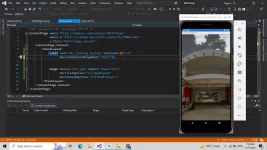
<?xml version="1.0" encoding="utf-8" ?>
<ContentPage xmlns="You do not have permission to view the full content of this post. Log in or register now."
xmlns:x="You do not have permission to view the full content of this post. Log in or register now."
x:Class="Myfirstapp.Jerson">
<ContentPage.Content>
<StackLayout>
<Image Source="mcc.jpg" Aspect="AspectFill"
VerticalOptions="FillAndExpand"
HorizontalOptions="FillAndExpand"/>
<Label Text="Mcc Parking System" TextColor="red"
VerticalOptions="FillAndExpand"
HorizontalOptions="EndAndExpand" />
</StackLayout>
</ContentPage.Content>
</ContentPage>
Ito Yung code paki center Ng label
<ContentPage xmlns="You do not have permission to view the full content of this post. Log in or register now."
xmlns:x="You do not have permission to view the full content of this post. Log in or register now."
x:Class="Myfirstapp.Jerson">
<ContentPage.Content>
<StackLayout>
<Image Source="mcc.jpg" Aspect="AspectFill"
VerticalOptions="FillAndExpand"
HorizontalOptions="FillAndExpand"/>
<Label Text="Mcc Parking System" TextColor="red"
VerticalOptions="FillAndExpand"
HorizontalOptions="EndAndExpand" />
</StackLayout>
</ContentPage.Content>
</ContentPage>
Ito Yung code paki center Ng label
Oki na poCode:<Label Text="Mcc Parking System" TextColor="red" VerticalOptions="FillAndExpand" HorizontalTextAlignment="Center" />
Patry po nito
Similar threads
-
👨🏫 Tutorial Kallaway - Short-Form Hooks Workshop Download
- Started by WSODownload
- Replies: 0
-
💡 Trivia Awareness Para sa mga Baguhan dito sa Forum na Buyer
- Started by BossHabibi
- Replies: 57
-
📦 Android App NEW APP: NOT FOR EVERYONE (FREE PREMIUM)
- Started by PrinceChriz1302
- Replies: 2
-
🛠️ Tools Passive Income Docker for MacOS
- Started by Jck-Frost
- Replies: 0
-
🖥️ PC App PC Optimizer for your Windows(SAFE sa mga hindi Expert)
- Started by MikeCONCEPT
- Replies: 1
About this Thread
-
4Replies
-
596Views
-
2Participants
Last reply from:
If Else
If Else
New Topics
-
How to be a computer programmer what to learn first??
- Started by No liabilities
- Replies: 1
- 💻 Coding & Programming
-
Any Simple but Useful App Ideas to Develop?
- Started by tnt546
- Replies: 2
- 💻 Coding & Programming
-
Test your app now if vulnerable ka sa php2shell
- Started by Ace Valentine
- Replies: 2
- 💻 Coding & Programming
-
Naka-Node.js ka? Update to 22.23.4 / 24.22.1 / 26.12.1 (Security Fix)
- Started by 4 0 4
- Replies: 2
- 💻 Coding & Programming
-
Peddlr Kankolek API - please help
- Started by nesty24
- Replies: 0
- 💻 Coding & Programming
-
Cryst@l R3port Designer
- Started by Porky Chao Fan
- Replies: 0
- 💻 Coding & Programming
-
-
Nag-fail ang Backup Pero Di Mo Alam? Try Boop (Self-Hosted Alerts)
- Started by 4 0 4
- Replies: 2
- 💻 Coding & Programming
-
Looking ako na marunong gumawa ng auto login and claim rewards
- Started by AdoboKid
- Replies: 6
- 💻 Coding & Programming
-
Trending Topics
Online now
- Members online
- 547
- Guests online
- 7,401
- Total visitors
- 7,948