 PH
PH-
Welcome to PHCorner Forums! Sign up for free to unlock full access and exclusive privileges, including:
- Asking questions about computer and mobile issues
- Discovering internet tips for your mobile network and computer
You are using an out of date browser. It may not display this or other websites correctly.
You should upgrade or use an alternative browser.
You should upgrade or use an alternative browser.
🤖
🤖
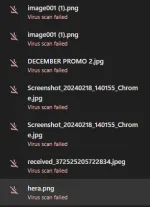
Hello! I'm sorry to hear that you're having trouble downloading files. It can be frustrating when you've tried various methods suggested online and none of them work. Let's try to troubleshoot this issue together.
1. Check Your Internet Connection: Make sure that you have a stable internet connection. Sometimes, a slow or intermittent connection can cause download problems.
2. Clear Browser Cache: Clear your browser's cache and cookies. Sometimes, a cluttered cache can cause download issues.
3. Disable Browser Extensions: Some browser extensions can interfere with downloads. Try disabling all extensions and then attempt to download a file.
4. Try a Different Browser: If you're using one browser, try downloading the file using a different browser. This can help determine if the issue is browser-specific.
5. Disable Antivirus/Firewall: Your antivirus software or firewall may be blocking the download. Temporarily disable them and try again.
6. Download Manager: Consider using a download manager like Internet Download Manager (IDM) to see if it helps with your download issues.
7. Run Malware Scans: Your device may be infected with malware that is causing download problems. Run a full antivirus scan to check for any threats.
8. Check File Size/Type: Sometimes, the file you are trying to download may be too large or in a format that your browser doesn’t support. Ensure the file size is within limits and the format is supported.
9. Update Browser: Make sure your browser is up to date. An outdated browser can sometimes have issues with downloading files.
If none of these solutions work, provide more details about the issue you are facing, such as the specific error message you receive when trying to download a file. This information can help in diagnosing the problem more accurately.
1. Check Your Internet Connection: Make sure that you have a stable internet connection. Sometimes, a slow or intermittent connection can cause download problems.
2. Clear Browser Cache: Clear your browser's cache and cookies. Sometimes, a cluttered cache can cause download issues.
3. Disable Browser Extensions: Some browser extensions can interfere with downloads. Try disabling all extensions and then attempt to download a file.
4. Try a Different Browser: If you're using one browser, try downloading the file using a different browser. This can help determine if the issue is browser-specific.
5. Disable Antivirus/Firewall: Your antivirus software or firewall may be blocking the download. Temporarily disable them and try again.
6. Download Manager: Consider using a download manager like Internet Download Manager (IDM) to see if it helps with your download issues.
7. Run Malware Scans: Your device may be infected with malware that is causing download problems. Run a full antivirus scan to check for any threats.
8. Check File Size/Type: Sometimes, the file you are trying to download may be too large or in a format that your browser doesn’t support. Ensure the file size is within limits and the format is supported.
9. Update Browser: Make sure your browser is up to date. An outdated browser can sometimes have issues with downloading files.
If none of these solutions work, provide more details about the issue you are facing, such as the specific error message you receive when trying to download a file. This information can help in diagnosing the problem more accurately.
About this Thread
-
1Replies
-
562Views
-
1Participants
Last reply from:
Unknown user
Unknown user
New Topics
-
Help b315s-938 po mga boss
- Started by thosamad12
- Replies: 0
- ❓ Internet Questions
-
Piso wifi no hulog
- Started by Grovey3
- Replies: 0
- ❓ Internet Questions
-
Asking kung unli ba talaga ang pldt prepaid fiber?
- Started by Joshua0821
- Replies: 1
- ❓ Internet Questions
-
Looking for outdoor Ethernet cable
- Started by rjackdaw
- Replies: 0
- ❓ Internet Questions
-
GlobeatHome HG6145D2 as extender
- Started by mac_dah
- Replies: 0
- ❓ Internet Questions
-
Paano ba magkaron ng million views sa blue app?
- Started by renvin1215
- Replies: 0
- ❓ Internet Questions
-
SMART 5G MAX Home Wifi: Post ρáíd
- Started by Slapsoil69
- Replies: 0
- ❓ Internet Questions
-
PISOFI COINSLOT ISSUE
- Started by Exclamatory
- Replies: 1
- ❓ Internet Questions
-
Video editor na meron ganitong feature content. Trending sa fbs and ads
- Started by Einra
- Replies: 0
- ❓ Internet Questions
-
Paano mang brick ng router
- Started by onegig
- Replies: 8
- ❓ Internet Questions
Trending Topics
Online now
- Members online
- 415
- Guests online
- 2,667
- Total visitors
- 3,082