 PH
PHNOTE: THIS IS ONLY FOR INTEL EQUIPPED SYSTEMS and RESULTS MAY VARY.
NOTE: THIS TOOL CAN BE ALSO USED FOR DESKTOP
NOTE: COMBINE WITH COOLING SYSTEM CLEANING AND THERMAL PASTE REPLACING FOR BETTER RESULTS
Your Laptop seems heating up with minimal task?
Let me introduce to you, You do not have permission to view the full content of this post. Log in or register now.! by UncleWebb.
A small sized overclocking/undervolting tool for Intel CPU`s.
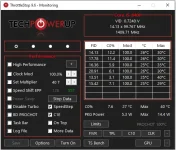
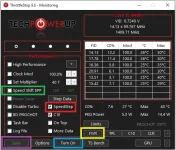
1. If you`re CPU is a Skylake and Later (6th Gen and Later), Enable Speed Shift EPP and disable SpeedStep.
2. Don`t forget to SAVE and press TURN ON.
3. Now to Undervolt, go to FIVR.
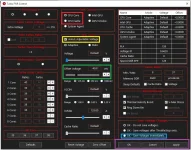
UNDERVOLTING PROCESS
1. THIS TWO, are the only one we will be using. Lets edit on the CPU CORE first.
2. Check "UNLOCK ADJUSTABLE VOLTAGE" and Set "OFFSET VOLTAGE" to "-50.0 mV" first. Set the same on CPU CACHE.
3. Check "SAVE VOLTAGES IMMEDIATELY" and APPLY then OK.
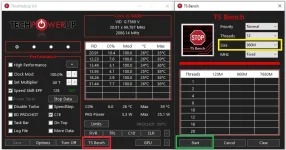
LETS CHECK IF THE UNDERVOLT IS STABLE
1. Click TS Bench
2. Set Size to your liking (I prefer 960M) and Start. Depending on your CPU, this will take time.
3. Now, if the bench finished, that means the Undervolt is stable.
4. This time, you can push the undervolt by -10mV and retest it. Repeat this process until you hit instability then change it back to the stable value.
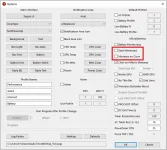
Keep in mind that the undervolt wont apply unless the app is running. So to make the app run when windows startup, go to Options and check the following.
2. At the far right of the window, click "Create Task"
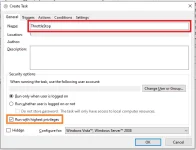
3. Set the Task Name to anything that you want and follow the highlighted items.
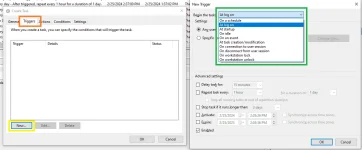
You can set the "Trigger" to either "at log on" or "at startup"
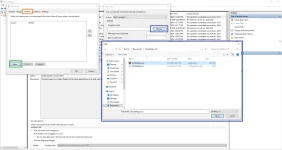
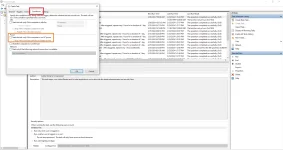
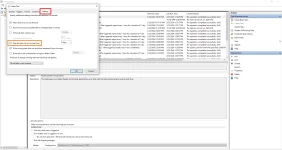
4. and your Done.

I hope this tutorial help some of those who have thermal problems. Refer to this You do not have permission to view the full content of this post. Log in or register now. for an indepth Guide.
EDITS: Grammar and Corrections
NOTE: THIS TOOL CAN BE ALSO USED FOR DESKTOP
NOTE: COMBINE WITH COOLING SYSTEM CLEANING AND THERMAL PASTE REPLACING FOR BETTER RESULTS
Your Laptop seems heating up with minimal task?
Let me introduce to you, You do not have permission to view the full content of this post. Log in or register now.! by UncleWebb.
A small sized overclocking/undervolting tool for Intel CPU`s.
NOTE: Too much "UNDERVOLTING" can cause system instability like Crashes and BSOD`s.
1. If you`re CPU is a Skylake and Later (6th Gen and Later), Enable Speed Shift EPP and disable SpeedStep.
NOTE: DONT FORGET TO ENABLE SPEED SHIFT AT TPL WINDOW AFTER ENABLING SPEED SHIFT EPP. SET THE VALUES TO THE DEFAULT "MIN" AND "MAX".
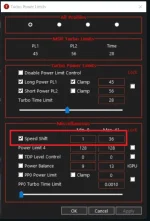
2. Don`t forget to SAVE and press TURN ON.3. Now to Undervolt, go to FIVR.
UNDERVOLTING PROCESS
1. THIS TWO, are the only one we will be using. Lets edit on the CPU CORE first.
2. Check "UNLOCK ADJUSTABLE VOLTAGE" and Set "OFFSET VOLTAGE" to "-50.0 mV" first. Set the same on CPU CACHE.
3. Check "SAVE VOLTAGES IMMEDIATELY" and APPLY then OK.
LETS CHECK IF THE UNDERVOLT IS STABLE
1. Click TS Bench
2. Set Size to your liking (I prefer 960M) and Start. Depending on your CPU, this will take time.
3. Now, if the bench finished, that means the Undervolt is stable.
4. This time, you can push the undervolt by -10mV and retest it. Repeat this process until you hit instability then change it back to the stable value.
Keep in mind that the undervolt wont apply unless the app is running. So to make the app run when windows startup, go to Options and check the following.
If the app still doesn`t run at windows startup, follow this one. Leave the startup settings at the app checked.
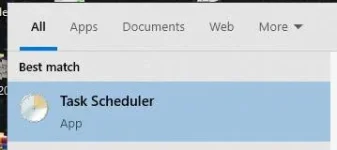
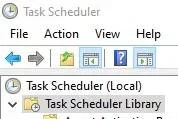
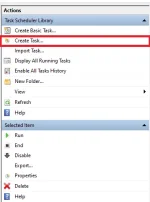
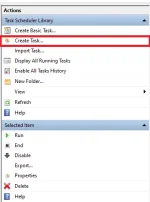
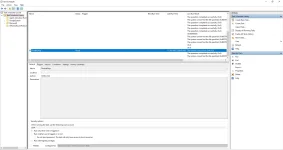
1. Open "Task Scheduler" and Click "Task Scheduler Library"2. At the far right of the window, click "Create Task"
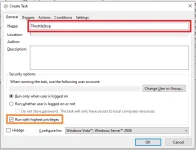
3. Set the Task Name to anything that you want and follow the highlighted items.
You can set the "Trigger" to either "at log on" or "at startup"
4. and your Done.
I hope this tutorial help some of those who have thermal problems. Refer to this You do not have permission to view the full content of this post. Log in or register now. for an indepth Guide.
EDITS: Grammar and Corrections