 PH
PH-
Welcome to PHCorner Forums! Sign up for free to unlock full access and exclusive privileges, including:
- Asking questions about computer and mobile issues
- Discovering internet tips for your mobile network and computer
You are using an out of date browser. It may not display this or other websites correctly.
You should upgrade or use an alternative browser.
You should upgrade or use an alternative browser.
ChatGPT4 Unlimited Premium: Lifetime (100% Working)
- Thread starter BillsAndBytes
- Start date
nekochaaan
Eternal Poster
keep on sharing po TS! pa BM po
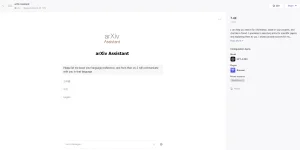

He he. Legit yan, and the website (coze) you have logged in provides free use of its AI playground. It is a new chatbot development site and still updating. Maraming ganyan sa net. Basahin nyo rin yung sinabi ko sa post#39 para maliwangan kayo. Make sure you read the documentation as additional info for clarity. You do not have permission to view the full content of this post. Log in or register now. nyan.safe ba ito?
View attachment 2905846
working pala TS.Thanks
View attachment 2905859 normal ba yan? or dapat wala yan? kc dapat unlimited d b?
Sa You do not have permission to view the full content of this post. Log in or register now. section nakasaad yung limits of use nya. Hindi yan UNLIMITED (no offence TS), pero it's as good as using premium. Tatlong OpenAI GPT ang pwede ninyong gamitin sa ngayon. They may add more soon. Pero yung "Arxiv Assistant" bot was only built using GPT4-8k+Browser Plugin. TS provided a sample bot as a starter to use. So please support his bot "AA". Pag naubos na yung limit sa requests ng bot niya, create your own ha? Malalaman nyo yan kung maka-receive kayo ng ganito: You have exceeded the daily limit for sending messages to the bot. Please try again later.
Kung gusto nyo ng custom bot na para sa into, you can create your own using a different GPT+your chosen plugins that are compatible to work with your preferred GPT. Hanggang 128k yung GPT4 *turbo" na pwedeng gamitin dyan. I'm just guiding you to make the most of the shared link sa post#1. As long as this playground is alive and free to use, make the most of using its AI service. Marami pang bots dyan na pwede ninyong gamitin bukod kay AA, for research, learning, writing, reading, talking to documents, etc. ...Check nyo na lang sa "Bot store". Pwede pa kayong mag-create ng Teams to collaborate sa inyong Bots, Plugins, Workflow, and Knowledge, as stated.
Ito yung simple procedure to create your special bot:
1. Sa main site, look at the left pane, and click "Create Bot"
2. Select the GPT you want to use, but make sure you know the limits of the GPT you are using para hindi kayo lumampas sa usage per day. Nag-range yan from 50 -500 interactions/day as stated sa FAQ. Each GPT has its own feature kaya di lahat ng plugin ay gagana sa kanya - like the lowest 2 have no "vision" feature. You'll need to read more on the the GPT version you are using from OpenAI site dahil yon ang gamit dyan.
3. Then Select the plugins you want to use with your GPT para may extra siyang "powers" he he like Browser (allows you to visit any website), Chat Doc (to read/talk to documents), Google Search (search engine), etc. hindi lahat yan ay pwede mong halu-haluin kaya test if your custom bot works with the plugins. That is how you can check compatibilities between GPT and plugins.
For the rest, kayo na ang mag-aral.
Kung nakagamit na kayo ng ChatGPTPlus, this AI Playground is the same as that!
Kung satisfied kayo, it's a courtesy to visit their d-cord channel para sa ibang details he he. Kasama sa experience yan. Dyan kayo magtanong - sa developers. Enjoy what it still lasts.
Sana, malinaw na ito sa lahat.
hehehe.. thanks for the info. nakagawa na ako ng sarili kong bot. dami plugin nilagay ko. magkasama si leonardo saka sa dalle. pede naman for personal use lang. Naka private lang.He he. Legit yan, and the website (coze) you have logged in provides free use of its AI playground. It is a new chatbot development site and still updating. Maraming ganyan sa net. Basahin nyo rin yung sinabi ko sa post#39 para maliwangan kayo. Make sure you read the documentation as additional info for clarity. You do not have permission to view the full content of this post. Log in or register now. nyan.
Sa You do not have permission to view the full content of this post. Log in or register now. section nakasaad yung limits of use nya. Hindi yan UNLIMITED (no offence TS), pero it's as good as using ρrémíùm. Tatlong OpenAI GPT ang pwede ninyong gamitin sa ngayon. They may add more soon. Pero yung "Arxiv Assistant" bot was only built using GPT4-8k+Browser Plugin. TS provided a sample bot as a starter to use. So please support his bot "AA". Pag naubos na yung limit sa requests ng bot niya, create your own ha? Malalaman nyo yan kung maka-receive kayo ng ganito: You have exceeded the daily limit for sending messages to the bot. Please try again later.
Kung gusto nyo ng custom bot na para sa into, you can create your own using a different GPT+your chosen plugins that are compatible to work with your preferred GPT. Hanggang 128k yung GPT4 *turbo" na pwedeng gamitin dyan. I'm just guiding you to make the most of the shared link sa post#1. As long as this playground is alive and free to use, make the most of using its AI service. Marami pang bots dyan na pwede ninyong gamitin bukod kay AA, for research, learning, writing, reading, talking to documents, etc. ...Check nyo na lang sa "Bot store". Pwede pa kayong mag-create ng Teams to collaborate sa inyong Bots, Plugins, Workflow, and Knowledge, as stated.
Ito yung simple procedure to create your special bot:
1. Sa main site, look at the left pane, and click "Create Bot"
2. Select the GPT you want to use, but make sure you know the limits of the GPT you are using para hindi kayo lumampas sa usage per day. Nag-range yan from 50 -500 interactions/day as stated sa FAQ. Each GPT has its own feature kaya di lahat ng plugin ay gagana sa kanya - like the lowest 2 have no "vision" feature. You'll need to read more on the the GPT version you are using from OpenAI site dahil yon ang gamit dyan.
3. Then Select the plugins you want to use with your GPT para may extra siyang "powers" he he like Browser (allows you to visit any website), Chat Doc (to read/talk to documents), Google Search (search engine), etc. hindi lahat yan ay pwede mong halu-haluin kaya test if your custom bot works with the plugins. That is how you can check compatibilities between GPT and plugins.
For the rest, kayo na ang mag-aral.
Kung nakagamit na kayo ng ChatGPTPlus, this AI Playground is the same as that!
Kung satisfied kayo, it's a courtesy to visit their d-cord channel para sa ibang details he he. Kasama sa experience yan. Dyan kayo magtanong - sa developers. Enjoy what it still lasts.
Sana, malinaw na ito sa lahat.
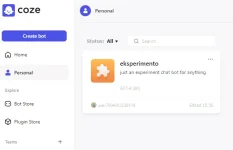
Nga pala, iba iba ang mga ibinibigay na tokens ng mga plugins. kaya pede ka mag "Unlimited" kung iba iba plugins na gamit mo pero same ang functionality. Gaya ng sa photo & photography section, meron dalle 2, dalle 3, leonardo etc.. kung ubos na token mo sa dalle2, pede mo gamitin si dalle3 o kaya si leonardo, V.V.
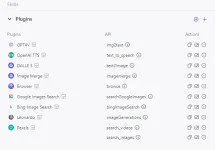
hahaha
Have fun mga ka-PH.
Spytheirweb
Established
Salamat po bossing
He he. That's my boy! You nailed it!hehehe.. thanks for the info. nakagawa na ako ng sarili kong bot. dami plugin nilagay ko. magkasama si leonardo saka sa dalle. pede naman for personal use lang. Naka private lang.
View attachment 2905966
Nga pala, iba iba ang mga ibinibigay na tokens ng mga plugins. kaya pede ka mag "Unlimited" kung iba iba plugins na gamit mo pero same ang functionality. Gaya ng sa photo & photography section, meron dalle 2, dalle 3, leonardo etc.. kung ubos na token mo sa dalle2, pede mo gamitin si dalle3 o kaya si leonardo, V.V.
View attachment 2905982
hahaha
Have fun mga ka-PH.
Pag di kumagat kung sakali yung ibang plugins, gamitin mo yung 128K. Outdated na yang 8K mo. Pwede namang palitan yung GPT model kung kinakailangan, at personal bot mo yan.
CyberGhost221
Honorary Poster
Pa bookmark muna 
amirnat2000
Leecher
wowerz salamat neto
Para sa hindi pa nakuha yung real purpose ng website na ito. The site is a platform for building powerful AI bots without code. Whether you know programming or not, you can quickly turn your bot ideas into reality. They're looking for a new market for this SW development. GTM (Go-To-Market) project ito at nakuha na nila yung market research hanggang customer engagement, kaya samantalahin ninyo hanggang libre pa. Any time soon, malapit na yung "marketing" roadmap para sa customers/buyers he he. Marami na akong nadaanang ganito, so enjoy while it last.
(Sa pag-imbestiga, ko ito yung real story: ByteDance secretly releases four AI apps powered by OpenAI's GPT tech: Cici AI, Chitchop, Coze, and BagelBell. Kaya pala puro Chinese yung developers, at related din sa Tiktok! Now you know.)
(Sa pag-imbestiga, ko ito yung real story: ByteDance secretly releases four AI apps powered by OpenAI's GPT tech: Cici AI, Chitchop, Coze, and BagelBell. Kaya pala puro Chinese yung developers, at related din sa Tiktok! Now you know.)
Paalala ko lang sa'yo at sa iba:hehehe.. thanks for the info. nakagawa na ako ng sarili kong bot. dami plugin nilagay ko. magkasama si leonardo saka sa dalle. pede naman for personal use lang. Naka private lang.
View attachment 2905966
Nga pala, iba iba ang mga ibinibigay na tokens ng mga plugins. kaya pede ka mag "Unlimited" kung iba iba plugins na gamit mo pero same ang functionality. Gaya ng sa photo & photography section, meron dalle 2, dalle 3, leonardo etc.. kung ubos na token mo sa dalle2, pede mo gamitin si dalle3 o kaya si leonardo, V.V.
View attachment 2905982
hahaha
Have fun mga ka-PH.
Ang basehan ng usage is on the GPT you use, not the plugin. The plugin is just a tool by the GPT, so it depends on the limit usage of the GPT you are using. As of 3/8/2024, yung usage limit conditions na nasa FAQ ang nasusunod. So kung maubos yung interactions/day mo sa isa, yung dalawang natitira ang iyong gamitn to continue.
Yan yung basis ng kanilang monitoring and the only basis for the user to extend its use. Malinaw yan sa site at sa d-cord channel.If you hit the limit, you can try to switch to a different model, or try again the next day.
Ayon na rin sa sinabi ko, adding plugins gives the GPT extended capabilities but it is not always the case and the end - malalaman nyo naman yan he he. Di lahat ng added plugins, with all enabled at the same time, will work efficiently kaya study how to control the Workflow. You can add Knowledge, Variables, Long Time Memory, the use of Multi-agent, and many other advanced features. Ang ibig kong sabihin, nandyan yung tools to enhance the bots. Ex. Sa Knowledge, ipasok nyo lahat ng information sa kanya basta pasok sa selected formats sa "add units" section. Pwedeng online or offline. (Balik kayo sa FAQ at documentation to learn more on its limits and added features.)
I'm just giving you ideas to make the most of it.
Magandang makuha yung similar development nito for personal use. May similarity siya sa kinakalikot ko ngayon he he: You do not have permission to view the full content of this post. Log in or register now.
Pang-wordpress nga lang.
Psycho Guy
Enthusiast
thanks paps keep sharing
Sisyphus_TheHedgehog
Established
Pasubok boss
PoopieHead
Enthusiast
salamat boss!
Similar threads
-
👨🏫 Tutorial QUILLBOT PREMIUM LIFETIME ACCESS [2026]
- Started by kyutkopromise
- Replies: 14
-
👨🏫 Tutorial Quillbot Premium lifetime Cracked Using Extension (OWN MAIL)
- Started by MsDeCipher
- Replies: 17
-
-
-
📦 Android App Running Tracker App - FITAPP Ver. 8.9.8 MOD APK | Premium Lifetime Subscription| ρáíd Unlocked
- Started by The Lazy Juan
- Replies: 0
About this Thread
-
90Replies
-
4KViews
-
80Participants
Last reply from:
aljhan17
aljhan17
New Topics
-
E×ρréššVPN Premium x5 #180
- Started by JoyBoy_
- Replies: 1
- 🆓 Freemium Access
-
Netflix Direct Links [PH] | PC | Mobile | TV | #212
- Started by JoyBoy_
- Replies: 1
- 🆓 Freemium Access
-
NEYYYTFLIX NEEEYYTFLIX NEEEYTFLIIXXX
- Started by maarky123
- Replies: 0
- 🆓 Freemium Access
-
𝚂𝚞𝚛𝚏𝚜𝚑𝚊𝚛𝚔 1 month
- Started by qojqva
- Replies: 0
- 🆓 Freemium Access
-
Netflix Premium Cookies x2 | #3
- Started by Beatriz9
- Replies: 0
- 🆓 Freemium Access
-
HBO Max Cookies x18 #14
- Started by JoyBoy_
- Replies: 0
- 🆓 Freemium Access
-
Disneyplus no need vpn x1 #8
- Started by kangog
- Replies: 6
- 🆓 Freemium Access
-
Prime Video Cookies X15 #123
- Started by JoyBoy_
- Replies: 0
- 🆓 Freemium Access
-
Doulingo Redemption Link - 2 Months #38
- Started by JoyBoy_
- Replies: 0
- 🆓 Freemium Access
-
Netflix direct link for phone,tv,web 10/29/26 1:56pm
- Started by kangog
- Replies: 0
- 🆓 Freemium Access
Trending Topics
Online now
- Members online
- 1,117
- Guests online
- 5,544
- Total visitors
- 6,661