 PH
PHEASY STEPS HUNTING WORKING SLOWDNS
STEP.1 DOWNLOAD TERMUX
 FOR NEWLY INSTALLED TERMUX KAYLANGAN NINYO E INSTALL
STEP.2 RUN THIS CODE (NEED INTERNET TO INSTALL)
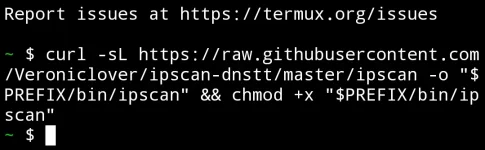
STEP.3 RUN COMMAND WITH YOUR DNS DOMAIN EXAMPLE :
THIS FROM PUBLIC SERVER mainssh Singapore 3
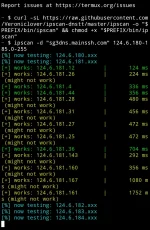
Palitan mo lang yung "sg3dns.mainssh.com" para maka hunt ka ibang panel
Main source
 SLOWDNS EXPLORE
STEP.1 DOWNLOAD TERMUX
FOR NEWLY INSTALLED TERMUX KAYLANGAN NINYO E INSTALL
Code:
pkg update
Code:
pkg upgrade
Code:
pkg install dnsutils -ySTEP.2 RUN THIS CODE (NEED INTERNET TO INSTALL)
Code:
curl -sL https://raw.githubusercontent.com/Veroniclover/ipscan-dnstt/master/ipscan -o "$PREFIX/bin/ipscan" && chmod +x "$PREFIX/bin/ipscan"STEP.3 RUN COMMAND WITH YOUR DNS DOMAIN EXAMPLE :
Code:
ipscan -d "sg3dns.mainssh.com" 124.6.180-185.0-255Palitan mo lang yung "sg3dns.mainssh.com" para maka hunt ka ibang panel
Main source
SLOWDNS EXPLORE 