❓ Help UIPATH RPA

IIZeroHourII

Eternal Poster
sa mga uipath master po jan.
ask lang..

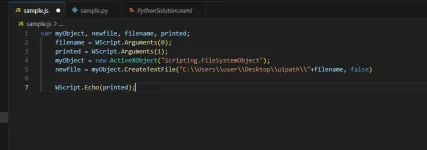
May way ba sa uipath ma execute tong jscript using terminal sana? file creation lang for testing.


i used command in terminal to run.
"cscript.exe sample.js argv1 argv2"
1705655405154.webp
 
Oo, may paraan na ma-eexecute mo ang isang JScript file sa UiPath gamit ang terminal. May mga hakbang na kailangan mong sundin para maisagawa ito:

1. Gumawa ng isang Invoke Power Shell activity sa UiPath at ilagay ito sa workflow mo.
2. Sa Invoke Power Shell activity, ilagay ang sumusunod na command:

Code:
Start-Process -FilePath "C:\path\to\cscript.exe" -ArgumentList "C:\path\to\sample.js", "argv1", "argv2" -NoNewWindow -Wait

Siguraduhin na palitan ang "C:\path\to\cscript.exe" ng tamang path ng iyong cscript.exe file at palitan din ang "C:\path\to\sample.js" ng tamang path ng iyong JScript file. Maaari mo ring palitan ang "argv1" at "argv2" sa tamang mga argumentong nais mong ipasa.

3. I-run ang workflow mo at makikita mong maisasagawa ang JScript file sa terminal.

Makatutulong ito sa iyo na ma-test ang paggawa ng file gamit ang JScript sa UiPath.
 

About this Thread

  • 2
    Replies
  • 305
    Views
  • 1
    Participants
Last reply from:
IIZeroHourII

Trending Topics

Online now

Members online
543
Guests online
1,570
Total visitors
2,113

Forum statistics

Threads
2,274,157
Posts
28,953,924
Members
1,235,103
Latest member
North005
Back
Top