 PH
PH-
Welcome to PHCorner Forums! Sign up for free to unlock full access and exclusive privileges, including:
- Asking questions about computer and mobile issues
- Discovering internet tips for your mobile network and computer
You are using an out of date browser. It may not display this or other websites correctly.
You should upgrade or use an alternative browser.
You should upgrade or use an alternative browser.
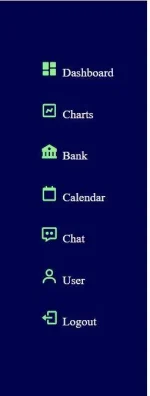
How to move the icon and text to left? CSS
🤖
🤖
To move the icon and text to the left using CSS, you can make use of flexbox or float.
Using Flexbox:
1. Wrap your icon and text in a container element, for example, a
2. Apply the following CSS to the container:
This sets the container to use flexbox and aligns the items vertically.
3. Apply the appropriate styles to the icon and text elements. For example:
This adds some spacing between the icon and text.
Using Float:
1. Wrap your icon and text in a container element, for example, a
2. Apply the following CSS to the container:
This sets the container to contain the floated elements and clears any additional floats.
3. Apply the appropriate styles to the text element. For example:
This prevents the text from wrapping around the floated icon.
Remember to adjust the CSS classes and styles to match your specific HTML structure and requirements.
Using Flexbox:
1. Wrap your icon and text in a container element, for example, a
<div> with a class of "container".2. Apply the following CSS to the container:
Code:
css
   .container {
     display: flex;
     align-items: center;
}3. Apply the appropriate styles to the icon and text elements. For example:
Code:
css
   .icon {
     margin-right: 5px; /* Adjust as needed */
}Using Float:
1. Wrap your icon and text in a container element, for example, a
<div> with a class of "container".2. Apply the following CSS to the container:
Code:
css
   .container {
     overflow: auto;
   }

   .icon {
     float: left;
     margin-right: 5px; /* Adjust as needed */
}3. Apply the appropriate styles to the text element. For example:
Code:
css
   .text {
     overflow: hidden;
}Remember to adjust the CSS classes and styles to match your specific HTML structure and requirements.
About this Thread
-
1Replies
-
436Views
-
1Participants
Last reply from:
Unknown user
Unknown user
New Topics
-
Every serious vibe coder should have bookmarked this
- Started by KumaKuma
- Replies: 0
- 💻 Coding & Programming
-
DDOS ATTACK (EDUCATION PURPOSE ONLY)
- Started by seanwhun
- Replies: 7
- 💻 Coding & Programming
-
Sino kaya i mod to SMAART RTA apps
- Started by MR - Z
- Replies: 0
- 💻 Coding & Programming
-
Wifi Jammer RTL8720DN
- Started by akosirenkz
- Replies: 2
- 💻 Coding & Programming
-
How to automatically synchronize your files to google drive
- Started by No liabilities
- Replies: 1
- 💻 Coding & Programming
-
****** SCRIPT SOURCE CODE
- Started by anonymoustechsell
- Replies: 1
- 💻 Coding & Programming
-
Smart Barangay E-Governance System
- Started by If Else
- Replies: 4
- 💻 Coding & Programming
-
Microsoft Activation Scripts (MAS) | From GitHub
- Started by J u g g y
- Replies: 3
- 💻 Coding & Programming
-
LF gpt plus or business for vps with dedi ipv4
- Started by ambitiousnoob
- Replies: 7
- 💻 Coding & Programming
-
[SHARE] Manny Apps My Official Website for Apps & Systems
- Started by bIOSman26
- Replies: 1
- 💻 Coding & Programming
Trending Topics
Online now
- Members online
- 673
- Guests online
- 2,600
- Total visitors
- 3,273