 PH
PHEcneralC1973
Forum Guru
since the speed of web today is slow why not combine it with any psiphon handler
REQUIREMENT:
Android device
Psiphon any version with handler
Web Tunnel
PROCEDURES:
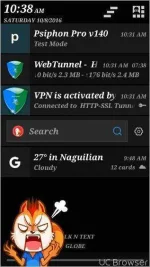
1. Download and install Web tunnel then open the application then launch it wait untill its connected successfully and press home button
2.Download and install VPN then open the application then choose browse only then on handler menu input on proxy server
For TNT/ smart
go.talkntext.com.ph
gamex.ph
tntpanawheel.com.ph
For globe
tm.dloadstation.com
For sun
server4-5.operamini.com
3.If you already have the VPN go to setting apps then clear the data and create new one
4.Then save your settings then try to connect your VPN until successfully connected.
NOTE:
For better connection use pingtools
good luck
Hit like and run !!!!
REQUIREMENT:
Android device
Psiphon any version with handler
Web Tunnel
PROCEDURES:
1. Download and install Web tunnel then open the application then launch it wait untill its connected successfully and press home button
2.Download and install VPN then open the application then choose browse only then on handler menu input on proxy server
For TNT/ smart
go.talkntext.com.ph
gamex.ph
tntpanawheel.com.ph
For globe
tm.dloadstation.com
For sun
server4-5.operamini.com
3.If you already have the VPN go to setting apps then clear the data and create new one
4.Then save your settings then try to connect your VPN until successfully connected.
NOTE:
For better connection use pingtools
good luck
Hit like and run !!!!

 keep sharing.


