 PH
PH---> First of all, tried and tested ko na to sa "device ko", at solve na solve na tong problem na to sakin.
***This may "work or not work" on your device.***
- Meron ka bang Pocket Wifi with zero balance Smart/TNT sim? - Chances are - Meron ka ring problema about sign into WiFi stuff.
Na-iinis kana ba sa "Sign into Wifi Network" stuff?
Na-d.disconnect ka ba after 1min or so?
-> Both ZTE SmartBro Pocket WiFi and Huawei Globe Tattoo Pocket WiFi with zero balance Smart/TNT sim have this problem.
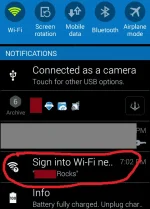
Mga boss, ang problemang yan ay nag ddepende sa android version ng device mo, depende rin kung anong model ng device mo at sa sim.
-Sa globe/TM kahit zero balance ka, walang ganyan na problem.
-Sa "KitKat" version ng android ko (Samsung Galaxy Core 2) ay meron ganyang problema (with Smart/TNT sim on WiFi).
-While sa "Lollipop" na Star Mobile ng friend ko, walang ganyan (at thesame wifi kami naka connect).
So, nag expirement ako at na chambahan ko sa device ko.
-Ganito, meron akong TNT sim sa WiFi ko.
-And then "forget" ko yung wifi ko sa phone ko.
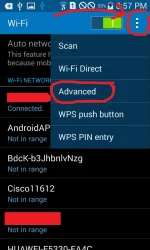
And then tap the options on Wi-Fi setting (that 3 dots) and tap "Advanced"
-(ito, kahit di mo na to gawin, optional lang to)
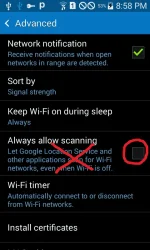
-And then "Uncheck" the "Always allow scanning", and then exit ka jan.
-Next, Select your WiFi Device, type in your password and tap "Show advanced options".
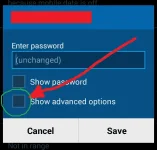
-After that, set the proxy to "Manual"
-Put - kahit-ano.com - on "Proxy host name" ("Any Site" Kahit anong site pwede ilagay jan, kahit imbentong site mo lang)
-Put - 8080 - on "Proxy port"
-And then tap "Save".
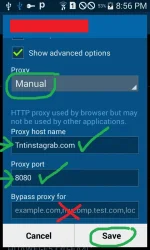
***And you're done!***
- You can now use your WiFi without being disconnected.
- You can use your WiFi on your "VPN" Stuffs.
- Enjoy!
Feel free to feedback.
Phrygian
***This may "work or not work" on your device.***
- Meron ka bang Pocket Wifi with zero balance Smart/TNT sim? - Chances are - Meron ka ring problema about sign into WiFi stuff.
Na-iinis kana ba sa "Sign into Wifi Network" stuff?
Na-d.disconnect ka ba after 1min or so?
-> Both ZTE SmartBro Pocket WiFi and Huawei Globe Tattoo Pocket WiFi with zero balance Smart/TNT sim have this problem.
Mga boss, ang problemang yan ay nag ddepende sa android version ng device mo, depende rin kung anong model ng device mo at sa sim.
-Sa globe/TM kahit zero balance ka, walang ganyan na problem.
-Sa "KitKat" version ng android ko (Samsung Galaxy Core 2) ay meron ganyang problema (with Smart/TNT sim on WiFi).
-While sa "Lollipop" na Star Mobile ng friend ko, walang ganyan (at thesame wifi kami naka connect).
So, nag expirement ako at na chambahan ko sa device ko.
-Ganito, meron akong TNT sim sa WiFi ko.
-And then "forget" ko yung wifi ko sa phone ko.
And then tap the options on Wi-Fi setting (that 3 dots) and tap "Advanced"
-(ito, kahit di mo na to gawin, optional lang to)
-And then "Uncheck" the "Always allow scanning", and then exit ka jan.
-Next, Select your WiFi Device, type in your password and tap "Show advanced options".
-After that, set the proxy to "Manual"
-Put - kahit-ano.com - on "Proxy host name" ("Any Site" Kahit anong site pwede ilagay jan, kahit imbentong site mo lang)
-Put - 8080 - on "Proxy port"
-And then tap "Save".
***And you're done!***
- You can now use your WiFi without being disconnected.
- You can use your WiFi on your "VPN" Stuffs.
- Enjoy!
Feel free to feedback.
Phrygian

