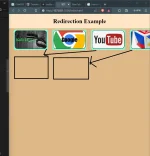
CSS/html po paano po kaya to hehehe

Screenshot 2024-01-04 210630.webp


ganyan sana yung pag nag resize ka ng windows mo mag rere adjust ang mga button po hehehe...hirap pala mag self study ng css hahahah

bali ito code ko

Code:
<!DOCTYPE html>
<html lang="en">
  <header>
    <style>
      .opening{
        background-color: bisque;
        padding: 20px;
        margin-left: none;
        margin-top: 0px;
        text-align: center;
        
      }
      
      body{
        margin: 0px;
        background-color: burlywood;
        
      }

      .Kali{
        list-style: none;
        padding: 5px;
        float: left;
        margin-left: 25px;
        margin-top: -15px;
        display: flex;
        background-color: aquamarine;
        border-radius: 10px;
      }

      .Google{
        list-style: none;
        padding: 5px; 
        float: left;
        margin-left: 25px;
        margin-top: -15px;
        display: flex;
        background-color: aquamarine;
        border-radius: 10px;
      }

      .youtube{
        list-style: none;
        padding: 5px; 
        float: left;
        margin-left: 25px;
        margin-top: -15px;
        display: flex;
        background-color: aquamarine;
        border-radius: 10px;
      }
      .phcorner{
        list-style: none;
        padding: 5px; 
        float: left;
        margin-left: 25px;
        margin-top: -15px;
        display: flex;
        background-color: aquamarine;
        border-radius: 10px;
      }
      .button-container{
        display: flex;
        max-width: 300px;
        gap: 1px;
      }
    
      button{
        background-color: whitesmoke;
        text-align: left;
        border-radius: 15px;
        

      }
      .button1{
        color: rgb(31, 202, 65);
        background-image: url(Kali_Linux.jpg);
        font-size: 20px;
        font-family: Georgia, 'Times New Roman', Times, serif;
        font-weight: bold;
        width: 175px;
        height:100px;
        
      }
      .button2{
        color: black;
        background-image: url(google.png);
        font-size: 30px;
        font-family: Impact, Haettenschweiler, 'Arial Narrow Bold', sans-serif;
        text-align: center;
        background-position: center;
        background-size: cover;
        width: 175px;
        height:100px
      }
      .button3{
        background-image: url(673518.png);
        background-size: cover;
        background-position: center;
        width: 175px;
        height:100px
      }
      .button4{
        background-image: url(XenForo.webp);
        background-size: 85%;
        background-position: center;
        max-width: 100%;
        width: 175px;
        height:100px;   
      }

    </style>
  </header>
<head>
 <h1 class="opening">Redirection Example</h1>
 
</head>
<body>
  <div class="button-container">
     <div class="Kali"><a href=Kali_Linux.jpg target="_blank"><button class="button1">Kali Linux</button></a></li></div>
     <div class="Google"><a href="https://www.google.com/" target="_blank"><button class="button2">Google</button></a></li></div>
     <div class=youtube><a href="https://www.youtube.com/" target="_blank"><button class="button3"></button></a></div>
     <div class="phcorner"><a href="https://phcorner.org/" target="_blank"><button class="button4"></button></a></div>
  </div>
</body>
</html>
 
To make the buttons adjust when the window is resized, you can use CSS media queries. Media queries allow you to apply different styles based on the size of the viewport.

First, you need to define the desired styles for different viewports. For example, you can set the buttons to be displayed vertically on small screens and horizontally on larger screens. Here's an updated version of your code with media queries:

HTML:
<!DOCTYPE html>
<html lang="en">
<head>
  <style>
    .opening {
      background-color: bisque;
      padding: 20px;
      margin-left: none;
      margin-top: 0px;
      text-align: center;
    }
    
    body {
      margin: 0px;
      background-color: burlywood;
    }

    .button-container {
      display: flex;
      justify-content: center;
      gap: 1px;
    }

    .button-container > div {
      flex-basis: 50%;
      max-width: 300px;
      padding: 5px;
    }

    .button {
      background-color: whitesmoke;
      text-align: left;
      border-radius: 15px;
    }

    .button1 {
      color: rgb(31, 202, 65);
      background-image: url(Kali_Linux.jpg);
      font-size: 20px;
      font-family: Georgia, 'Times New Roman', Times, serif;
      font-weight: bold;
      width: 175px;
      height: 100px;
    }

    .button2 {
      color: black;
      background-image: url(google.png);
      font-size: 30px;
      font-family: Impact, Haettenschweiler, 'Arial Narrow Bold', sans-serif;
      text-align: center;
      background-position: center;
      background-size: cover;
      width: 175px;
      height: 100px;
    }

    .button3 {
      background-image: url(673518.png);
      background-size: cover;
      background-position: center;
      width: 175px;
      height: 100px;
    }

    .button4 {
      background-image: url(XenForo.webp);
      background-size: 85%;
      background-position: center;
      max-width: 100%;
      width: 175px;
      height: 100px;
    }

    /* Media queries */
    @media (max-width: 768px) {
      .button-container {
        flex-direction: column;
      }

      .button-container > div {
        flex-basis: unset;
        max-width: unset;
        margin-bottom: 10px;
      }
    }
  </style>
</head>
<body>
  <h1 class="opening">Redirection Example</h1>

  <div class="button-container">
    <div class="Kali">
      <a href="Kali_Linux.jpg" target="_blank">
        <button class="button1">Kali Linux</button>
      </a>
    </div>
    <div class="Google">
      <a href="https://www.google.com/" target="_blank">
        <button class="button2">Google</button>
      </a>
    </div>
    <div class="youtube">
      <a href="https://www.youtube.com/" target="_blank">
        <button class="button3"></button>
      </a>
    </div>
    <div class="phcorner">
      <a href="https://phcorner.org/" target="_blank">
        <button class="button4"></button>
      </a>
    </div>
  </div>
</body>
</html>

In the above code, I added a media query that targets screens with a maximum width of 768px (typical tablet or mobile phone size). Inside the media query, the .button-container is set to display as a column and the styles for the individual buttons are adjusted accordingly.

Now, when the window is resized to a smaller size, the buttons will be displayed vertically, and on larger screens, they will be displayed horizontally.

I hope this helps! Let me know if you have any further questions.
 
CSS:
.button-container{
  display: flex;
  flex-wrap: wrap; /* enable wrapping */
  max-width: 500px; /* 300px */
  gap: 1px;
}
 
CSS:
.button-container{
  display: flex;
  flex-wrap: wrap; /* enable wrapping */
  max-width: 500px; /* 300px */
  gap: 1px;
}
Code:
<!DOCTYPE html>
<html lang="en">
  <header>
    <style>
      .opening{
        background-color: bisque;
        padding: 20px;
        margin-left: none;
        margin-top: 0px;
        text-align: center;
        
      }
      
      body{
        margin: 0px;
        background-color: burlywood;
        
      }

      .Kali{
        list-style: none;
        padding: 5px;
        float: left;
        margin-left: 25px;
        margin-top: -15px;
        display: flex;
        background-color: aquamarine;
        border-radius: 10px;
      }

      .Google{
        list-style: none;
        padding: 5px;
        float: left;
        margin-left: 25px;
        margin-top: -15px;
        display: flex;
        background-color: aquamarine;
        border-radius: 10px;
      }

      .YøùTùbé{
        list-style: none;
        padding: 5px;
        float: left;
        margin-left: 25px;
        margin-top: -15px;
        display: flex;
        background-color: aquamarine;
        border-radius: 10px;
      }
      .phcorner{
        list-style: none;
        padding: 5px;
        float: left;
        margin-left: 25px;
        margin-top: -15px;
        display: flex;
        background-color: aquamarine;
        border-radius: 10px;
      }
    
      button{
        background-color: whitesmoke;
        text-align: left;
        border-radius: 15px;

      }
      .button1{
        color: rgb(31, 202, 65);
        background-image: url(Kali_Linux.jpg);
        font-size: 20px;
        font-family: Georgia, 'Times New Roman', Times, serif;
        font-weight: bold;
        width: 175px;
        height:100px;
        
      }
      .button2{
        color: black;
        background-image: url(google.png);
        font-size: 30px;
        font-family: Impact, Haettenschweiler, 'Arial Narrow Bold', sans-serif;
        text-align: center;
        background-position: center;
        background-size: cover;
        width: 175px;
        height:100px
      }
      .button3{
        background-image: url(673518.png);
        background-size: cover;
        background-position: center;
        width: 175px;
        height:100px
      }
      .button4{
        background-image: url(XenForo.webp);
        background-size: 85%;
        background-position: center;
        max-width: 100%;
        width: 175px;
        height:100px;   
      }


    </style>
  </header>
<head>
 <h1 class="opening">Redirection Example</h1>
 
</head>
<body>
  <div class="button-container">
     <div class="Kali"><a href=Kali_Linux.jpg target="_blank"><button class="button1">Kali Linux</button></a></li></div>
     <div class="Google"><a href="https://www.google.com/" target="_blank"><button class="button2">Google</button></a></li></div>
     <div class=YøùTùbé><a href="https://www.YøùTùbé.com/" target="_blank"><button class="button3"></button></a></div>
     <div class="phcorner"><a href="https://phcorner.org/" target="_blank"><button class="button4"></button></a></div>
  </div>
</body>
</html>

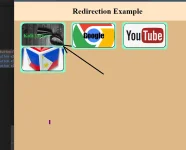
boss may mga tinangal akong code tapos bigla gumana hahah pwoblema ko lang namna yung space sa pagitan ng button di ko mahanap hahaha

Screenshot 2024-01-04 215544.webp
 
HTML:
<!DOCTYPE html>
<html lang="en">
<header>
  <style>
    .opening {
      background-color: bisque;
      padding: 20px;
      margin-left: none;
      margin-top: 0px;
      text-align: center;
    }

    body {
      margin: 0px;
      background-color: burlywood;
    }

    .Kali {
      list-style: none;
      padding: 5px;
      float: left;
      margin-left: 25px;
      margin-top: -15px;
      display: flex;
      background-color: aquamarine;
      border-radius: 10px;
    }

    .Google {
      list-style: none;
      padding: 5px;
      float: left;
      margin-left: 25px;
      margin-top: -15px;
      display: flex;
      background-color: aquamarine;
      border-radius: 10px;
    }

    .YøùTùbé {
      list-style: none;
      padding: 5px;
      float: left;
      margin-left: 25px;
      margin-top: -15px;
      display: flex;
      background-color: aquamarine;
      border-radius: 10px;
    }

    .phcorner {
      list-style: none;
      padding: 5px;
      float: left;
      margin-left: 25px;
      margin-top: -15px;
      display: flex;
      background-color: aquamarine;
      border-radius: 10px;
    }

    .button-container {
      display: flex;
      flex-wrap: wrap;
      max-width: 100%; /*300px*/
      gap: 30px; /*1px*/
    }

    button {
      background-color: whitesmoke;
      text-align: left;
      border-radius: 15px;
    }

    .button1 {
      color: rgb(31, 202, 65);
      background-image: url(Kali_Linux.jpg);
      font-size: 20px;
      font-family: Georgia, 'Times New Roman', Times, serif;
      font-weight: bold;
      width: 175px;
      height: 100px;
    }

    .button2 {
      color: black;
      background-image: url(google.png);
      font-size: 30px;
      font-family: Impact, Haettenschweiler, 'Arial Narrow Bold', sans-serif;
      text-align: center;
      background-position: center;
      background-size: cover;
      width: 175px;
      height: 100px
    }

    .button3 {
      background-image: url(673518.png);
      background-size: cover;
      background-position: center;
      width: 175px;
      height: 100px
    }

    .button4 {
      background-image: url(XenForo.webp);
      background-size: 85%;
      background-position: center;
      max-width: 100%;
      width: 175px;
      height: 100px;
    }
  </style>
</header>
<head>
  <h1 class="opening">Redirection Example</h1>
</head>
<body>
  <div class="button-container">
    <div class="Kali">
      <a href=Kali_Linux.jpg target="_blank"><button class="button1">Kali Linux</button></a></li>
  </div>
  <div class="Google">
    <a href="https://www.google.com/" target="_blank"><button class="button2">Google</button></a></li>
</div>
<div class=YøùTùbé>
  <a href="https://www.YøùTùbé.com/" target="_blank"><button class="button3"></button></a>
</div>
<div class="phcorner">
  <a href="https://phcorner.org/" target="_blank"><button class="button4"></button></a>
</div>
</div>
</body>
</html>
 

Similar threads

About this Thread

  • 4
    Replies
  • 537
    Views
  • 2
    Participants
Last reply from:
Nel003

Trending Topics

Online now

Members online
336
Guests online
1,062
Total visitors
1,398

Forum statistics

Threads
2,274,120
Posts
28,953,759
Members
1,235,086
Latest member
Kant_Otzero
Back
Top