PH
PHEcneralC1973
Forum Guru
Some of the android phones have locked there network mode so there's no way you can switch your data connection.
This tuturials might be of help on how to bypass or switch your data connection from 2g to 3g ,E to H+
As for 4g,LTE your area must be covered by it.
Note:
Your android phones must be 3g / H+ capable
The secret codes sometimes doesn't work for some android
REQUIREMENTS:
Android phones
MTK tools
Secret codes for android
PROCEDURES:
option 1.
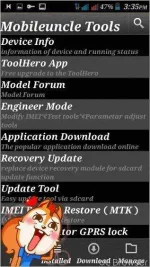
1. Download MTK tools v2.9.9apk and install the application then launch it.
2. On Mobileuncle tools( index) choose Engineer Mode then enter it will redirect you to Engineer Mode.
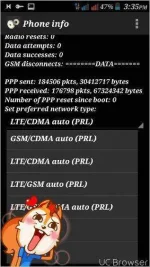
3. Open Engineer Mode (android) android parameter adjust and it will redirect you to Phone Info.
4. Under Phone Info scroll down until you reach preferred network type.
5. Click the menu button on preffered network type then choose WCDMA preferred then wait for your signal change.
6. If the H+ appears then you're successfully then exit.
Option 2.
1. Just type this code *#*#4636#*#* then your phone will redirect you to Phone Info.
2. Just follow the steps on 4 to 6 on option 1.
3. If the H+ appears then you're successfull.
NOTE:
On some androids the codes doesn't work
DOWNLOAD LINK:
You do not have permission to view the full content of this post. Log in or register now.
Good luck just hit LIKE and run
This tuturials might be of help on how to bypass or switch your data connection from 2g to 3g ,E to H+
As for 4g,LTE your area must be covered by it.
Note:
Your android phones must be 3g / H+ capable
The secret codes sometimes doesn't work for some android
REQUIREMENTS:
Android phones
MTK tools
Secret codes for android
PROCEDURES:
option 1.
1. Download MTK tools v2.9.9apk and install the application then launch it.
2. On Mobileuncle tools( index) choose Engineer Mode then enter it will redirect you to Engineer Mode.
3. Open Engineer Mode (android) android parameter adjust and it will redirect you to Phone Info.
4. Under Phone Info scroll down until you reach preferred network type.
5. Click the menu button on preffered network type then choose WCDMA preferred then wait for your signal change.
6. If the H+ appears then you're successfully then exit.
Option 2.
1. Just type this code *#*#4636#*#* then your phone will redirect you to Phone Info.
2. Just follow the steps on 4 to 6 on option 1.
3. If the H+ appears then you're successfull.
NOTE:
On some androids the codes doesn't work
DOWNLOAD LINK:
You do not have permission to view the full content of this post. Log in or register now.
Good luck just hit LIKE and run