 PH
PH-
Welcome to PHCorner Forums! Sign up for free to unlock full access and exclusive privileges, including:
- Asking questions about computer and mobile issues
- Discovering internet tips for your mobile network and computer
You are using an out of date browser. It may not display this or other websites correctly.
You should upgrade or use an alternative browser.
You should upgrade or use an alternative browser.
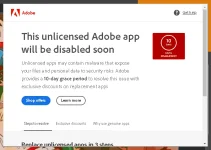
❓ Help NEED HELP! RIP sa mga naka-Photoshop na cruck.
- Status
- Not open for further replies.
🤖
🤖
Hello! It's great that you're seeking assistance for your Photoshop-related issue. While waiting for the next version of Photoshop, there are a few potential solutions you can try to address your problem.
1. Update Photoshop: Ensure that you have the latest version of Photoshop installed. Sometimes, updating the software can fix various bugs and issues.
2. Check system requirements: Verify if your computer meets the minimum system requirements for Photoshop. If your system is not powerful enough, it may struggle to run the software smoothly.
3. Reset Photoshop preferences: Resetting Photoshop preferences can often resolve issues with the software. To do this, hold down the Shift+Ctrl+Alt keys (Windows) or Shift+Command+Option keys (Mac) while launching Photoshop. A dialog box will appear asking if you want to delete the Photoshop settings file. Confirm and try using Photoshop again.
4. Reinstall Photoshop: If none of the above solutions work, you can try uninstalling and reinstalling Photoshop. Make sure to properly uninstall the software and then download the latest version from the Adobe website.
If the above steps do not solve your problem, it may be helpful to provide more specific details about the issue you are facing. This will enable others to give more targeted assistance or suggestions.
1. Update Photoshop: Ensure that you have the latest version of Photoshop installed. Sometimes, updating the software can fix various bugs and issues.
2. Check system requirements: Verify if your computer meets the minimum system requirements for Photoshop. If your system is not powerful enough, it may struggle to run the software smoothly.
3. Reset Photoshop preferences: Resetting Photoshop preferences can often resolve issues with the software. To do this, hold down the Shift+Ctrl+Alt keys (Windows) or Shift+Command+Option keys (Mac) while launching Photoshop. A dialog box will appear asking if you want to delete the Photoshop settings file. Confirm and try using Photoshop again.
4. Reinstall Photoshop: If none of the above solutions work, you can try uninstalling and reinstalling Photoshop. Make sure to properly uninstall the software and then download the latest version from the Adobe website.
If the above steps do not solve your problem, it may be helpful to provide more specific details about the issue you are facing. This will enable others to give more targeted assistance or suggestions.
Remremskie
Established
Di naman ganyan akin lods, parihas naman tayo naka (kung sa tagalog pa bitak) madami yan sa youtube search mo nalang.
- Status
- Not open for further replies.
Similar threads
-
-
❓ Help Pa help sa mga naka try jan na expert sa DISTROKID WITHDRAWAL
- Started by fritz.idol
- Replies: 8
-
🔒 Closed Opinion nyo naman sa mga naka Toyota Veloz dyan
- Started by -Hexacode
- Replies: 14
-
💡 Trivia Para sa mga naka Unli Data
- Started by NaCl23
- Replies: 2
-
❓ Help Help po yung cp ko hindi na makakita ng Wifi kahit may mga naka open naman
- Started by TheFlash06
- Replies: 15
About this Thread
-
2Replies
-
897Views
-
2Participants
Last reply from:
Remremskie
Remremskie
New Topics
-
Help po !!!! My account got häçked Facebook and steam
- Started by bujoy20
- Replies: 0
- ❓ Computer Discussion & Support
-
Replace laptop lcd
- Started by toki07
- Replies: 0
- ❓ Computer Discussion & Support
-
Mga bossing patulong po nahäçk account ko due to carelessness
- Started by Jeii
- Replies: 2
- ❓ Computer Discussion & Support
-
Computer parts na cheap
- Started by bjenjay1
- Replies: 1
- ❓ Computer Discussion & Support
-
PC APPS - remote or auto saved type and auto audio
- Started by babyzero
- Replies: 0
- ❓ Computer Discussion & Support
-
Data Recovery May Chance pa bato
- Started by tambay28
- Replies: 0
- ❓ Computer Discussion & Support
-
Capcut PC pasabit po
- Started by L A Z A
- Replies: 0
- ❓ Computer Discussion & Support
-
Download Youtube Video using CMD
- Started by BeerGin69
- Replies: 1
- ❓ Computer Discussion & Support
-
Taiwebs alternative websites
- Started by gigsta
- Replies: 0
- ❓ Computer Discussion & Support
-
Tropic Colour - Sino meron nito?
- Started by mikehacker182
- Replies: 0
- ❓ Computer Discussion & Support
Trending Topics
Online now
- Members online
- 1,209
- Guests online
- 3,192
- Total visitors
- 4,401