. Plug in your hard drive, memory card or USB drive to your computer
2. Go to the start menu, type in "cmd" in a search bar, hit enter and then you can see something named "cmd. exe" under a list of programs.
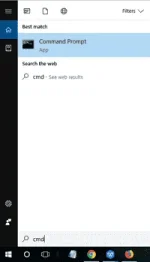 3.
3. Right click "cmd. exe" and then you will get the command windows that allows you to recover virus infected files. Type in "attrib -h -r -s /s /d drive letter:\*.*", for example, "attrib -h -r -s /s /d G:\*.*".
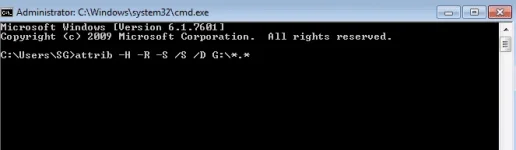
After all the steps, Windows will start to repair the virus infected hard drive, memory card or USB drive. It usually needs one or more minutes. Please wait patiently. After the repairing process finished, you can go to your drive or card to check if you can see all of the virus infected files. If you successfully
You do not have permission to view the full content of this post.
Log in or register now., memory card or hard drive which is infected with virus, congratulations! But if not, please don’t despair. You have another option. Just try a third-party data recovery software!
Solution 2. Use EaseUS data recovery software to recover virus infected files
When you failing to manage virus file recovery using CMD, EaseUS
You do not have permission to view the full content of this post.
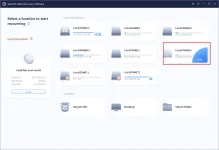
Log in or register now. becomes a nice alternative solution. The program is a professional recovery software for hard drive and all external storage devices. With its powerful file recovery capacity, it can effectively recover deleted, corrupted or hidden files from virus infected hard drives, memory cards or USB drives. And the virus file recovery process is extremely easy. You just need to answer two simple questions and the program will do all the rest job for you. For a step-by-step tutorial, please refer to
You do not have permission to view the full content of this post.
Log in or register now..
 You do not have permission to view the full content of this post.
Log in or register now. You do not have permission to view the full content of this post.
Log in or register now.
You do not have permission to view the full content of this post.
Log in or register now. You do not have permission to view the full content of this post.
Log in or register now.
 PH
PH